

Two concerns come up often when AEC firms consider a Deltek Vantagepoint implementation: they are not sure they have the internal capacity to support the project, or they have been through a software rollout before that never fully took hold.
Both concerns usually come down to the same practical issue: what will this implementation actually require from our team?
That is a fair question. Controllers already have a full workload, project managers are focused on client work, principals have limited time, and many firms do not have a large internal IT team sitting in reserve.
A Vantagepoint implementation does require participation from the firm, but that participation is concentrated in specific parts of the project. The people involved, the amount of time they need to give, and the type of work they are responsible for all change as the implementation moves forward.
BCS ProSoft can carry the configuration, migration, technical work, coordination, and training. Your team still needs to make the business decisions, validate the setup, and provide the knowledge that an outside partner cannot supply.
That division of responsibility is the best place to start.
What BCS Handles and What Your Firm Has to Own
When you work with BCS ProSoft, you can expect us to carry the heavy lift of the implementation.
That includes much of the planning, system setup, migration work, and project coordination needed to move the implementation forward. Your firm still has a smaller set of responsibilities, but those are the parts that depend on your internal judgment, operational priorities, and knowledge of how your business runs.
Here’s how we look at it:
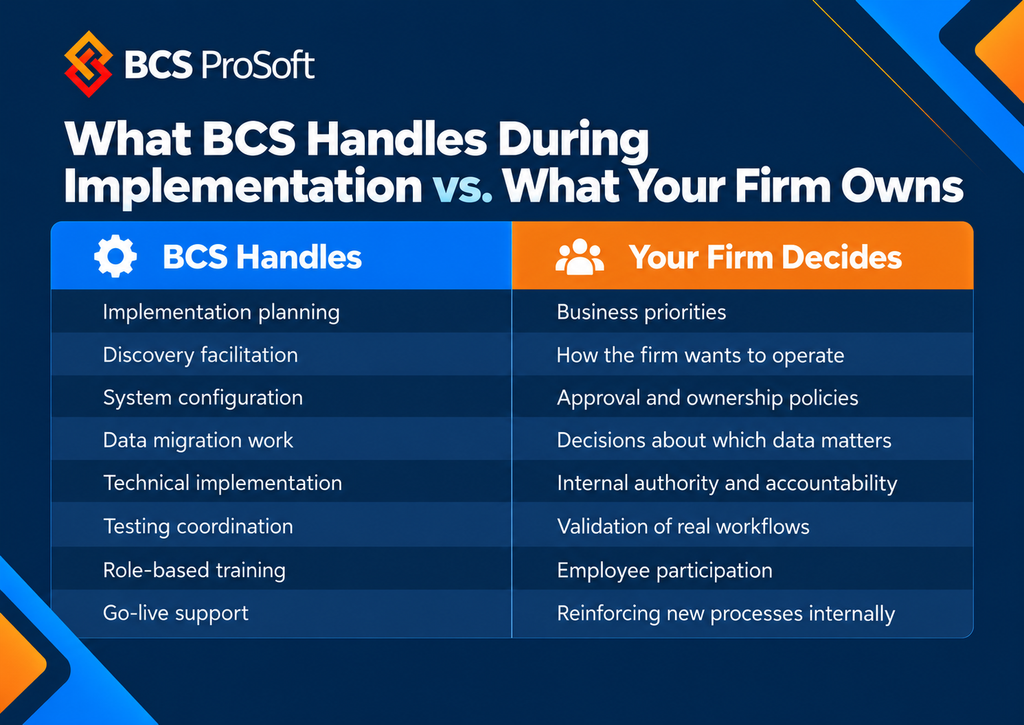
Once that division is clear, the next question is easier to answer: how much time does your team actually need to give?
How Much Time Does Your Team Actually Need to Give?
The exact commitment will vary based on firm size, modules, integrations, data quality, migration scope, and how many processes need to be reviewed.
Still, most firms can plan around a fairly clear group of people.
The table below gives a practical range for the roles that usually need to participate most directly.
| Role | When They’re Most Involved | Approx. Time During Active Weeks | What They’re Doing |
|---|---|---|---|
| Executive sponsor / principal | Discovery, major decisions, go-live | 1–2 hrs/week | Setting priorities, resolving policy questions, supporting major decisions |
| Internal project lead | Throughout implementation | 3–6 hrs/week | Coordinating internal input, reviewing work, following up on decisions |
| Controller / accounting lead | Discovery, configuration, data review, testing | 3–5 hrs/week | Financial setup, billing, reporting, accounting workflows |
| Operations / PM lead | Workflow design and testing | 1–3 hrs/week | Project structure, PM workflows, approvals, reporting needs |
| HR / payroll representative | Relevant setup periods | 1–2 hrs/week | Employee data, labor setup, related process decisions |
| IT / system administrator | Technical setup, integrations, launch | 1–3 hrs/week | Access, system connections, technical coordination |
| Selected PMs / end users | Testing and training | Concentrated sessions | Testing real workflows and attending role-based training |
These ranges should be treated as planning estimates rather than fixed requirements.
A 75-person firm moving from a relatively clean system with limited integrations may need a different level of participation than a 400-person firm with multiple offices, custom workflows, several integrations, and years of historical data.
The pattern matters more than the exact number.
Most people should not need to spend several hours every week for the full implementation. Their involvement tends to rise during the parts of the project where their knowledge is needed and fall during the periods when BCS is doing the heavier configuration, migration, and technical work.
That becomes easier to see when you look at the project week by week.
What the Implementation Looks Like Week by Week

A Vantagepoint implementation is not one long stretch of meetings.
Different phases call for different people, different decisions, and different levels of involvement.
The exact schedule can shift based on scope, but the following breakdown gives a useful picture of where your team’s time usually goes.
Weeks 1–2: Discovery and Data Review
The opening weeks are usually where BCS needs the clearest picture of how the firm works today.
That means spending time with the people who understand your accounting structure, project setup, reporting requirements, operational workflows, and current systems.
Your team may be asked to walk through:
- How projects and phases are structured
- How billing works
- How revenue is handled
- Which reports leadership and PMs rely on
- Which systems exchange data with your ERP
- Where manual workarounds exist
- Which historical data needs to carry forward
- Which processes differ between offices or departments
- Which pain points the firm wants the new system to address
The internal project lead and controller are usually the most involved during this stage. An operations leader, principal, IT contact, or other process owner may join specific conversations where their knowledge matters.
BCS carries the discovery process itself. That includes gathering requirements, reviewing the current environment, identifying data and configuration needs, and documenting how the implementation should be approached.
Your team’s job is to explain the business clearly enough for those decisions to be grounded in how the firm actually operates.
For firms moving from Deltek Vision, this is also where we start looking closely at what should carry forward into Vantagepoint, including data, workflows, reports, and any processes that have built up around the old system. If that is your starting point, our guide to moving from Deltek Vision to Vantagepoint goes deeper into the upgrade itself.
That information feeds directly into the next phase.
Weeks 3–5: Configuration and Business Decisions
Once discovery is far enough along, the project moves into decisions that affect how Vantagepoint will be set up.
Some are relatively straightforward. Others can expose long-running differences in how departments, offices, or leaders think the firm should work.
Questions may include:
- Who can create a project?
- How should phases be structured?
- Who approves time and expenses?
- How should billing responsibility be assigned?
- Which fields should be required?
- How much flexibility should PMs have?
- Which financial and project reports matter most?
- How should organizations or business units be represented?
- Which historical exceptions still need to exist?
- Which old processes can be retired?
This is where internal participation matters most.
We can explain the available options inside Vantagepoint, show how different choices affect downstream workflows, and make recommendations based on experience with AEC firms.
The final answer still has to come from the firm.
If three offices handle project setup differently, BCS can help surface the difference and explain how each approach would work in Vantagepoint. Leadership still has to decide whether those differences should remain.
If the controller and operations team have different expectations around approvals, we can map the available options. The firm still has to choose the policy.
A large share of implementation risk lives here because configuration becomes harder when the underlying business decisions remain unresolved.
Once those choices are made, more of the workload shifts back toward BCS.

Weeks 6–8: Migration, Review, and Testing
During this phase, BCS is carrying a heavier share of the system work.
The firm’s role becomes more focused on review and validation.
That usually includes:
- Reviewing migrated data
- Checking project and employee records
- Testing reports
- Running billing or accounting scenarios
- Testing project setup
- Reviewing approvals
- Checking permissions
- Running real workflows with selected users
This is the point where the implementation should expand beyond the controller and internal project lead.
A project manager will often spot something in a PM workflow that accounting would never see. A principal may notice that a report is missing a piece of information leadership depends on. An employee who regularly submits expenses may find a confusing step before that issue reaches the rest of the firm.
Testing works best when the people doing the work participate in it. Research on ERP implementations has also pointed to user participation as an important part of implementation, particularly because ERP systems affect how people work across multiple functions.
That does not mean every employee needs to join a testing team. A small group of representative users can usually cover the major workflows and give the implementation team useful feedback.
Their involvement also sets up the next phase more effectively because the system has already been tested through the eyes of the people expected to use it.
Weeks 9–10: Training and Go-Live Preparation
As the system gets closer to launch, more people become involved for shorter periods.
The focus shifts toward getting users ready and confirming that the firm is prepared to operate in the new environment.
Work may include:
- Role-based training
- Final workflow testing
- Confirming user access
- Reviewing cutover steps
- Finalizing internal procedures
- Communicating changes to staff
- Resolving remaining questions
The internal project lead is usually active here because many small questions start coming from different parts of the firm at once.
Controllers, PMs, principals, and other users may attend different training sessions based on what they actually need to do inside Vantagepoint.
That matters because the system does not look the same from every role.
A principal may care about firm performance, project visibility, and approvals. A project manager may spend more time in project setup, budgets, reports, and time review. Accounting will work much more deeply inside financial processes.
Role-based training keeps the focus on the parts of Vantagepoint each group actually uses.
Go-Live and the First Weeks After
Go-live is when the project becomes part of daily operations.
We support the launch, answers questions, and works through issues that surface once people begin using the system with live data.
The firm still needs its internal lead and process owners available.
Some questions only appear in real use.
A PM may find that a field is unclear. Accounting may need an adjustment to a report. A permission issue may surface when a user attempts something that did not come up during testing.
That is normal implementation work.
The value of the earlier planning and testing shows up here because the firm already has people who understand the decisions behind the setup and know who can answer questions internally.
Your Internal Project Lead Does Not Have to Be a Vantagepoint Expert

We do not expect your internal project lead to already know how to run an ERP implementation. That is our job.
What we do need is someone who knows your firm well, can get the right people involved, and can help us keep decisions moving when questions come up.
Your project lead should be able to:
- Identify who needs to weigh in on a question
- Bring the right people into a review
- Get decisions from leadership when needed
- Keep track of open items
- Coordinate internal testing
- Communicate changes across the firm
- Tell us when something does not line up with how your business actually works
They do not need to know how to configure Vantagepoint, handle a data migration, or work through the technical setup. We bring that expertise to the implementation.
We also do not want your controller carrying the entire project alone.
Accounting will usually be involved more than most teams because Vantagepoint touches billing, revenue, project accounting, reporting, and financial controls. But there are parts of the implementation that need input from people outside accounting.
Your project managers know how projects are run day to day. Your operations team understands the workflows behind that work. Your principals know what they need to see and approve. Your IT team knows the systems Vantagepoint needs to work alongside.
We bring those people in when their input matters. They do not need to sit through every meeting or become part-time ERP consultants.
Deltek Vantagepoint Implementation: Know What You’re Signing Up For
A Deltek Vantagepoint implementation will ask for time from your team, but that time should be tied to the parts of the project where their knowledge and decisions matter most. The internal project lead does not need to become a Vantagepoint expert, and your controller should not have to carry the entire rollout alone.
When you work with BCS, we handle the implementation work that requires Vantagepoint expertise, including planning, configuration, migration, coordination, training, and go-live support. Your team provides the business context, makes the decisions that belong with the firm, and helps us confirm that the system works the way your people need it to.
That is the balance we aim for from the beginning: your team stays involved where it matters, and we carry the work that belongs with us.
If you are planning a Vantagepoint implementation and want a clearer picture of what the process would require from your firm, talk with BCS ProSoft about Deltek implementation.
Key Takeaways
- A Deltek Vantagepoint implementation requires participation from your team, but the workload is concentrated around specific phases and roles rather than spread evenly across the entire project. Pasted markdown
- BCS handles much of the implementation work, including planning, system setup, migration, coordination, training, and go-live support. Your firm still needs to make the business decisions and provide the internal knowledge that shapes the system. Pasted markdown
- The internal project lead does not need to be a Vantagepoint expert. Their role is to coordinate people, keep decisions moving, support testing, and represent how the firm actually works. Pasted markdown
- Controllers usually play a major role, but they should not carry the implementation alone. Project managers, operations, principals, IT, and other process owners need to contribute where their knowledge matters. Pasted markdown
- Firms that have struggled with a previous system rollout should look closely at where that project broke down, especially around decision-making, testing, ownership, and user participation, before starting the next implementation.
Frequently Asked Questions
How long does a Vantagepoint implementation take?
The exact timeline depends on the size of the firm, the modules being implemented, the condition of the data, the number of integrations, and how quickly key decisions are made. In the example schedule used in this article, the core implementation work spans roughly 10 weeks, followed by go-live support. Pasted markdown
How many hours will my team spend?
That depends on the role. During active weeks, an executive sponsor may spend about 1 to 2 hours, an internal project lead about 3 to 6 hours, and a controller about 3 to 5 hours. Operations, IT, HR, and end users usually have lighter or more concentrated involvement. These are planning ranges, not fixed requirements.
What happens if we do not have internal IT?
You can still implement Vantagepoint without a large internal IT team. Your firm does need someone who can help with access, system connections, and technical coordination when those questions come up, but that does not require a full internal IT department. BCS carries the technical implementation work, while your team provides the internal information and access needed to support it. Pasted markdown
Why do ERP implementations fail at A&E firms?
The blog points to several common causes: delayed decisions, too much responsibility falling on one person, old workarounds being recreated in the new system, limited user testing, weak ownership after go-live, and leadership stepping away from the project too early. The software may be configured correctly and still struggle if those internal issues are not addressed.