



BCS ProSoft Connect is a Sage 100 API: a modern RESTful interface that gives external systems, custom applications and automation tools realtime, programmatic access to Sage 100 ERP data, and a great alternative to SData.
It is built on .NET, C# and the Sage 100 Business Objects Interface, and every endpoint is versioned and documented in Swagger.
Tell us which system needs to reach Sage 100. We review the modules and records involved and confirm whether BCS ProSoft Connect supports the connection.
WHY BCS PROSOFT CONNECT EXISTS
Sage 100 does not provide a native REST API. Connecting it to another application has usually meant working directly with Sage Business Objects, building custom middleware, or relying on imports, exports and manual steps built around the ERP.
Those approaches can work, and they get harder to maintain as systems and data requirements change. BCS ProSoft Connect gives developers a standard RESTful layer instead, so Sage 100 can talk to modern applications in the way those applications already expect.
HOW IT WORKS
BCS ProSoft Connect sits between Sage 100 and the application that needs its data. Your developers make standard REST calls; BCS ProSoft Connect communicates with Sage 100 through the Business Objects Interface and returns the result.
KEY INTEGRATION POINTS
Developers use standard API technology to access Sage 100 data and actions through documented, versioned endpoints. This is the current coverage, module by module.
| Module | Methods | Data or action | Access |
|---|---|---|---|
| Library Master | GET / POST / PUT / DELETE | Zip codes | Read and write |
| Common Information | GET / POST / PUT | Item codes | Read and write |
| Accounts Payable | GET / POST / PUT / DELETE | Vendors and vendor contacts | Read and write |
| Accounts Receivable | GET / POST / PUT / DELETE | Customers, contacts, terms codes, and open invoices by customer | Read and write |
| Sales Orders | GET / POST / PUT / DELETE | Sales orders and detail lines | Read and write |
| Purchase Orders | GET / POST / PUT / DELETE | Purchase orders and detail lines | Read and write |
| Inventory Management | GET | Item warehouse information and inventory levels | Read only |
| Production Management | GET | Work ticket information | Read only |
| Payroll Time Track | GET / POST / PUT / DELETE | Employee time track entries | Read and write |
| Return Merchandise Authorization | GET / POST / PUT / DELETE | RMAs and detail lines | Read and write |
| Health Check | GET | Operational health of the API | Monitoring |
| License | GET | Refresh the cached license when modules are added or removed | Administration |
INSIDE THE API
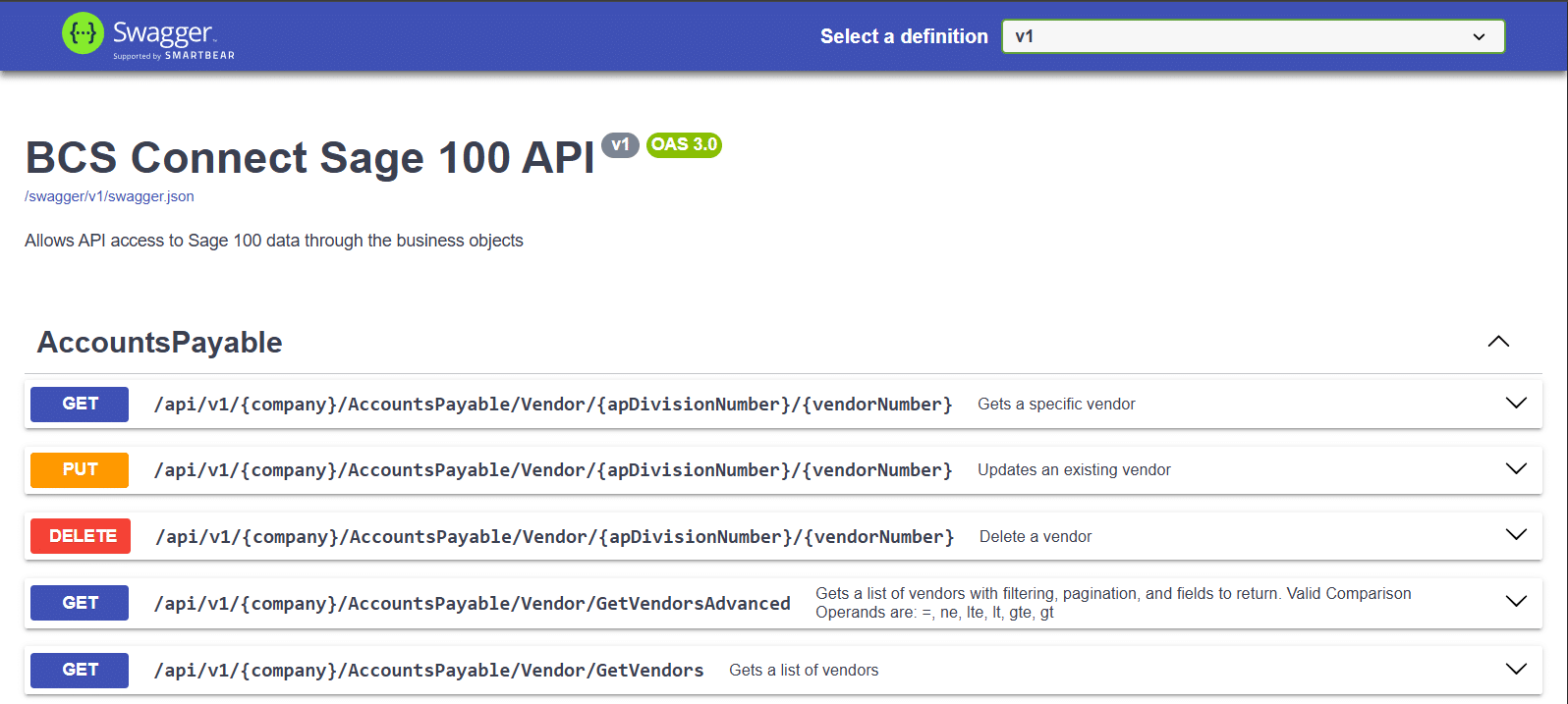
These are captures of the BCS ProSoft Connect documentation itself. Every endpoint is described, and every one can be tried from the same page.
DOCUMENTED ENDPOINTS
Each module groups its endpoints in one place. For Accounts Payable that means getting a specific vendor, updating or deleting one, and listing vendors, all under a versioned /api/v1 route that includes your Sage 100 company code.
GetVendorsAdvanced adds filtering, pagination and a choice of fields to return, using comparison operators such as =, ne, lt and gte.
READ INVENTORY LEVELS
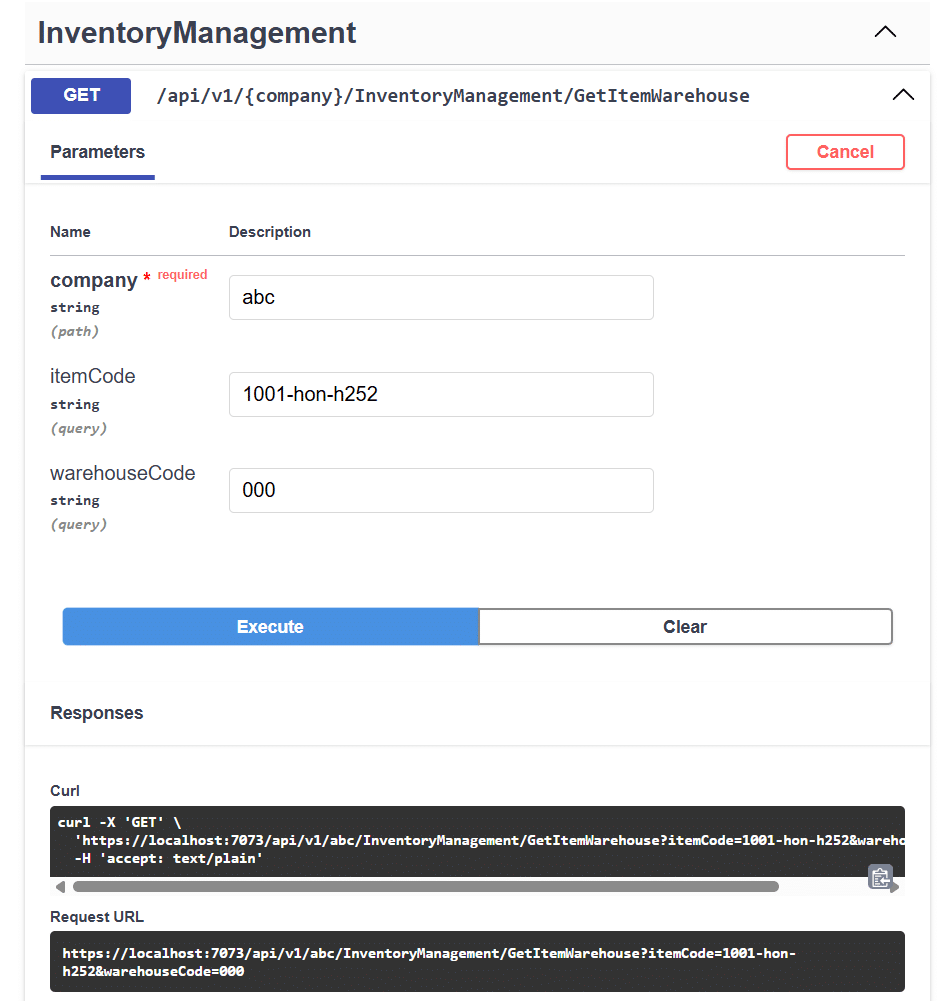
Inventory Management exposes item warehouse information, which is how an outside system reads current inventory levels for one item or several.
The documentation shows the parameters each call takes, lets a developer execute it, and displays the exact request that was sent, which shortens the path from reading about an endpoint to using it.
WRITE BACK TO SAGE 100
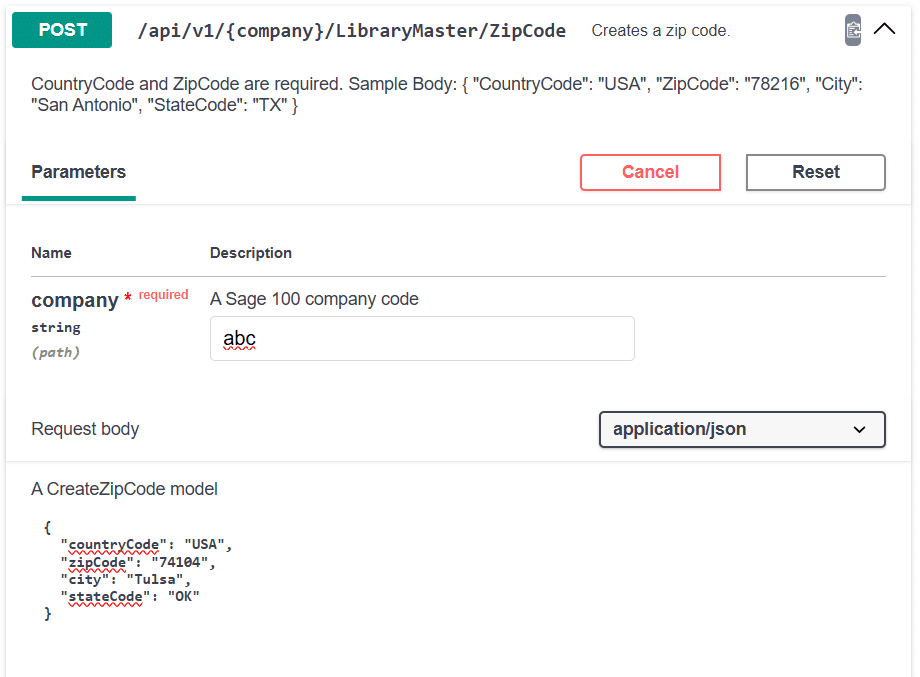
Where a module supports it, BCS ProSoft Connect writes to Sage 100 as well as reading from it. Each write endpoint documents its required fields and shows a sample request body.
The same pattern applies to vendors, customers, sales orders, purchase orders, time track entries and RMAs.
Screen captures show the BCS ProSoft Connect Swagger interface with sample parameters and sample data.
KEY FEATURES
The things a developer checks first when evaluating an API are already there.
COMMON QUESTIONS
The questions that come up before an integration is scoped.
Sage 100 does not provide a native REST API. BCS ProSoft Connect adds one: a RESTful interface that works through the Sage 100 Business Objects Interface to give outside systems programmatic access to supported Sage 100 data and actions.
BCS ProSoft Connect is an API for Sage 100 built by BCS ProSoft. It is built on .NET and C# and exposes Sage 100 data and actions through documented, versioned endpoints, so other software can work with your Sage 100 system using standard API technology.
Library Master, Common Information, Accounts Payable, Accounts Receivable, Sales Orders, Purchase Orders, Inventory Management, Production Management, Payroll Time Track and Return Merchandise Authorization, plus health check and license endpoints.
Yes, for supported endpoints. Depending on the module, BCS ProSoft Connect can retrieve, create, update or delete records using GET, POST, PUT and DELETE. Inventory Management and Production Management are read-only today.
No. BCS ProSoft Connect does not perform tasks by itself. It exposes Sage 100 data and actions in a standard way, and the application calling it decides what to read, create or change.
That depends on the outside system, the Sage 100 modules involved, and the records it needs to read or write. BCS ProSoft reviews the use case and tells you whether the current endpoints support it and what additional work may be needed.
HOW TO GET STARTED
Most conversations start with a system that already needs Sage 100 data. Related reading: Sage 100 and Sage 100 consulting.
Which application needs to reach Sage 100, which modules are involved, what records it reads or writes, and how often the data needs to move.
BCS ProSoft reviews the use case against the current BCS ProSoft Connect endpoints and tells you what is supported and what additional integration work may be required.
Your developers work against documented, versioned endpoints, with BCS ProSoft on hand for the Sage 100 side of the project. See our services.
Talk with BCS ProSoft about your Sage 100 integration needs. Tell us the system you want to connect and the data it needs, and we will walk you through how BCS ProSoft Connect fits.
BCS ProSoft Connect is an API for Sage 100 from BCS ProSoft.
