

If you’ve ever been responsible for putting together an SF330, you know how much time can go into gathering the information.
You need updated employee resumes, relevant project descriptions, firm qualifications, and details about who worked on which projects. Depending on how your firm manages that information, you might spend hours tracking down project managers, reviewing old proposals, and checking whether the details you have are still accurate.
The General Services Administration (GSA) estimates that completing an SF330 takes approximately 29 hours, including reading the instructions and gathering the necessary information.
That’s a considerable amount of time for an A&E marketing team, especially when several federal pursuits are moving at once.
Much of the information required for an SF330, however, may already exist in your Deltek Vantagepoint CRM.
Vantagepoint includes SF330 proposal functionality that uses existing employee, project, and firm records to populate sections of the form. When those records are properly maintained, your team has less information to collect every time a new opportunity comes along.
Let’s look at how it works and what your team should be keeping current.
A Practical SF330 Maintenance Routine for A&E Marketing Teams
Before we get into how Vantagepoint builds an SF330, let’s cover a few ways your team can keep employee, project, and firm records up to date. These are the records you’ll rely on when preparing future proposals.
Start by making updates part of the work your firm is already doing.
Project managers know when work has been completed. Employees know when they’ve earned new credentials or taken on different responsibilities. Marketing knows which experience gets used most frequently in proposals.
The key is deciding who updates the records and when.
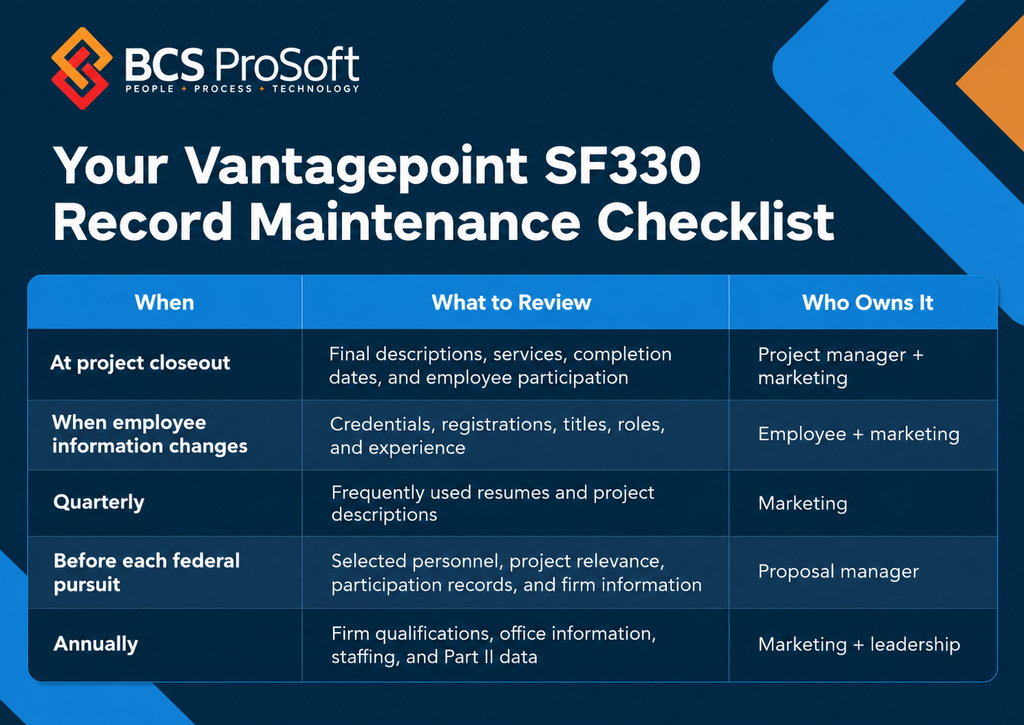
This is a recommended internal maintenance schedule rather than a federal requirement.
Update Project Records at Closeout
Project closeout is a good time to collect the information marketing will need later.
The project manager can confirm the final scope, identify participating employees, and provide details about unusual technical requirements or accomplishments.
Marketing can use that information to maintain a project description suitable for future proposals.
Having a standard set of required fields or questions can make this process easier for everyone involved.
Keep Employee Resumes Current
New registrations, completed projects, promotions, and changing responsibilities can all affect an employee’s qualifications.
Give employees a clear process for reporting those changes so marketing can update the appropriate Vantagepoint records.
A quarterly review of frequently proposed personnel can also help catch missing information.
Review Records Before Each Pursuit
Even with a consistent maintenance routine, every SF330 needs a final review.
Marketing still needs to choose the people and projects that best fit the opportunity, confirm employee roles, and check the accuracy of the information being submitted.
This is also a useful opportunity to look at your firm’s proposal workload and business development KPIs.
If your team repeatedly spends days tracking down missing qualifications, your record maintenance process may need attention.
What Is an SF330, and What Goes Into Parts I and II?
Standard Form 330, commonly called the SF330, is used by architecture and engineering firms to present their qualifications for federal design contracts.
The form supports qualifications-based selection, where agencies evaluate a firm’s experience, personnel, and capabilities for a particular project.
It has two parts.
SF330 Part I: Qualifications for a Specific Contract
Part I focuses on the contract your firm is pursuing. It identifies the proposed team, key personnel, and the experience that makes them qualified for the work.
It contains eight sections:
- A: Contract Information
- B: Architect-Engineer Point of Contact
- C: Proposed Team
- D: Organizational Chart of Proposed Team
- E: Resumes of Key Personnel Proposed for This Contract
- F: Example Projects Which Best Illustrate Proposed Team’s Qualifications
- G: Key Personnel Participation in Example Projects
- H: Additional Information
For marketing coordinators, Sections E, F, and G often require the most coordination. They involve selecting relevant experience, reviewing resumes, and confirming which employees participated in previous projects.
SF330 Part II: General Firm Qualifications
Part II contains general information about the firm, including its offices, professional disciplines, experience, staffing, and revenue information.
Much of this information remains consistent between pursuits, although it should still be reviewed regularly.
The GSA requires a separate Part II for each firm participating on the proposed team. Branch offices with key roles may also need separate submissions.
You can find the official form and instructions on the GSA’s SF330 page.
Where Does Deltek Vantagepoint Get the Information for an SF330?
Your firm likely maintains much of the information needed for an SF330 throughout the year.
Employee records contain professional qualifications, registrations, and experience. Project records hold information about completed work. Firm records contain general company details.
Vantagepoint’s SF330 functionality brings this information into the proposal. Here’s how the different sections connect to your existing records.
SF330 Sections and Their Vantagepoint Source Records
| SF330 Section | What It Asks For | Vantagepoint Source | Who Keeps It Current |
|---|---|---|---|
| A–B | Contract details and point of contact | Proposal information | Marketing/BD |
| C–D | Proposed team and organizational chart | Proposal firm information and pursuit-specific chart | Proposal manager |
| E | Key personnel resumes and qualifications | Employee hub | Marketing and employees |
| F | Relevant example projects | Projects hub | Marketing and project managers |
| G | Employee participation in example projects | Sections E and F, with project role information | Marketing and project managers |
| H | Additional qualifications | Pursuit-specific content | Proposal manager |
| Part II | General firm and office qualifications | Proposal Firms settings and SF330 Part II records | Marketing/firm administration |
The employee, project, and firm records are particularly valuable because they can support multiple proposals.
For example, when an architect earns a new professional registration, updating their employee record makes that information available for future SF330s. The same applies to completed projects and employee participation history.
Of course, Vantagepoint can only use the information your team maintains. Incomplete records still require someone to track down the missing details.
How Deltek Vantagepoint Builds Your SF330 From Existing Records

The most useful connections for A&E marketing teams are found in Sections E, F, and G, where resumes, example projects, and employee participation come together.
Section E: Pulling Key Personnel Resumes From Employee Records
Section E contains resumes for the key personnel proposed for the contract.
For each person, the form asks for information such as their name, proposed role, years of experience, education, professional registrations, qualifications, and relevant projects.
Vantagepoint can populate much of this information directly from the Employee hub.
Deltek’s documented SF330 workflow provides two selection options:
- Add Employees: Select employees associated with the proposal firms identified in Section C.
- Add Any Employee: Select from the broader Employee hub.
Once an employee is selected, Vantagepoint uses their record to populate applicable fields, including their name, experience, education, registrations, and qualifications.
The marketing coordinator then selects the employee’s proposed role in Block 13. Relevant project experience can also be added to Block 19.
Consider an architect who recently earned a professional registration and completed a major federal renovation project.
If those details haven’t been added to their employee record, your marketing coordinator will still need to collect the information and make corrections.
And even with an accurate employee record, there’s still some proposal-specific work to do. Marketing needs to confirm the proposed role and select projects that best demonstrate the employee’s qualifications for that particular contract.
The difference is that the basic resume information is already available.
Section F: Adding Relevant Projects From the Projects Hub
Section F presents example projects that demonstrate your team’s qualifications.
Let’s say your firm is pursuing a federal office renovation. You might select similar renovations, projects completed for federal agencies, or work involving comparable technical requirements.
Vantagepoint allows marketing to select project records for Section F using documented options such as Add Projects and Add Any Project.
When a project is selected, Vantagepoint populates Blocks 20 through 24 using project information and the firm’s configured preferences.
This can include the project key number, title, location, completion dates, client information, and description.
For example, the title and location can come from the Projects hub, while the project description comes from information maintained on the project record.
However, the project description still needs to address the relevance of the work to the contract you’re pursuing.
Your firm might have completed a federal facility renovation involving occupied spaces, complex phasing, and specialized mechanical systems.
For one pursuit, the occupied-facility experience might be most relevant. For another, the agency may be particularly interested in the engineering work.
Your marketing team can tailor the description while using the same underlying project information.
That’s why complete project records matter. Marketing should have accurate descriptions, scope details, completion information, and employee participation available without having to contact the project manager every time.
Section G: Showing Which Employees Worked on Your Example Projects
Section G connects the employees selected in Section E with the projects selected in Section F.
It creates a matrix showing which proposed personnel participated in each example project and whether they performed the same or similar roles.
Vantagepoint populates this matrix using the selected records.
The documented role-matching behavior uses two indicators:
- X: The employee’s proposed role matches the role recorded for the example project.
- Asterisk (*): The employee participated in the project, but their recorded role isn’t an exact match.
For example, an employee might be proposed as the lead architect for a federal renovation but have served as project architect on one of your selected examples.
Those responsibilities may be similar enough to qualify under the SF330 instructions.
Vantagepoint’s Section G Roles dialog allows the coordinator to review those relationships and identify similar roles.
The system also includes a Refresh Matrix function. Changes to employee or project information outside the proposal may require the coordinator to refresh the matrix before reviewing the results.
One other detail worth knowing: employees or projects entered manually into the SF330 may not populate Section G the same way as records selected through Vantagepoint.
Using the connected records helps keep the participation information consistent throughout the proposal.
Part II: Maintaining Your Firm’s General Qualifications
Part II contains general firm qualifications, including office information, professional disciplines, staffing, and professional services revenue categories.
In Deltek’s documented workflow, firm-level SF330 information is maintained through Proposal Firms settings, including an SF330 tab.
This is where firms can maintain much of the information used to prepare Part II.
For an A&E firm with multiple offices, the marketing team needs accurate office information and the appropriate firm records.
Vantagepoint also supports preparing separate Part II forms for firms and branch offices involved in the proposed team.
If your firm regularly works with subconsultants, you’ll still need to collect and review their information. Your own firm qualifications, however, can be maintained throughout the year rather than reconstructed for every pursuit.
How to Generate and Review the Final SF330 in Vantagepoint

Once the required information is in place, Vantagepoint’s documented SF330 workflow uses merge templates to create the proposal documents.
These templates contain merge codes that identify which employee, project, firm, and proposal information belongs in each section.
In the documented desktop workflow, the coordinator selects the appropriate template set, chooses the sections to include, and runs the merge.
Vantagepoint generates Rich Text Format (RTF) files that can be opened in Microsoft Word for review and editing.
Depending on the selected templates, the merge can produce separate files for resumes, example projects, the participation matrix, additional information, and Part II.
Your marketing team should review the generated files carefully.
Check the employee roles and qualifications, confirm the selected project descriptions, and review the Section G participation matrix. You’ll also need to verify the proposed team information, Part II details, and any solicitation-specific requirements.
Some formatting adjustments may be needed in Word, particularly when longer project descriptions or resumes affect the available space.
The final review remains an important part of preparing the SF330. The benefit of the merge process is having much of the factual information already populated from your Vantagepoint records.
What Happens When Your Employee and Project Records Are Outdated?
Most A&E marketing teams have encountered this situation.
A proposal is due in two weeks, and the team has identified the employees and projects it wants to include.
Then someone realizes a project manager’s resume is missing their latest work. Another project doesn’t have a complete description. An employee’s title has changed, but the old title is still in the system.
Now the proposal manager has to track down the correct information while handling the rest of the submission.
These issues can also create inconsistencies between proposals. Your firm might describe the same project differently in several submissions or have multiple versions of an employee’s resume.
A consistent approach to CRM for architects and engineers helps address these issues.
The same employee and project information can support future proposals, qualifications packages, and other business development activities.
Keeping it current reduces the amount of repeated research your marketing team has to do.
Getting More Out of Vantagepoint’s SF330 Functionality
Having Deltek Vantagepoint in place doesn’t necessarily mean your marketing team is using all of its proposal functionality.
For SF330 preparation, it’s worth reviewing a few areas of your current setup.
Are employee records maintained with proposal use in mind? Do your project records contain the descriptions and participation details marketing needs? Is your firm information current? Are the SF330 settings and merge templates configured for the way your team works?
It’s also important to establish who owns the information.
Marketing shouldn’t have to guess which project details are accurate or reconcile several versions of an employee’s resume every time a proposal is due.
A properly configured Deltek CRM gives your team a consistent place to maintain that information.
At BCS ProSoft, we help A&E firms review their Vantagepoint setup, organize the records their teams depend on, and configure CRM and proposal workflows around how they work.
If your firm already uses Vantagepoint but still builds every SF330 from Word documents, spreadsheets, and shared folders, your current setup is worth reviewing.
Final Thoughts: A Better SF330 Starts With Better Records

Preparing an SF330 will always involve some opportunity-specific work. Your team needs to choose the right people, select relevant projects, and explain why your firm’s experience fits the contract.
Much of the supporting information, however, is information your firm already keeps.
Accurate employee, project, and firm records make it easier to use Vantagepoint’s SF330 functionality whenever a new opportunity comes along.
If your marketing team is still spending hours gathering resumes and updating project descriptions, we can help you review how Vantagepoint is configured.
Schedule a Deltek Vantagepoint Consultation to discuss your current SF330 workflow.
Key Takeaways
- The SF330 has two parts. Part I presents qualifications for a specific federal design contract, while Part II contains general firm or branch-office qualifications.
- Vantagepoint uses existing records to populate important sections. Employee records support Section E, project records support Section F, and the system uses both to populate Section G.
- Section G identifies employee participation and matching roles. The matrix uses X and asterisk indicators that marketing teams can review.
- Accurate records reduce repeated work. Maintaining employee qualifications, project descriptions, and firm information throughout the year makes future SF330 preparation easier.
- Your Vantagepoint configuration matters. BCS ProSoft can help review your CRM records, firm settings, and SF330 proposal workflow.
Frequently Asked Questions
What Is an SF330?
An SF330, or Standard Form 330, is used by architecture and engineering firms to present their qualifications for federal A&E contracts. It includes proposed personnel, relevant project experience, team information, and general firm qualifications.
What Is the Difference Between SF330 Part I and Part II?
An SF330, or Standard Form 330, is used by architecture and engineering firms to present their qualifications for federal A&E contracts. It includes proposed personnel, relevant project experience, team information, and general firm qualifications.
Can Deltek Vantagepoint Generate an SF330?
Yes. Vantagepoint includes SF330 functionality that uses employee, project, and firm records to populate sections of the form. Its documented workflow uses merge templates to generate files that can be opened in Microsoft Word for review and editing.
How Often Should Resumes Be Updated for SF330s?
Employee resumes should be updated whenever significant changes occur, including new credentials, completed projects, promotions, or changes in responsibilities. A quarterly review of frequently proposed personnel is a useful practice, along with a final review before each submission.