

AI is everywhere in finance right now, and Sage Intacct is no exception. New Copilot and AI features keep showing up across the platform, which leaves controllers with a practical question:
What actually changes during month-end close?
This article looks at five areas where Sage Copilot and Sage Intacct AI can affect the close: close management, AP review, variance analysis, financial questions, and control review.
We’ll also cover what still requires controller judgment and where clean dimensions, vendor records, and approval workflows need to come first.
Let’s get into it.
A Quick Look at Sage Intacct AI Across the Close
Before we get into each feature in detail, here’s a quick look at where Sage Copilot can make the biggest difference during close. Use this as the at-a-glance version of what it helps with and where it fits into the controller’s work.
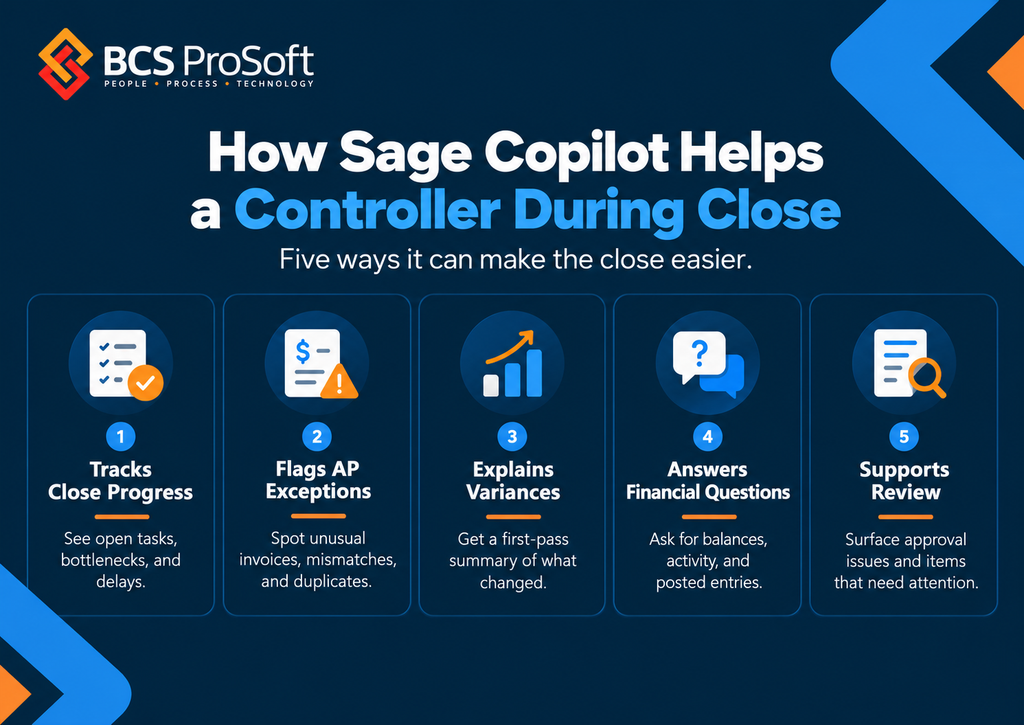
A Step by Step Look at How Sage Copilot Helps Controllers
The best way to understand where Sage Copilot helps during close is to follow the close itself.
Controllers do not experience month-end as a list of software features. They experience it as a sequence of work: checking what is still open, clearing AP issues, reviewing transactions, explaining variances, answering questions, and signing off on the books.
Looking at Sage Copilot step by step makes it easier to see where it can actually reduce work, where it can speed up review, and where the controller still needs to make the final call.
Step 1: See What Is Still Open and Where the Close Is Stuck
At the start of close, the controller needs a clear picture of what has been completed and what is still outstanding.
Close Workspace and Sage Copilot can help surface open tasks, incomplete work, and potential bottlenecks. That gives the controller a quicker read on where the close stands and which items may hold things up.
The controller still decides whether a task is actually complete and whether anything needs to be escalated before moving forward.
If your team is still managing much of the close through spreadsheets, email, or manual checklists, our guide to financial close automation goes deeper into how firms can organize and automate more of that process.
Step 2: Clear AP Issues With AI Flagging the Exceptions
AP is often one of the heavier parts of close because invoices, purchase orders, approvals, and vendor information all need to line up.
Sage Intacct can help flag unusual invoice amounts, vendor mismatches, and differences between vendor documents and purchase orders.
That gives the AP team and controller a more focused list of items to review before close.
A flagged item still needs to be checked against the source documents and the company’s approval rules before anyone decides whether a correction is needed.
Step 3: Review Unusual Activity With AI Pointing Out What Needs Attention
Once the major AP work is handled, the controller starts looking more broadly at the financial activity for the period.
Sage Copilot can help surface transactions or patterns that may deserve a closer look. That might include unusual activity, missing approvals, or items that fall outside the expected pattern.
The controller can use those flags as a starting point for review, then trace them back to the underlying transaction, coding, approval history, and supporting documentation.
Step 4: Explain Variances With Copilot Drafting the First Analysis

After the books are close to final, variance analysis becomes a larger part of the work.
Copilot Variance Analysis can identify budget variances and generate a first-pass explanation of what drove the change.
That can save the controller from starting with a blank report. The next step is to check the explanation against the actual transactions and decide whether it reflects what happened in the business.
This is also where clean dimensions matter. If department, location, project, or other dimensional coding is inconsistent, the variance analysis will be less useful.
Step 5: Answer Financial Questions Without Pulling Another Report
Once the numbers are ready, the questions usually start.
Leadership may want to know where expenses increased, which vendors accounted for the most spend, or which departments had the largest variances.
The Finance Intelligence Agent can answer some of those questions in plain language using Sage Intacct data.
That means the controller may be able to get to the supporting information without building another report every time a question comes in.
Finance still needs to interpret the answer and explain why it matters.
Step 6: Complete Final Review With AI Supporting the Checks
The last part of close still belongs firmly with the controller and finance team.
Copilot can help surface information, summarize activity, and point the team toward items that need attention. Final review still includes confirming approvals, checking material items, reviewing adjustments, and deciding whether the books are ready to close.
That level of oversight becomes more important as AI takes on a larger role in finance. The Journal of Accountancy has emphasized the need for clear governance, controls, and human oversight around AI, especially when the technology is being used in financial processes.
Before You Use Sage Intacct AI in the Close, Check the Setup Underneath It
Before you can get much value from Sage Intacct’s AI capabilities during close, the setup underneath them needs to be in good shape.
Copilot is working from the dimensions, vendor records, purchasing data, approval rules, permissions, and close processes already configured in Intacct. If those are inconsistent or outdated, the AI has weaker information to work with and the results become less useful.
That is where BCS ProSoft can help. We can review how your Sage Intacct environment is configured today, identify the areas that need cleanup, and help make sure your dimensions, workflows, permissions, and approval rules are ready before you start relying more heavily on AI during close.
Before turning on more AI features, review:
- Dimension structure and coding practices
- Vendor records
- Purchasing data
- Approval rules
- User permissions
- Close task ownership
If you want a broader view of the work that needs to be completed before signoff, our month-end close checklist gives you a practical list to work from.
Final Thoughts on Sage Copilot

Sage Copilot can take some of the stress out of month-end close, especially in the parts of the process that involve tracking open work, reviewing exceptions, explaining variances, and answering follow-up questions.
The bigger question is whether your Sage Intacct setup is ready to support those features well.
If dimensions are inconsistent, approval rules are outdated, or permissions are unclear, AI will only have so much to work with. A cleaner setup gives Copilot better information and gives your finance team more confidence in how those features are being used.
BCS ProSoft can help you review your current Intacct environment, decide which AI capabilities make sense for your close, and handle the configuration and training needed to put them to work.
If you are considering Sage Copilot or want to get more out of Sage Intacct during close, request a Sage Intacct demo and talk with our team about where to start.
Key Takeaways
- Sage Copilot can help controllers during close by surfacing open tasks, flagging AP exceptions, supporting variance analysis, and answering financial questions in plain language.
- The quality of the results depends heavily on the Sage Intacct setup underneath them, especially dimensions, vendor records, approval rules, permissions, and purchasing data.
- Copilot can reduce some of the manual checking and first-pass analysis around close, while accounting judgment, approvals, corrections, and final signoff still stay with the finance team.
- Features such as Close Workspace, Copilot Variance Analysis, and the Finance Intelligence Agent are among the most practical places for controllers to start.
- BCS ProSoft can help review your current Intacct environment, identify which AI features fit your close, and support the configuration and training needed to use them well.
Frequently Asked Questions
Does Sage Intacct have AI?
Yes. Sage Intacct includes AI-supported capabilities across areas such as close management, variance analysis, AP review, and financial analysis.
What is Sage Copilot?
Sage Copilot is Sage’s AI assistant across supported Sage products, including Sage Intacct. In Intacct, its capabilities include financial analysis, variance review, close support, and access to financial information through natural-language questions.
Is Sage Copilot included with Sage Intacct or does it cost extra?
Availability and packaging vary by product, region, subscription, and feature. Confirm current licensing for the specific Sage Intacct capabilities your organization plans to use.