
If you are researching the Sage Intacct API, you are probably trying to figure out how Sage Intacct can connect with another system your company already relies on.
In many cases, that connection is possible. The real question is which approach makes sense for the workflow you have.
A Sage Intacct Marketplace integration may already cover what you need. Middleware can handle more involved data mapping and business rules. For highly specific requirements, a custom API integration may be the better fit.
This guide breaks down what the Sage Intacct API can do, when custom development is worth considering, and what you should define before any integration work begins.
What Is the Sage Intacct API?

The Sage Intacct API gives developers programmatic access to Sage Intacct, which means they can create workflows that perform many of the same actions a user would normally handle inside the platform.
That includes creating customers and vendors, posting transactions, updating records, retrieving financial data, working with dimensions, and connecting Sage Intacct with other business systems.
For a company evaluating an integration, the important point is that the API works through Sage Intacct’s business layer. The integration is interacting with the application itself, rather than writing directly to database tables. That matters because Sage Intacct still applies its accounting logic when records are created or updated.
For example, an integration can send an invoice into Sage Intacct, and the platform handles the related accounting entries according to the rules already built into the system.
REST API vs. XML Web Services
Sage Intacct currently supports two main API approaches.
REST API
Sage Intacct REST API is the primary option for new development. Sage is putting new API features and objects here, and it uses a more modern structure based on standard HTTP methods, predictable endpoints, and OAuth 2.0 authentication.
For a new custom integration, REST is generally the place to start.
XML API, or Web Services
The XML API is Sage Intacct’s older integration framework. It accepts XML requests through HTTP POST and is still widely used by existing integrations.
Sage continues to support it for backward compatibility, so companies with established XML integrations do not need to rebuild them simply because REST is now the preferred path for new work.
The XML API also includes two types of functions developers may encounter:
- Generic functions, which can create, read, update, or delete records across supported objects
- Object-specific functions, which were built for particular records such as customers or vendors
That distinction matters mostly to developers maintaining older integrations. For a new project, the broader question is which API gives you access to the records and actions your workflow requires.
What Can the Sage Intacct API Work With?
Sage Intacct exposes API access across many of the areas companies use every day, including:
- General Ledger
- Accounts Payable
- Accounts Receivable
- Cash Management
- Purchasing
- Order Entry
- Inventory
- Project and Resource Management
- Employee Time and Expenses
Developers can also work with standard and custom objects, which gives companies more flexibility when the integration depends on fields or records specific to their Sage Intacct setup.
Sage also provides developer tools and SDK support for common languages and environments, including .NET, Node.js, and Java.
All of that gives companies a lot of room to connect Sage Intacct with the rest of their software stack.
When Do You Need a Custom Sage Intacct API Integration?

Most companies should start by asking what already exists.
If a tested Sage Intacct Marketplace integration handles the systems, records, fields, and timing you need, there may be little reason to recreate that connection from scratch. Sage’s Marketplace currently includes both direct integrations and integration platforms designed to connect Intacct with other applications.
Custom development becomes more relevant as your requirements move away from those standard workflows.
Here are the situations we would look at first.
Your Critical Software Has No Suitable Sage Intacct Integration
Some systems simply do not have a ready-made Sage Intacct connector.
This comes up frequently with proprietary applications, older software, internal databases, smaller industry platforms, and software built for a very specific operational process.
Imagine a rental company with an industry-specific platform that tracks equipment status, contracts, usage, and customer activity. Finance wants selected transactions and customer information passed into Intacct, complete with the correct entities and dimensions.
If the operational platform has an API but no suitable Sage Intacct connector exists, custom development starts to make sense.
The important word here is suitable.
Finding a connector with both product names on its website does not automatically mean it supports your accounting workflow. That becomes especially important when the connector handles some of your required data and leaves out the rest.
The Existing Connector Does Not Support the Data You Need
A prebuilt integration can get you surprisingly close to what you need while still missing one piece that matters to finance.
Maybe invoices move correctly, yet project dimensions do not.
Maybe customer records sync, although your custom fields are excluded.
Maybe the integration passes transaction totals while your accounting team needs line-level detail.
Maybe attachments, classes of transactions, custom objects, or particular approval statuses are outside the connector’s supported scope.
That is where the evaluation needs to get specific.
Write down the actual records and fields that need to move. Include the accounting result you expect once the data arrives in Intacct. You can then compare those requirements with the connector’s real capabilities instead of evaluating it based on a feature list.
If the gaps are small, configuration or middleware may cover them. Larger gaps can make API work more practical.
Your Workflow Requires Company-Specific Business Rules
Accounting integrations rarely boil down to moving Field A into Field B.
The source data often needs context before Sage Intacct knows what to do with it.
A transaction may need one department when it comes from one service line and another department when it comes from somewhere else. An invoice may only move after a particular approval. A customer type might determine which entity receives the transaction. Project information may control the dimensions placed on individual lines.
Those requirements can become difficult to handle through a fixed connector.
For example, suppose an approved project in your project management system needs to create a corresponding Sage Intacct project. The entity, department, manager, project type, and billing configuration are determined by several pieces of information in the source system.
That is no longer a simple record sync. There is business logic sitting between the two applications.
Custom development or configurable middleware can provide a place for that logic to live.
Several Systems Participate in the Same Workflow
Integrations get more complicated when there are three or four systems involved.
Consider a workflow where:
CRM → project management → Sage Intacct
The CRM owns the original customer and contract information. The project platform owns delivery. Sage Intacct owns the accounting record.
Now the team needs answers to questions such as:
- What happens when the customer name changes?
- Which system creates the project?
- Where is the project ID generated?
- When can billing information move into Intacct?
- Does payment status need to travel back to the project platform or CRM?
A direct connection between two applications may not be enough for this type of setup. Middleware can be particularly useful here because it can coordinate data and rules across several platforms. Custom API work may also be appropriate when the workflow is highly specific to the company.
Manual Imports Have Become a Recurring Finance Job
CSV imports are useful. Plenty of companies can run perfectly reasonable processes with them.
The issue appears when the import itself becomes a job.
Someone exports a file every morning. Another person reformats columns. A lookup table adds departments. Rows with missing values get investigated. The file gets imported. Finance checks the results. Another spreadsheet tracks anything that failed.
Then everybody does it again tomorrow.
At that point, the question is worth asking: Is this process stable enough to automate?
Repeated data entry and file handling are particularly good candidates when the rules are predictable and transaction volume is meaningful.
A custom integration could apply the same mapping rules automatically and send qualified records into Sage Intacct at an agreed point in the workflow.
You Need Specific Timing or Approval Rules
Some integrations need more control over when data moves.
A nightly sync may work perfectly for one process. Another process could require data to move shortly after an approval occurs.
You might need:
- Approved invoices sent every evening
- New projects created after a signed contract reaches a defined status
- Customer records updated several times per day
- Payroll journals passed on a fixed schedule
- Transactions held until all required dimensions have been assigned
These requirements matter because timing is part of integration design.
Sage Intacct also applies processing and concurrency rules to API activity, so higher-volume integrations need to account for throughput, request size, timing, and error handling during technical design.
Once you have identified why a standard connector falls short, the next decision is choosing the right way to close that gap.
Native Connector vs. Middleware vs. Custom Sage Intacct API Integration
Custom API development is only one option.
For most Sage Intacct integration projects, there are three broad routes worth evaluating. Here’s an easy way to look at it:
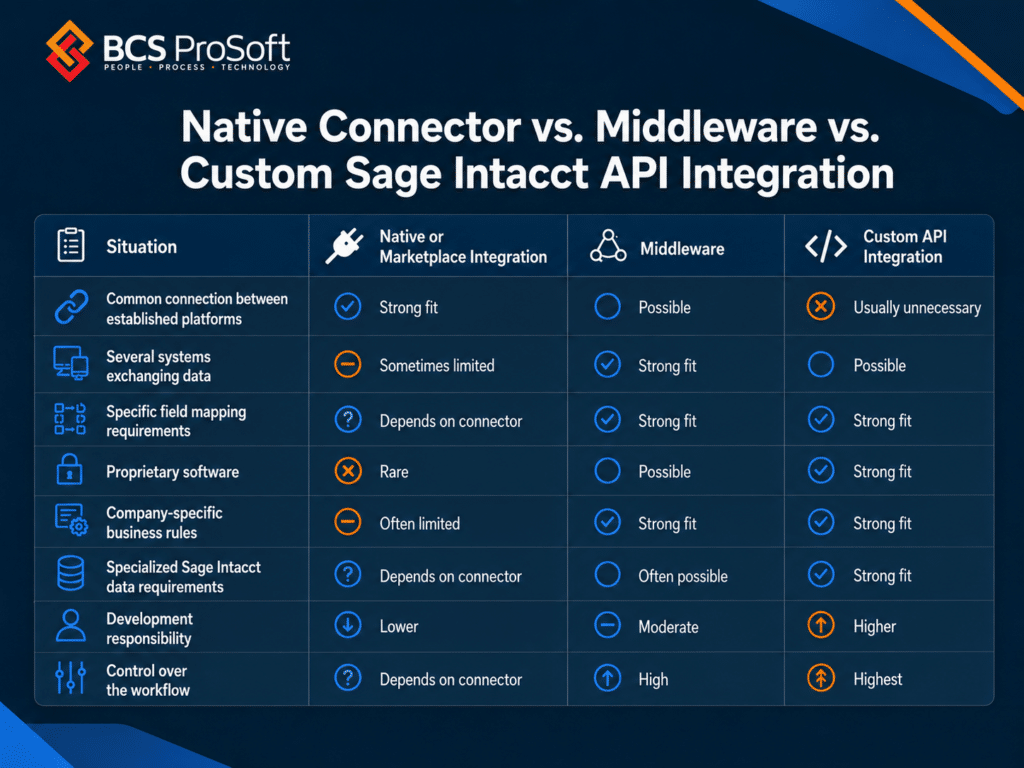
A Marketplace integration is usually worth evaluating first because much of the connection has already been built.
Middleware gives you another layer where mappings, triggers, and logic can be configured across applications. Sage’s Marketplace includes connectors, ETL products, iPaaS platforms, middleware, and direct integrations for exactly this reason.
Custom API development gives the team direct control over the integration logic. That control comes with responsibility for testing, monitoring, documentation, and future maintenance.
The right choice depends heavily on the software sitting around Sage Intacct.
What Should You Define Before Building the Integration?
A good integration project starts with a workflow map.
Pick one business process and follow a real transaction through it.
Suppose a project starts in your CRM, moves into project management after the contract is signed, and eventually reaches Sage Intacct for billing.
For every point in that process, document which application owns the information and what event should cause something to happen elsewhere.
Eight questions can uncover most of the decisions that need to be made:
- Which system owns each record?
- What event should trigger data movement?
- Which fields need to move?
- Which Sage Intacct dimensions need to be assigned?
- Does information need to move in one direction or both?
- What should happen when a record fails?
- How will duplicates and later updates be handled?
- Who will monitor the integration after launch?
Pay particular attention to ownership.
If two systems can independently change the same customer field, project status, or transaction value, you need a rule for which one wins. Without one, a perfectly functional API connection can create confusing data.
You also need to decide how much authority the integration should have inside accounting.
Some incoming records may be safe to create automatically. Others may belong in a review process first.
For example, finance may want to review transactions that:
- Are missing a required dimension
- Exceed a certain value
- Contain a customer or vendor that cannot be matched
- Have already been modified in Sage Intacct
- Require an accounting judgment before posting
- Fail a validation rule
In those cases, the integration could flag the record for review instead of forcing it through.
Once those rules are documented, you can make a much better call on the technology required to support them. You can also spot cases where custom development would add more complexity than the process deserves.
When Is a Custom Sage Intacct Integration Probably Overkill?
There are plenty of situations where we would not recommend starting with custom API development.
One is obvious: a reliable Sage Intacct Marketplace integration already covers the requirements.
Sage’s current Marketplace contains solutions across dozens of financial and operational categories, including AP automation, CRM, payroll, project accounting, ecommerce, inventory, tax, spend management, and reporting.
Custom work may also be unnecessary when:
- Only a small number of records need to be transferred
- A scheduled import handles the workload comfortably
- Middleware already supports the required mappings and rules
- The underlying business process changes every few months
- Nobody can agree which system owns the data
- The proposed automation would save very little manual work
That fourth point deserves attention.
Automating a workflow that is still changing can leave you rewriting the integration every time the business changes its process.
Get the operating rules settled first. Once the workflow is repeatable, the technical scope becomes much easier to define.
And when custom development really is warranted, that preparation pays off quickly during implementation.
What Does a Sage Intacct API Integration Project Involve?

A custom integration has more moving parts than the API call itself.
The exact project will vary, although most implementations need to cover the following areas.
Workflow Mapping
Like we talked above above, start with the process your employees actually follow.
Document where records originate, who approves them, when finance gets involved, and where people currently perform manual work.
This gives the technical team a clear business event to build around.
Data Mapping
Next, map the information in the source system to the corresponding fields in Sage Intacct.
That may include:
- Accounts
- Entities
- Departments
- Locations
- Customers
- Vendors
- Projects
- Employees
- Transaction fields
- Standard dimensions
- Custom dimensions or fields
This is where many integration issues first become visible. The source system may use a different naming convention, group customers differently, or lack information Sage Intacct requires.
Those gaps need rules before development starts.
Integration Architecture
The team can then decide how the systems should communicate.
That could involve a direct API connection, middleware, an integration platform, or a custom service sitting between the applications.
This decision should reflect the number of applications involved, the amount of custom logic required, transaction volume, monitoring requirements, and the team’s ability to maintain the setup.
Development and Testing
Testing needs to cover the awkward cases as well as the happy path.
What happens when:
- A customer already exists?
- A dimension is missing?
- Someone changes a record after it has synced?
- The source application sends incomplete information?
- Sage Intacct rejects a request?
- The same transaction arrives twice?
- A large batch is processed?
- One system becomes temporarily unavailable?
Sage’s API documentation includes error responses, processing behavior, and concurrency considerations that developers need to account for during this work.
Finance should also reconcile the results.
If 1,000 transactions leave the source system, verify what arrived in Sage Intacct, how the dimensions were assigned, and whether the resulting accounting matches the expected totals.
Monitoring and Exception Handling
APIs occasionally encounter bad data, unavailable services, rejected requests, expired credentials, and other exceptions.
Someone needs visibility into those events.
A production integration should have a defined process for logging errors, identifying failed records, retrying appropriate requests, and giving someone enough information to correct the problem.
Documentation and Ownership
Finally, document what was built.
Future employees should be able to understand which systems exchange data, what triggers each workflow, what mappings are applied, where errors appear, and who is responsible for the integration.
That becomes particularly valuable when the person who originally designed the workflow is no longer the person maintaining it.
These implementation steps also reveal why several common API mistakes cause so much trouble.
Common Sage Intacct API Integration Mistakes
Some integration problems are obvious because the connection stops working.
The more frustrating ones keep working while producing the wrong accounting result. Here are a few we would watch closely:
Treating a Successful API Response as Proof the Accounting Is Correct
A successful request tells you that the application accepted the request.
Finance still needs to confirm that the resulting record has the expected account, dimensions, entity, amount, date, customer or vendor, and other required accounting information.
Technical testing and accounting testing serve different purposes. A proper project needs both.
Testing New Records Without Testing Changes
Creating a customer or project is usually the easy case.
What happens six months later when somebody changes it?
Updates, corrections, cancellations, credits, reversals, and deleted or inactive records need their own rules. If they are part of the business process, they belong in the testing plan.
Hard-Coding Too Much Accounting Logic
A developer can put account mappings, dimension IDs, customer rules, and other logic directly into code.
That may work initially.
It becomes painful when finance changes a department structure or adds a new transaction type and needs a developer to alter the integration.
Where practical, mappings and business rules should be maintainable without rewriting core integration code.
Ignoring Transaction Volume
A workflow that works with ten records during testing may behave differently with thousands.
Sage applies concurrency and processing rules to API activity. Integrations handling meaningful volume should be designed and tested with those constraints in mind.
Skipping Post-Launch Reconciliation
An integration can run every day for months without anyone noticing that a small group of transactions is being rejected or mapped incorrectly.
Reconciliation gives finance a way to compare source records with what actually reached Sage Intacct.
Why Contact BCS ProSoft About a Sage Intacct Integration?

If you are at the point where you are comparing Marketplace connectors, middleware, and custom API work, BCS ProSoft can help you figure out which route actually fits your Sage Intacct environment.
The value of that conversation is in getting the scope right before development starts. BCS ProSoft can review the systems involved, the records that need to move, the dimensions finance depends on, and the points where manual work is creating friction.
That review can help answer questions such as:
- Does an existing Sage Intacct integration already cover the requirement?
- Can middleware handle the workflow without a custom build?
- Where would custom API development add real value?
- Which system should own each record?
- What accounting rules need to be built into the integration?
- How should errors, duplicates, and failed records be handled?
BCS ProSoft also brings Sage Intacct implementation and accounting experience into the conversation. That matters because the goal is not simply to get data from one system to another. The records need to land correctly inside Sage Intacct, with the right entities, accounts, dimensions, and reporting treatment.
If your team is already spending time on manual imports, duplicate entry, brittle workarounds, or an integration that only handles part of the process, it is worth having BCS ProSoft review the workflow before you commit to a technical approach.
Conclusion: When Does a Custom Sage Intacct API Integration Make Sense?
The Sage Intacct API gives companies a broad set of options for connecting financial data with the systems that run the rest of the business. Sage recommends REST for new client applications, while continuing to support its established XML API.
Custom development makes the strongest case when you have a stable, repeatable workflow that existing integrations cannot support. Proprietary software, unusual data requirements, company-specific accounting logic, and multi-system processes are all good reasons to investigate it.
Start with the workflow. Define who owns the data, what needs to move, when it needs to move, and what Sage Intacct should contain when the process is complete.
From there, you can compare Marketplace integrations, middleware, and custom API development with a much clearer idea of what the business actually needs.
BCS ProSoft can help you review your Sage Intacct setup, integration requirements, and current manual processes to determine which approach fits the workflow.
Key Takeaways
- The Sage Intacct API can connect the platform with CRMs, project systems, payroll tools, industry software, proprietary applications, and other business systems.
- Sage recommends the REST API for new development, while the XML API remains supported for existing integrations.
- A custom API integration makes the most sense when standard connectors cannot support the required data, business rules, timing, or system complexity.
- Marketplace integrations and middleware are often worth evaluating before committing to custom development.
- Successful integration planning depends on clear data ownership, field mapping, dimension requirements, trigger rules, and exception handling.
- BCS ProSoft can help assess the workflow, compare integration options, and determine whether a native connector, middleware, or custom Sage Intacct API integration is the right fit.
Frequently Asked Questions About the Sage Intacct API
Does Sage Intacct Have an API?
Yes. Sage Intacct provides APIs that developers can use to create, retrieve, update, and work with financial and operational data. Sage currently recommends its REST API for new client applications and continues to support its XML API.
Does Sage Intacct Use REST or XML?
Sage Intacct supports both. REST is now Sage’s recommended API for new client applications, and Sage says new objects and features will be released through REST going forward. The XML API remains supported for existing and legacy integrations.
Can Sage Intacct Integrate With Custom Software?
Yes, custom applications can be connected to Sage Intacct when the required data and operations are available through the applicable APIs and the other application provides a workable way to exchange information.
The integration still needs defined rules for authentication, field mapping, record ownership, triggers, errors, and updates.
Do I Need a Developer to Integrate With Sage Intacct?
Not always. Many common integrations are already available through the Sage Intacct Marketplace, and middleware platforms can handle many additional workflows without building a connection entirely from scratch.
Custom API work generally requires developers or an integration partner familiar with both the technical connection and the Sage Intacct environment.
Can Sage Intacct Integrations Work With Dimensions?
Sage Intacct APIs expose numerous accounting, project, platform, and object capabilities that can be used in integration workflows. The exact dimension support depends on the object, API, workflow, and integration method involved.
Dimension mapping should be documented early because it often determines whether incoming operational data produces useful financial reporting.
Is Custom API Development Better Than Middleware?
The better option depends on the workflow.
Middleware can be a good fit when several applications need to exchange information or when configurable mapping and workflow logic can handle the requirements. Custom development makes more sense when the company needs control that existing connectors and integration platforms cannot reasonably provide.
How Much Does a Custom Sage Intacct Integration Cost?
Scope depends heavily on what needs to be built.
Major cost drivers include the number of systems, number of workflows, amount of data being exchanged, one-way versus bidirectional communication, custom business logic, transaction volume, exception handling, testing, and ongoing support requirements.
A project that creates customers from one source system has a very different scope from a multi-system workflow handling customers, projects, invoices, payments, dimensions, updates, and error processing.
How Do I Know if a Sage Intacct Integration Already Exists?
Start with the Sage Intacct Marketplace. Sage lists approved solutions across accounting, CRM, payroll, project management, ecommerce, inventory, reporting, tax, spend management, and other business functions.
From there, compare the connector’s supported records, fields, directions, timing, and mapping capabilities with your actual workflow. The existence of a connector is only the first part of the evaluation.