
As Sage 100 requirements grow, companies usually face a practical choice: keep adding functionality around the current ERP or start evaluating a more advanced Sage system.
Extending Sage 100 can make sense when the core system still fits the business and the missing capabilities are concentrated in specific areas. A Sage 100 upgrade becomes worth evaluating when new requirements span several departments and the company is relying on more integrations, add-ons, customizations, and manual processes to support everyday work.
This guide looks at the signs that can help separate those two situations.
A Quick Way to Look at the Decision
Before breaking that down, here is a quick way to look at it.
If Sage 100 still supports the company’s core processes and the main issue sits within one area of the business, additional functionality may address it.
If workarounds, manual processes, and system maintenance are showing up across several departments, it may be time to review the ERP more broadly.
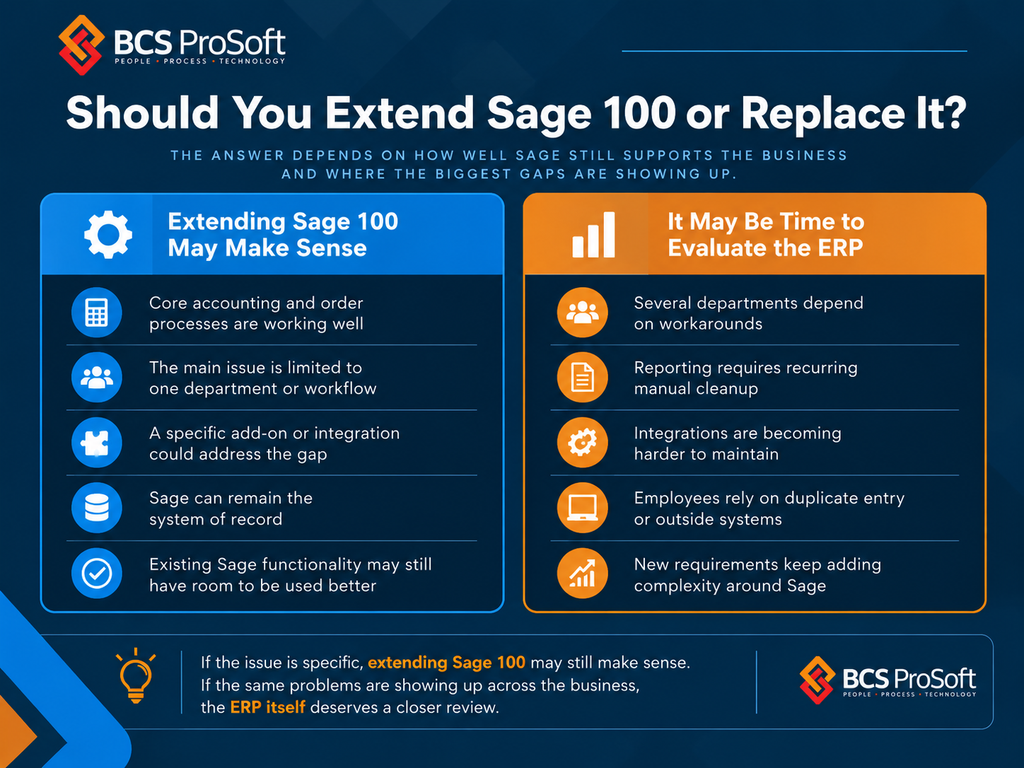
The rest of the decision comes down to how much of the business Sage 100 still handles well and how much extra architecture is required to support everything around it.
Start With the Core Sage 100 Processes
The first place to look is the work Sage 100 already handles today.
That usually includes accounting, purchasing, sales orders, inventory, reporting, and any other processes the company depends on every day.
If those areas are stable, users trust the data, and the core workflows still fit the business, that is a strong argument for keeping Sage 100 in place.
The question then becomes more specific: what capability is missing?
A company may need better CRM connectivity, ecommerce integration, EDI, warehouse functionality, reporting, shipping tools, or another specialized application. Those are defined needs that can often be addressed without changing the ERP.
If the core Sage processes themselves are becoming difficult to support, the discussion is broader.
When Adding to Sage 100 Still Makes Sense

Additional functionality makes the most sense when the requirement has clear boundaries.
For example, a company may be satisfied with Sage 100 for accounting and order management but need better connectivity with an ecommerce platform. Another may need more advanced reporting while the rest of the ERP works well.
In those cases, the added application has a specific purpose.
Before selecting anything new, define:
- What the application needs to do
- Which records remain in Sage 100
- Which system owns each important piece of data
- How information will move between systems
- How often that information needs to move
- Who will support the connection
- What users will do if a transaction fails
That gives the company a clearer picture of the future Sage 100 environment before another layer is added.
Look at How Much of the Business Depends on Add-Ons
A few connected applications are common.
The more important question is what they are doing.
If each add-on supports a specialized requirement, the setup may still be perfectly reasonable. Problems start to appear when more of the company’s core operation depends on separate systems to complete routine work.
Look at the current stack and ask:
- Which applications are required for normal daily processes?
- Which ones hold information Sage 100 does not?
- Which ones duplicate information stored somewhere else?
- How many systems does a user have to touch to finish one process?
- Which applications would have to be replaced or rebuilt if Sage changed?
This gives you a better sense of whether the company is extending Sage 100 or gradually building a second operating environment around it.
Review the Integration Architecture
Integrations are often where the long-term cost of an extended Sage 100 environment becomes more visible.
Sage 100 can connect to other systems through several methods, including Visual Integrator, ODBC, the Business Object Interface, scheduled flat files, middleware, and purpose-built API layers.
A company may use several of those approaches at once.
That does not automatically create a problem. What matters is how the connections are supported.
For each integration, review:
- Whether data moves one way or both ways
- How often information moves
- Which system is the source of record
- How failed transactions are identified
- Whether users have to reconcile mismatched records
- Whether custom code is involved
- Who understands the integration
- What testing is required during upgrades
- How easily the connection can be changed when business requirements change
A connection that works today can still become expensive to maintain if every change requires custom development or manual intervention.
That is one of the clearest areas to compare against what a more advanced Sage ERP could handle differently.
Check How Much Routine Work Happens Outside Sage 100

Routine work outside the ERP is another useful signal.
Finance may export data to build recurring reports. Purchasing may maintain a separate tracker. Operations may rely on spreadsheets for information that is hard to manage inside Sage. Customer service may have to check several applications to answer a basic question.
Document that work by process.
For each recurring task, look at:
- Where the information starts
- Where employees move it
- Which edits or calculations happen outside Sage
- Whether the result gets entered back into Sage
- How often the process happens
- How many people depend on it
This helps separate occasional spreadsheet use from processes that have become part of the company’s operating structure.
If a large share of routine work depends on external tools, that deserves attention during the ERP review.
Look at What It Costs to Keep Extending Sage 100
The cost of staying on Sage 100 is broader than licensing.
Every added application, customization, and integration brings its own support requirements. Research on ERP customization has also found that heavier customization can make future updates and upgrades more difficult, which is worth factoring into the long-term cost of the system.
An extended Sage 100 environment can also require:
- Add-on subscriptions
- Integration development
- Consultant support
- Customizations
- IT maintenance
- Upgrade testing
- Manual reconciliation
- Recurring reporting work
- Training around company-specific processes
- Support across multiple vendors
These costs are easy to miss because they are spread across departments and budgets.
Before approving another add-on, it is worth estimating how much time and money already goes into maintaining the current environment.
That does not mean an extended Sage 100 setup is automatically too expensive. It gives the company a more accurate basis for comparing continued investment in Sage 100 with a move to a more advanced Sage ERP.
Check What Sage 100 Already Has

Another application should not be the first assumption.
Some companies already own Sage 100 functionality they have never fully implemented. A module may be underused. A feature may have been configured around an old process. A custom report may still be in use even though the original requirement has changed.
Review the current environment at the module and workflow level.
That should include:
- Licensed modules
- Active modules
- Features employees actually use
- Custom fields and screens
- Reports
- Visual Integrator jobs
- Business Object integrations
- ODBC connections
- Scheduled imports and exports
- Third-party applications
- Custom code
- Security and user roles
This review can reveal gaps that are fixable inside Sage 100.
It can also show that the company has already used most of the practical room available in the current system.
Ask Whether You Are Solving One Requirement or Redesigning the ERP Around Sage 100
This is one of the most useful questions in the entire decision.
Adding one application for a clearly defined requirement is straightforward.
A company may need to think differently when the plan includes several new applications, additional integrations, more custom development, expanded reporting infrastructure, and continued manual work across multiple departments.
At that point, the issue is no longer one missing capability.
The company is making a larger architecture decision about how much functionality should continue to sit around Sage 100.
That is the point where comparing the extended Sage 100 environment with a more advanced Sage ERP becomes valuable.
Sage 100 Upgrade: Company Size Alone Does Not Answer the Question
Revenue, employee count, and transaction volume can provide context, but they do not tell you how complicated an ERP environment is.
Two companies with similar revenue can place very different demands on Sage 100.
One may have straightforward accounting, limited inventory complexity, a few locations, and a small number of integrations.
Another may have several entities, complex inventory, ecommerce, EDI, detailed reporting requirements, multiple business units, and several systems exchanging data with Sage.
The second company has a much more demanding ERP environment even if the headline numbers look similar.
A better assessment looks at:
- Number of entities and locations
- Inventory complexity
- Pricing structures
- Reporting requirements
- EDI volume
- Ecommerce activity
- Number of integrations
- Customizations
- Manual exception handling
- Security requirements
- Number of departments relying on outside systems
Those factors tell you much more about whether Sage 100 still fits the business.
What Would a More Advanced Sage ERP Need to Do Better?
If the company decides to evaluate another Sage ERP, the next step is to define what the new system must improve.
That should come directly from the current Sage 100 review.
Look at which add-ons could be eliminated, which integrations could be reduced, which manual processes need to disappear, and which capabilities the company needs to support inside the ERP itself.
That may include:
- More advanced financial management
- Better support for multiple entities or locations
- More complex inventory requirements
- Deeper operational workflows
- Stronger reporting
- Fewer external applications
- Better integration options
- More automation
- Better support for future growth
This turns the migration discussion into a requirements exercise rather than a general search for a “bigger” ERP.
How BCS ProSoft Helps Evaluate Both Paths

BCS ProSoft can review the current Sage 100 environment and help the company compare both options.
That starts with understanding how Sage 100 is being used today, which modules are in place, where employees depend on outside systems, how integrations are built, and which requirements are driving the conversation.
From there, the company can look at what continued investment in Sage 100 would actually involve.
That may include better use of existing functionality, additional modules, integrations, reporting changes, custom development, or specialized applications.
The same review can also show when it makes sense to start evaluating a more advanced Sage ERP.
If your company is trying to decide how much further to build around Sage 100, talk with the BCS ProSoft Sage 100 consulting team. We can review the current environment and help you compare the available paths.
Key Takeaways
- Extending Sage 100 makes the most sense when the core ERP still fits the business and the missing functionality is limited to specific areas.
- Add-ons, integrations, reporting tools, warehouse software, ecommerce connections, and other applications should have clear roles and manageable support requirements.
- A more advanced Sage ERP deserves consideration when new requirements span several departments and more routine work is happening outside Sage 100.
- Integration maintenance, customizations, manual processes, and support across multiple systems all add to the long-term cost of staying on the current setup.
- The decision should be based on the Sage 100 environment the company will need next, including future requirements, added software, integration demands, and the amount of complexity the business is prepared to maintain.
Frequently Asked Questions
Can Sage 100 support a growing business without moving to another ERP?
Yes. Many companies continue using Sage 100 as they grow, especially when the core accounting and operational processes still fit the business. The bigger question is how much additional software, integration work, and customization the company needs to support new requirements.
How do you know when an add-on is a better choice than moving to another Sage ERP?
An add-on is usually a better fit when the requirement is specific, the rest of Sage 100 is working well, and the new application can connect cleanly with the existing system. A broader ERP review becomes more relevant when several departments need separate fixes.
Does using several Sage 100 integrations mean the company has outgrown the ERP?
Not necessarily. The number of integrations matters less than how difficult they are to support. A company can have several stable integrations and still have a manageable Sage 100 environment. The concern grows when integrations require frequent maintenance, manual reconciliation, or custom development.
Should companies compare the cost of add-ons with the cost of moving to another Sage ERP?
Yes. The comparison should include software costs, implementation, integration work, consulting, internal IT time, upgrade testing, training, and any manual work that remains after the project.