
If you are looking for a Sage 100 integration, you are probably trying to solve a specific connection problem.
Maybe Sage 100 needs to exchange data with a CRM, ecommerce platform, or reporting tool. Maybe the connection already exists, but employees are still re-keying information, fixing failed imports, or waiting on overnight updates that no longer keep pace with the business.
There are several valid ways to connect Sage 100, and the right choice depends on the workflow.
That might involve Visual Integrator, ODBC, the Business Object Interface, scheduled flat files, middleware, or a purpose-built API layer. Each method handles data differently, requires a different level of technical support, and comes with its own maintenance considerations.
This guide explains how the main Sage 100 integration methods work, where they tend to fall short, and how to choose the approach that fits the way your systems actually need to exchange data.
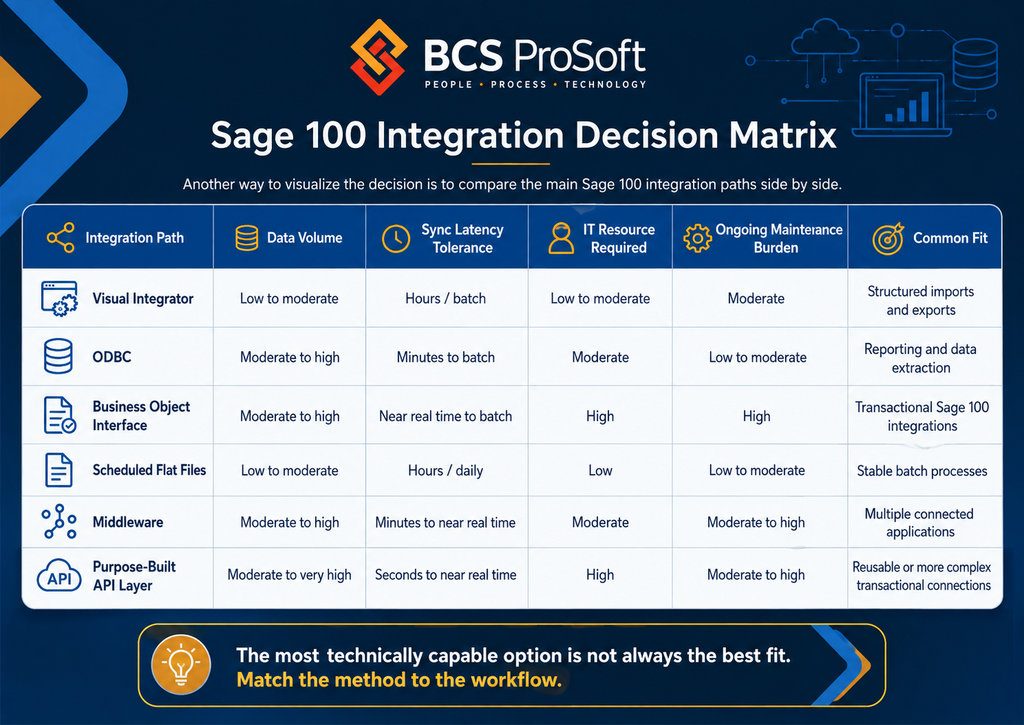
Sage 100 Integration Decision Matrix
A good way to visualize the decision is to compare the main Sage 100 integration paths side by side.
The table below shows how each method generally lines up against the same factors we just covered: data volume, sync speed, IT involvement, maintenance, and the type of workflow it tends to fit best.
How Does Sage 100 Connect to Other Systems?
Like we mentioned above, there is no one integration mechanism sitting inside Sage 100 waiting to connect every application you buy.
Instead, Sage 100 gives you several ways to get information in and out. Some are well suited to simple batch processes. Others can support much more involved transactions.
The differences matter because an integration that works well for a daily reporting feed may be a poor choice for ecommerce inventory that changes throughout the day.
So, let’s look at the main ways Sage 100 can connect to the rest of your stack, how each method works, and where each one tends to make the most sense.
1. Visual Integrator
Visual Integrator is one of the more familiar Sage 100 integration options.
It can import information into Sage 100 or export information out according to a predefined job. You define the source, map the fields, add any necessary rules, and run the job manually or on a schedule.
That makes it useful for processes such as:
- Importing customer records
- Bringing in transaction data
- Updating item information
- Exporting Sage data on a schedule
- Processing information from CSV, text, or ODBC sources
Visual Integrator can be a very practical choice when the information has a predictable format and does not need to move immediately.
Suppose another application produces a customer file every evening. Sage 100 needs those customers available the following morning. A scheduled Visual Integrator job may handle that without requiring a larger development project.
The trouble usually begins when the process stops being as predictable as it was when the job was created.
A source application adds a field. A required field changes. Someone changes the file layout. Records start rejecting. The job runs, but part of the data does not arrive as expected.
Error handling can also be limited compared with a more purpose-built integration. Sage community guidance specifically notes that Visual Integrator can import from ODBC or CSV/TXT sources and be called as a preconfigured job, while also cautioning that its error-handling options are limited.
Visual Integrator can work very well when the workflow fits it. The important question is how much variability and urgency the process contains.
2. ODBC
Sometimes the other system does not need to send anything into Sage 100. It only needs to read what is already there.
That is where ODBC often comes into the conversation.
Sage 100’s ODBC driver can provide access to Sage data for reporting, analysis, dashboards, lookups, and other read-heavy requirements. Sage community guidance commonly points to ODBC as the straightforward route when the requirement is simply to query Sage 100 data.
For example, a reporting application might need sales history, inventory quantities, customer information, or general ledger data.
ODBC can make sense because the reporting system does not need to create a sales order or update inventory. It just needs the data.
That distinction is important.
The standard Sage 100 ODBC approach is read-only. It is not the appropriate route for pushing transactions back into Sage. Directly updating underlying database tables can also bypass Sage business logic, which creates its own risks.
So if the requirement is:
“Our BI tool needs to pull sales and inventory data from Sage.”
ODBC may be a strong fit.
If the requirement becomes:
“Our ecommerce store needs to create sales orders in Sage.”
Now you are dealing with a different integration problem.

3. Business Object Interface
For transactional work, one option is the Sage 100 Business Object Interface, commonly called BOI.
BOI lets developers interact with Sage 100 application objects using Component Object Model, or COM. Sage describes it as a way for third-party developers with the required technical knowledge to access Sage 100 programs and applications.
The important part is that the integration can work through Sage business logic rather than treating Sage 100 as a collection of database tables.
That matters when you are creating something like a sales order.
A sales order is more than a row in a database. There are validations, customer records, item records, quantities, pricing, taxes, permissions, and other rules that may affect what happens when the transaction is created.
BOI gives developers a way to work with those Sage objects.
That makes it useful for more involved integrations where another application needs to create or update Sage transactions.
There is a tradeoff.
BOI is based on COM and is closely tied to the Sage 100 environment. A cloud application cannot necessarily call directly into an on-premise Sage installation as though Sage 100 were a modern public web API.
That can introduce Windows, network, Sage workstation, session, security, and development considerations.
A developer may be able to create exactly the Sage transaction the business needs, but there is still an architectural question: how does the outside application reliably reach that BOI process?
That question is one reason companies sometimes put another layer between Sage 100 and the applications around it.
4. Scheduled Flat Files
There is also a much less glamorous integration method that continues to work perfectly well in many companies: the file.
CSV, text, XML, and similar structured files can move information between systems on a set schedule.
It sounds basic because it is. That can be a benefit.
Imagine payroll needs to send a journal entry into Sage 100 once per pay period. The format rarely changes, the process is predictable, and nobody needs that information in Sage five seconds after payroll finishes.
A file-based exchange may be all that is required.
Problems appear when the timing or complexity of the business changes.
Consider inventory.
Your ecommerce platform receives an inventory file from Sage 100 at midnight showing that 18 units of an item are available.
Orders arrive throughout the morning.
Meanwhile, your warehouse ships product from orders that originated elsewhere.
If ecommerce does not receive another Sage inventory update until midnight, customers can be making purchasing decisions based on information that is hours old.
The file worked exactly as designed. The business simply reached a point where a nightly batch was no longer frequent enough.
That is the distinction to keep in mind with file-based Sage 100 integrations. The method itself may still work. The question is whether the timing still fits the operation.
5. Middleware
Once several systems become involved, integration can become harder to manage through individual point-to-point connections.
CRM talks to Sage. Ecommerce talks to Sage. The warehouse talks to Sage. Shipping talks to ecommerce. A reporting system pulls from several of them.
Middleware can sit between these applications and handle parts of that communication.
Depending on the platform and configuration, middleware may handle tasks such as mapping fields, moving data, scheduling processes, applying workflow logic, monitoring connections, and translating information from one system into a format another system understands.
This can be useful when the company has several applications and does not want each one to carry its own custom Sage 100 connection.
It still has to be maintained.
The middleware becomes another part of the technology stack. Someone has to understand the mappings, watch failures, make changes when applications change, and know where to look when a transaction disappears between systems.
There is also a difference between a connector claiming to support Sage 100 and supporting the exact Sage 100 workflow your business needs.
“Connects to Sage 100” sounds straightforward.
“Creates sales orders with our pricing rules, customer structure, warehouse assignments, user-defined fields, and exception handling” is a much more specific requirement.
That is why the workflow has to come before the product choice.
6. A Purpose-Built API Layer
For more involved environments, another approach is to place an API or service layer between Sage 100 and the rest of the stack.
Think of it as a controlled doorway into Sage.
Instead of asking every cloud application to understand BOI, Sage sessions, business objects, and local infrastructure, those applications communicate with the API layer.
The API layer handles the Sage-specific work behind it.
For example:
Ecommerce → API layer → Sage 100
The store might send an order to an endpoint. The API receives it, validates the request, passes the information into Sage through the appropriate mechanism, records what happened, and returns a result.
The same service could potentially be reused by other applications.
That becomes valuable when several systems need similar Sage functions or when near-real-time exchange matters.
It also gives the company a place to handle things that basic file transfers struggle with:
- Authentication
- Validation
- Logging
- Retry logic
- Error messages
- Monitoring
- Consistent business rules
There is more work involved in building and maintaining that architecture.
If you need to move one stable file every night, building an API may create far more technical overhead than the process deserves.
So how do you choose?
That is where it helps to step away from the technology names and look at what the workflow actually requires.
The BCS ProSoft VITAL Framework for Choosing a Sage 100 Integration

We can break that decision into five factors: Volume, Immediacy, Transaction Complexity, Administration, and Lifecycle.
Together, they make up the VITAL Framework.
Volume
How much data needs to move?
Moving 30 customer records every evening is a very different job from synchronizing thousands of inventory changes and orders throughout the day.
Higher transaction volume can place more pressure on batch jobs, file transfers, and manual exception handling.
Immediacy
How old can the information be before it causes a business problem? This is one of the most useful questions you can ask.
A daily financial reporting feed may be perfectly acceptable. A daily inventory feed may not be.
If a delay causes customers to order products you do not have, prevents the warehouse from acting, or leaves salespeople quoting outdated information, the integration probably needs a shorter sync interval.
Transaction Complexity
What does the integration need to do once it reaches Sage 100?
Reading a customer balance is relatively straightforward.
Creating a sales order with multiple lines, pricing rules, warehouses, taxes, user-defined fields, and other Sage logic is much more involved.
The more transactional the workflow becomes, the more important it is to account for Sage business rules.
Administration
Who is going to own this after it goes live?
That may be internal IT, your Sage partner, another software vendor, or an outside integration provider.
This question gets overlooked during integration projects.
A technically impressive connection that only one developer understands can become difficult to support a few years later.
You need to know who will receive an alert when something fails and who has enough context to fix it.
Lifecycle
Finally, how much is this workflow likely to change?
A stable payroll export could retain the same structure for years.
An ecommerce environment may change regularly as products, storefronts, warehouses, fulfillment processes, payment systems, or business rules change.
The more change you expect, the more attention you should give to maintainability when choosing the connection method.
With those five factors in mind, the differences between the major Sage 100 integration paths become easier to see.
What Goes Wrong With Sage 100 Integrations and When Should You Rework Them?
Maybe you already have a Sage 100 integration in place.
That can solve a lot, but it does not always mean the connection is still handling the workflow as well as it should.
You may still have employees re-keying certain information. Inventory may only update overnight. Failed jobs may go unnoticed until someone downstream finds the issue. New systems may have been added through separate scripts or file exchanges that were never designed to work together.
In those cases, the integration may still be running, but the process around it has become harder to manage.
That is when it is worth looking at how the connection performs in day-to-day use.
Employees Are Still Filling Gaps Between Systems
One of the easiest warning signs to spot is repeated data entry.
An ecommerce order may already flow into Sage 100, but customer service still has to add a field manually. The warehouse may receive the order electronically, while someone later types shipment details into another application.
Some manual steps may be reasonable.
The question is how often they happen and how much time they consume.
If employees are copying the same information between systems every day, the current integration probably stops short of the actual workflow.
Batch Timing Starts Affecting the Business
Nightly processing works well when the information can wait until tomorrow.
Inventory is a good example of where that can change.
A distributor may start with one warehouse and relatively low ecommerce volume. Updating inventory overnight causes few problems. A few years later, the company has more orders, another warehouse, and customers buying online throughout the day.
The same overnight process now means the storefront may be working from inventory quantities that are several hours old. Research published in the International Journal of Production Economics found that inventory record inaccuracy can contribute to stockouts and lower store performance, which gives you a good sense of why inventory timing starts to matter more as volume grows.
At that point, the issue is not necessarily that the integration failed. The timing requirement changed

People Notice Failures Before the System Does
This is one of the more expensive patterns because the integration may appear healthy until someone downstream realizes something is missing.
A salesperson cannot find an order.
Accounting notices yesterday’s transactions never arrived.
The warehouse gets a call about an order that is not in its queue.
Scheduled files and Visual Integrator jobs can be especially vulnerable when something changes upstream. A source file may move. A field may be renamed. A required value may change. A mapping that worked for months may suddenly reject records.
The more important the workflow is, the more important monitoring, logging, and error handling become.
Two Systems Both Think They Own the Same Data
Some integration problems are really ownership problems.
Consider a customer record shared between CRM and Sage 100. Sales updates the contact information in CRM. Accounting changes billing information in Sage. Credit status also lives in Sage.
Now ask a simple question:
Which system is allowed to overwrite which fields?
If that answer has never been defined, a two-way integration can create confusion even when the connection itself is working.
The same issue can come up with inventory quantities, pricing, customer addresses, salesperson assignments, order status, and shipment status.
The Stack Has Accumulated Too Many One-Off Connections
This usually looks less like a failed integration and more like technical clutter.
One application gets a CSV export.
Another gets a scheduled script.
A second warehouse needs a slightly different version of the same file.
A new ecommerce tool requires another mapping.
After enough additions, no one has a complete picture of how information moves from one end of the business to the other.
That is a good indication that the next project should not be treated as one more isolated connection.
Sage 100 Changes Create Too Much Uncertainty
Every connection has dependencies.
A Sage 100 upgrade, new custom field, configuration change, operating system update, or change in the connected application can affect an integration.
The concern is whether anyone knows what needs to be tested afterward.
If an upgrade creates a scramble to figure out which scripts, BOI processes, mappings, or scheduled jobs might be affected, maintenance ownership probably needs more attention.
A healthy integration environment should have a clear answer to two questions:
- What depends on this Sage 100 process?
- Who is responsible for testing it when something changes?
Having an integration in place is only part of the picture.
The better question is whether that integration still fits the way your business operates today.
How BCS ProSoft Approaches Sage 100 Integration

Maybe you already have Sage 100 connected to several systems and are not sure whether the setup is working as well as it could. Or maybe you are starting from scratch and need help deciding how Sage 100 should connect to the rest of your stack.
BCS ProSoft can help with both.
We start by looking at the workflow itself. That means understanding where data originates, which system should own it, how often it needs to move, what Sage 100 needs to do with it, and where your team is still stepping in manually.
From there, we can help determine which integration method makes the most sense for each part of the process. That may involve Visual Integrator, ODBC, BOI, scheduled files, middleware, a purpose-built API layer, or a combination of approaches.
We also look at the parts that tend to create problems later, such as monitoring, error handling, upgrade testing, ownership, and ongoing maintenance.
So if you are trying to figure out how to connect Sage 100 to another system, or you want a second look at an existing setup that feels harder to manage than it should, BCS ProSoft can help you work through the options and build a clearer integration plan.
Finding the Right Sage 100 Integration Approach
Connecting Sage 100 to the rest of your stack is rarely a one-size-fits-all project.
The right setup depends on how much data needs to move, how quickly it needs to move, what each system is responsible for, and how much technical support the business can realistically maintain over time. In some cases, a simple scheduled file is enough. In others, the better fit may be ODBC, BOI, middleware, an API layer, or a mix of methods.
That is why BCS ProSoft looks at the full workflow before recommending an approach.
If you are planning a new Sage 100 integration or want to take a closer look at a setup that already exists, BCS ProSoft can help you evaluate the options and determine what makes the most sense for your environment.
Key Takeaways
- Sage 100 can connect to other systems through Visual Integrator, ODBC, the Business Object Interface, scheduled flat files, middleware, and purpose-built API layers.
- The right integration method depends on data volume, sync speed, transaction complexity, maintenance needs, and who will support the connection over time.
- A Sage 100 integration can still be running while employees continue re-keying information, fixing errors, or working around stale data.
- Manufacturing, distribution, ecommerce, warehouse, and reporting workflows can place very different demands on the same Sage 100 environment.
- One company may need several integration methods at once because different workflows have different requirements.
- BCS ProSoft can help evaluate an existing Sage 100 setup or determine the best way to connect Sage 100 with the rest of your software stack.
Frequently Asked Questions
Does Sage 100 have an API?
Sage 100 has several ways developers can connect to it, but it does not function like a modern cloud ERP with one broad REST API covering the entire system. Sage 100 includes the Business Object Interface, or BOI, which lets developers work with Sage 100 programs and business objects through COM.
How do you integrate with Sage 100?
The right method depends on what the connected system needs to do. Sage 100 supports options including Visual Integrator for structured imports and exports, ODBC for reading Sage data, BOI for transactional work, scheduled file exchanges, middleware, and custom integration layers. Sage specifically positions Visual Integrator as a tool for importing, exporting, scheduling jobs, and working with ODBC-compliant data sources.
Is Sage 100 compatible with Windows 11?
Yes, supported Sage 100 releases can run on Windows 11, but compatibility depends on the specific Sage 100 version, edition, and deployment configuration. Before installing or upgrading, check the Supported Platform Matrix for your exact Sage 100 release because Sage publishes version-specific operating system requirements.
Is Sage 100 considered an ERP system?
Yes. Sage 100 is an ERP, or enterprise resource planning, system designed primarily for small and midsize businesses, with a strong presence in manufacturing and distribution. It can handle areas such as accounting, inventory, purchasing, sales orders, reporting, payroll, and other business processes within one system. Sage itself classifies Sage 100 as ERP software.