

Connecting Sage 100 to another application has traditionally required more development work than many businesses expect.
Sage 100 does not provide a native REST API, so integrations often depend on direct work with Sage Business Objects, custom middleware, imports and exports, or manual processes built around the ERP. These approaches can become harder to maintain as systems, workflows, and data requirements change.
Introducing BCS ProSoft Connect:
BCS ProSoft Connect provides a RESTful API that allows external systems, custom applications, and automation tools to access supported Sage 100 data and operations through the Sage 100 Business Objects Interface.
What is it is and how does it help your business?
In this blog, we’ll explain how BCS ProSoft Connect works and the benefits it offers businesses using Sage 100.
What Is BCS ProSoft Connect?
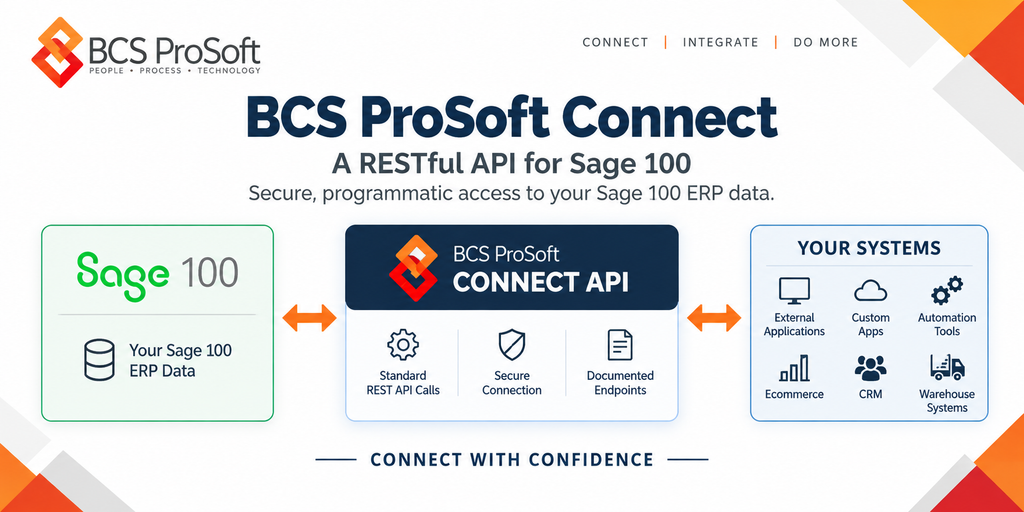
BCS ProSoft Connect sits between Sage 100 and the applications that need to exchange information with it.
The basic architecture looks like this:
Sage 100 ↔ BCS ProSoft Connect API ↔ Your Systems
An external application sends a standard REST API request to BCS ProSoft Connect. Connect handles the interaction with Sage 100 through its Business Objects Interface and returns the appropriate response.
For example, a company might have an online ordering portal that needs to retrieve inventory information or submit sales orders to Sage 100.
Developers can use supported BCS ProSoft Connect endpoints to build those interactions without developing every connection directly against Sage 100 Business Objects.
The API includes endpoints across several core Sage 100 modules, with available operations depending on the module and record type.
BCS ProSoft Connect also includes interactive Swagger documentation, where developers can review available endpoints, parameters, and request and response structures.
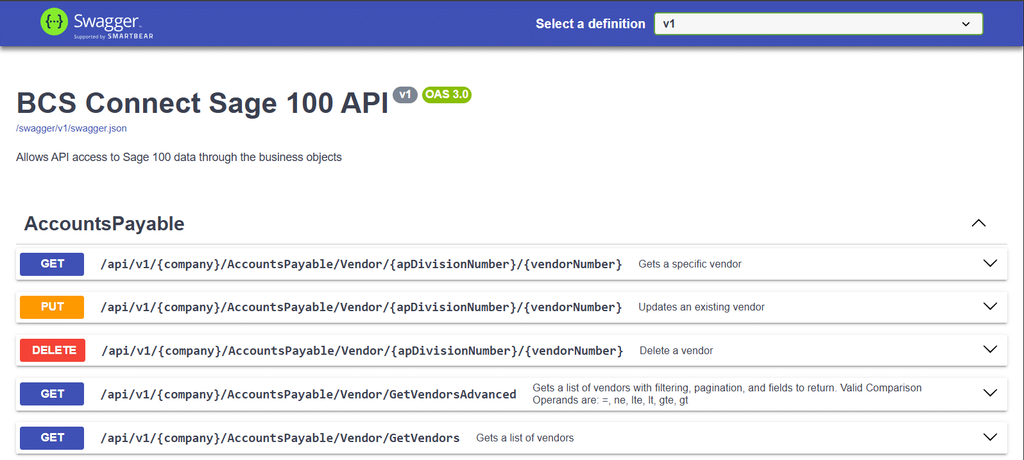
This documentation helps developers understand what the API currently supports and how to structure requests when building an integration.
6 Benefits of Using BCS ProSoft Connect

BCS ProSoft Connect makes it easier to use Sage 100 data in the other applications your business uses every day.
If you’re connecting existing software or building a custom application, here are six ways the API can help:
1. Reduce the Complexity of Sage 100 Integrations
Developing directly against Sage 100’s Business Objects Interface requires knowledge of how Sage 100 exposes records and processes transactions.
BCS ProSoft Connect handles that underlying communication and provides developers with a standard REST API.
Development teams can use familiar HTTP methods, JSON request structures, and documented endpoints instead of writing every interaction directly against Sage 100 Business Objects.
This can reduce the amount of Sage 100-specific development required and make it easier for developers with REST API experience to work on integration projects.
2. Make Sage 100 Data Accessible Across More Applications
Many businesses use several applications alongside Sage 100.
A distributor might manage accounting and inventory in Sage 100, receive orders through an ecommerce platform, and handle fulfillment through warehouse management software.
BCS ProSoft Connect allows developers to make supported Sage 100 information available to these applications.
An ordering portal could retrieve inventory records, a customer application could access account information, and a purchasing tool could retrieve purchase order details.
Employees can use Sage 100 information within the applications designed for their specific responsibilities.
3. Reduce Manual Data Entry Between Systems
When applications don’t communicate, employees often have to enter the same information more than once.
For example, an order received through an online portal may need to be entered manually into Sage 100. Customer details might also need to be maintained separately across several applications.
BCS ProSoft Connect provides API access developers can use to build integrations that transfer supported records between systems.
An ordering application could submit a new sales order directly to Sage 100 through a supported endpoint, reducing the need for duplicate entry.
The integration still needs to handle record validation, matching, and errors, but the API provides a direct method for exchanging the information.
For businesses processing large numbers of orders, reducing repetitive entry can save employees time and reduce opportunities for mistakes.
4. Give Employees Access to More Current Business Information
Employees often need Sage 100 information while working outside the ERP.
Sales representatives may need inventory availability before confirming an order. Customer service teams may need to check order details. Purchasing employees may need to review vendor information.
Without an integration, they may depend on spreadsheets, exported reports, or information provided by another department.
BCS ProSoft Connect allows external applications to request supported Sage 100 data directly.
An ordering portal, for example, could retrieve inventory information when a customer checks product availability.
How current the displayed information is depends on when the application requests data and how the integration is designed.
This gives businesses a way to provide employees with updated ERP information without relying exclusively on manual exports.
5. Support Custom Applications and Business Workflows
Some businesses have operational processes that require software developed specifically for their needs.
A manufacturer might use a proprietary production application. A distributor could operate a custom ordering portal. A service company may maintain an internal application for handling specialized work.
BCS ProSoft Connect gives developers access to supported Sage 100 records and operations that can be incorporated into these applications.
For example, a custom application could retrieve customer information, display open orders, and submit new sales orders.
The available functionality depends on the API endpoints and the business rules developed into the application.
This gives companies more flexibility to build software around their existing Sage 100 environment.
6. Make Future Integrations Easier to Maintain
As companies introduce new software, they may need to develop additional Sage 100 integrations.
Without a common API, each application may require its own implementation of Sage 100-specific integration logic.
BCS ProSoft Connect provides a consistent set of documented endpoints that developers can use across supported integration projects.
This gives development teams a common reference when building new connections, troubleshooting existing ones, or making changes to applications.
For businesses maintaining several connected systems, that consistency can reduce the amount of specialized integration code they need to manage.
How Would a Business Use BCS ProSoft Connect?

Consider a distributor that uses Sage 100 to manage inventory and sales orders but also operates an online ordering portal.
The distributor wants customers to see product availability before placing an order. It also wants completed orders entered into Sage 100 without requiring employees to reenter the information manually.
BCS ProSoft Connect provides API endpoints developers can use to support both requirements.
Here’s what that integration could look like:
- A customer checks product availability. The ordering portal sends a request through BCS ProSoft Connect to retrieve supported inventory information from Sage 100.
- The portal displays the inventory information. Customers can see the availability information returned through the API, according to the portal’s display rules.
- The customer submits an order. The portal sends the order information to a supported Sales Order endpoint.
- Sage 100 processes the request. BCS ProSoft Connect handles the interaction through Sage 100 Business Objects and returns the API response.
With the integration in place, the distributor can reduce manual order entry and give customers access to inventory information maintained in Sage 100.
Developers would still need to build the portal integration and account for customer matching, order validation, error handling, and other business requirements.
BCS ProSoft Connect supplies the API access needed to build these interactions using supported Sage 100 operations. The same general approach can be applied to other business applications that need customer, vendor, sales order, purchasing, or inventory information.
Conclusion: Is BCS ProSoft Connect Right for Your Business?

BCS ProSoft Connect provides a practical way for businesses to connect Sage 100 with external applications. Its REST API gives developers access to supported ERP records and operations while reducing the need for direct development against Sage 100 Business Objects.
For businesses, this can mean less manual data entry, easier access to Sage 100 information, and more flexibility when building custom applications or connecting existing software.
The next step is determining whether BCS ProSoft Connect supports the specific records and actions your integration requires. Available endpoints and operations vary by Sage 100 module, so reviewing that coverage is an important part of planning your project.
Can BCS ProSoft Connect support the integration you have in mind?
Our technical guide, What Sage 100 Data Can BCS ProSoft Connect Access, and Will It Work for Your Integration?, breaks down the supported Sage 100 modules, available API operations, and compatibility considerations to help you evaluate your requirements.
Key Takeaways
- REST API for Sage 100: Connect external applications using standard HTTP requests and JSON.
- Less custom development: Access supported Sage 100 functionality without building directly against Sage Business Objects.
- Broad integration capabilities: Connect ecommerce platforms, CRMs, warehouse systems, and custom applications.
- Read and write access: Retrieve, create, update, and delete supported records, depending on the endpoint.
- Built-in developer tools: Swagger documentation, pagination, filtering, rate limiting, and health checks.
- Integration compatibility: Supported functionality depends on the Sage 100 records and operations your application requires.
Frequently Asked Questions
What applications can BCS ProSoft Connect integrate with?
BCS ProSoft Connect can support integrations with ecommerce platforms, CRMs, warehouse management systems, manufacturing applications, reporting tools, and custom business software. Compatibility depends on the Sage 100 records and API operations required by the application.
What Sage 100 modules does BCS ProSoft Connect support?
The first release supports endpoints across ten Sage 100 modules, including Accounts Payable, Accounts Receivable, Sales Orders, Purchase Orders, Inventory Management, Production Management, Payroll Time Track, Return Merchandise Authorization, Common Information, and Library Master. Available records and operations vary by module.
Can BCS ProSoft Connect create and update records in Sage 100?
Yes. BCS ProSoft Connect supports GET, POST, PUT, and DELETE operations across supported endpoints. These methods allow applications to retrieve, create, update, and delete certain Sage 100 records. Some endpoints, including the current Inventory Management endpoints, provide read-only access.
Does BCS ProSoft Connect automatically synchronize data between applications?
BCS ProSoft Connect provides the API access developers need to build data synchronization workflows. The connected application or integration must manage when information is exchanged, how records are matched, and how errors are handled. Synchronization frequency and behavior depend on the integration’s design.
Do developers need experience with Sage 100 Business Objects to use BCS ProSoft Connect?
Developers can communicate with BCS ProSoft Connect using standard REST API methods and JSON without building every interaction directly against Sage 100 Business Objects. Familiarity with the relevant Sage 100 records, business rules, and transaction requirements is still valuable when developing an integration.