

If you’re planning to connect Sage 100 with another application, one of the first things you need to confirm is whether the API supports the records and operations your integration requires.
BCS ProSoft Connect provides REST API access to supported Sage 100 data across ten modules, including Accounts Payable, Accounts Receivable, Sales Orders, Purchase Orders, and Inventory Management.
However, access varies by module and endpoint. Some support retrieving, creating, updating, and deleting records, while others are limited to reading information.
This guide covers the Sage 100 data BCS ProSoft Connect can access, the available API operations, and what to consider when evaluating it for your integration.
What Sage 100 Data Can BCS Connect Access?

The first release of BCS ProSoft Connect covers a broad range of Sage 100 data and actions:
Library Master
Library Master endpoints let BCS Connect work with ZIP code records in several ways. An application can list the ZIP codes already in Sage 100, look up a specific ZIP code, add a new one, update an existing record, or delete one.
This gives connected systems a straightforward way to retrieve and maintain ZIP code information without requiring someone to make those changes manually in Sage 100.
Common Information
Common Information endpoints support item codes through:
- GET
- POST
- PUT
An outside application can use those endpoints to retrieve item information or create and update supported item records.
Accounts Payable
Accounts Payable endpoints support vendors, vendor contacts, and invoice data entry.
Available methods include:
- GET
- POST
- PUT
- DELETE
That creates possibilities for systems that need to retrieve vendor information, create vendor records, maintain vendor data, or work with vendor contacts.
Accounts Receivable
Accounts Receivable support includes customers, customer contacts, terms codes, open invoices, and invoice data entry.
Depending on the record, developers can use GET, POST, PUT, and DELETE methods.
For example, an application could retrieve an existing customer, send a new customer into Sage 100, update supported customer information, or look up open invoices associated with a customer.
Sales Orders
BCS Connect supports sales orders and sales order detail lines.
Developers can use:
- GET
- POST
- PUT
- DELETE
An ecommerce platform, order-management application, or another business system could potentially use those endpoints when a workflow needs to exchange sales order data with Sage 100.
Purchase Orders
Purchase order endpoints also support:
- GET
- POST
- PUT
- DELETE
This gives developers API access to purchase orders and their detail lines for supported workflows.
Inventory Management
Inventory Management currently includes GET access for item warehouse information and inventory levels.
That can be useful when another application needs current Sage 100 inventory information for a particular item and warehouse.
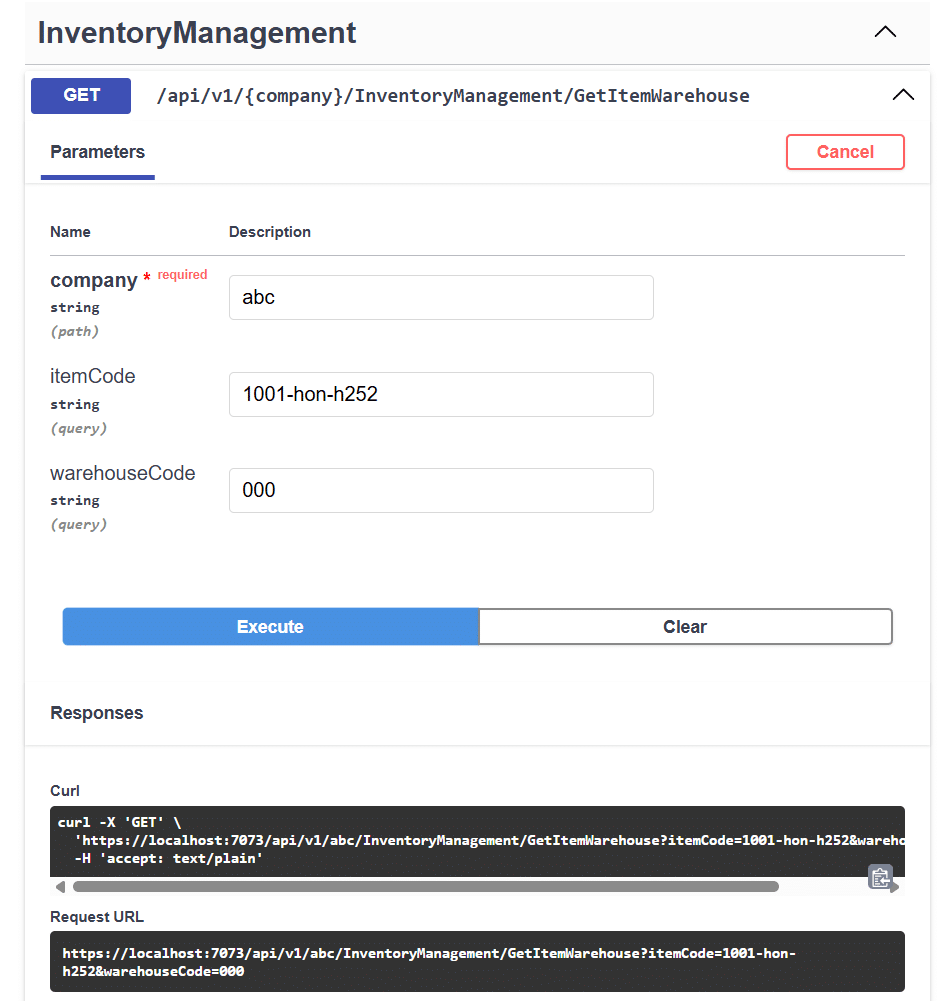
In the example above, the developer specifies the Sage 100 company, item code, and warehouse code. BCS Connect then provides the API request for retrieving the corresponding item warehouse information.
Production Management
Production Management includes GET access to work ticket information.
That gives outside applications a documented endpoint for retrieving supported production data from Sage 100.
Payroll Time Track
Payroll Time Track supports employee time track entries through:
- GET
- POST
- PUT
- DELETE
Applications can work with supported employee time records without building their own direct interface to the underlying Sage 100 business objects.
Return Merchandise Authorization
Return Merchandise Authorization endpoints cover RMAs and RMA detail lines.
Available methods include:
- GET
- POST
- PUT
- DELETE
Health and License Endpoints
BCS Connect also includes a health check endpoint for checking API operational health and a license endpoint used to refresh the cached license when modules or controllers change.
Together, these endpoints give developers a defined set of API operations they can build around instead of treating Sage 100 integration as an entirely custom project every time another application needs access.pends on what your system needs to read from or write to Sage 100.
For an introduction to the product, see our companion article on the features and benefits of BCS ProSoft Connect.
Will BCS ProSoft Connect Work for Your Sage 100 Integration?

That depends on the outside application, the Sage 100 modules involved, and the records that need to move between the two systems.
You may need an ecommerce platform to access current inventory. Your CRM may need customer information from Sage 100. A warehouse, manufacturing, time-tracking, or custom application may need a different combination of data and actions.
BCS ProSoft can review the specific connection you have in mind and determine whether the current BCS ProSoft Connect endpoints support it.
That conversation can cover questions such as:
- Which application needs to connect with Sage 100?
- Which Sage 100 modules are involved?
- What records need to be retrieved?
- Does the outside system need to create or update Sage 100 records?
- How often does the information need to move?
From there, BCS ProSoft can determine how BCS Connect fits the project and what additional integration work may be required.
Talk to BCS ProSoft About BCS ProSoft Connect
BCS ProSoft Connect gives Sage 100 customers and developers a new way to approach integrations that would otherwise require direct Sage-specific development.
Its current endpoints cover areas including vendors, customers, orders, purchase orders, inventory, work tickets, time entries, RMAs, item codes, and ZIP codes.
The next step is figuring out how those endpoints line up with the application and workflow you are trying to connect.
If you have a CRM, ecommerce platform, warehouse system, custom application, reporting tool, or other software that needs to exchange information with Sage 100, BCS ProSoft can review the requirements and determine where BCS Connect fits.
Talk to BCS ProSoft about your Sage 100 integration and BCS ProSoft Connect.
Key Takeaways
- BCS ProSoft Connect provides a RESTful API for Sage 100. External applications can access supported Sage 100 data and actions through documented API endpoints.
- Connect works through the Sage 100 Business Objects Interface. Developers can communicate with Connect using standard REST API calls while Connect handles the Sage-specific interaction.
- The API includes read and write capabilities across multiple Sage 100 modules. Current endpoints cover areas including AP, AR, sales orders, purchase orders, inventory, production, payroll time tracking, RMAs, Common Information, and Library Master.
- Available methods vary by endpoint. Some records are GET-only, while others support POST, PUT, and DELETE operations.
- Swagger UI documents the API. Developers can review endpoints, parameters, models, and request and response formats from the API documentation.
- The business workflow still determines the integration design. The right setup depends on the records involved, system ownership, required actions, frequency, and how the connected application will use the API.
Frequently Asked Questions
Does Sage 100 Have a Native REST API?
Sage 100 does not provide a native REST API. BCS ProSoft Connect provides a RESTful interface that works with the Sage 100 Business Objects Interface to give outside systems programmatic access to supported Sage 100 data and actions.
What Types of Sage 100 Data Can BCS ProSoft Connect Access?
BCS ProSoft Connect currently supports data across areas such as Accounts Payable, Accounts Receivable, Sales Orders, Purchase Orders, Inventory Management, Production Management, Payroll Time Track, and Return Merchandise Authorization.
Can BCS ProSoft Connect Create and Update Records in Sage 100?
Yes, for supported endpoints. Depending on the module, Connect can retrieve, create, update, or delete records using standard API methods such as GET, POST, PUT, and DELETE.
How Do I Know If BCS ProSoft Connect Will Work for My Integration?
The answer depends on the outside system, the Sage 100 modules involved, and the records or actions the integration requires. BCS ProSoft can review your use case and determine whether the current Connect endpoints support what you need.