
Architecture and engineering firms have a basic time-and-expense problem that software does not automatically solve: a large part of the workforce may spend very little time sitting in front of the computer where the firm’s business systems live.
Project managers move between client meetings and job sites. Engineers and inspectors may spend an entire day in the field. Receipts end up in trucks, wallets, inboxes, and camera rolls. Timesheets get reconstructed from calendars at the end of the week, while approvals wait for a PM to get back to a laptop.
Deltek Vantagepoint gives these employees two options to handle routine work from a phone or tablet. Mobile Time & Expense supports time entry, expense reports, receipt capture, and approvals, while Deltek CRM for Vantagepoint provides access to firms, contacts, activities, projects, and opportunities.
In this blog, we will cover the problems field teams run into, what the mobile Deltek Vantagepoint apps can and cannot do, the setup choices that affect day-to-day use, and a practical way to roll them out to employees.
The Field-Reality Problems Vantagepoint Mobile Has to Account For

There is a big difference between testing a mobile application in the office and relying on it during a normal day in AEC work.
For AEC firms, mobile applications have to account for several realities that can affect day-to-day use. Three issues deserve particular attention: connectivity, receipt capture, and approvals on the move.
Connectivity Can Be Unreliable
A&E work does not always happen in places with dependable cellular or Wi-Fi service.
Civil and infrastructure projects may be remote. Large buildings can have dead zones. Employees may spend the day moving between locations with very different levels of connectivity.
That creates a basic problem for any mobile workflow: employees need to be able to access the information they need when they need it.
If a field employee regularly loses service, even a short administrative task can get pushed aside. Time entry may be delayed until later in the day, and expense reporting may wait until the employee is back at home or in the office.
That delay is where firms often start to see incomplete entries, forgotten details, and end-of-week catch-up work.
Receipt Capture Is Easy to Put Off
Receipts are one of the most common weak points in field expense reporting.
An employee may leave a parking garage with a paper receipt, pay for lunch with a company card, or buy project materials on the way to a site. That receipt can end up in a wallet, truck console, email inbox, or camera roll before anyone enters the expense.
The longer the delay, the harder it becomes to remember the context around the purchase.
Employees may forget which project the expense belonged to, lose the receipt entirely, or wait until the end of the month to sort through a pile of transactions.
Accounting then has to spend time following up on missing documentation or unclear coding.
The issue is rarely the receipt itself. It is the gap between the purchase and the point when the employee actually records the expense.
Approvals Often Happen Between Everything Else
Project managers rarely have a dedicated block of time for timesheet and expense approvals.
Those tasks compete with client calls, site visits, internal meetings, project reviews, and travel. A PM may have several submissions waiting while they are away from their desk for most of the day.
That can create delays for payroll, billing, reimbursements, and accounting close processes.
The volume of approvals can also become a problem.
A PM responsible for several projects may receive time and expense submissions from multiple employees at once. Some items are straightforward, while others require more context before the PM can sign off.
When approval work piles up, it tends to get pushed to the end of the day or the end of the week. That creates another bottleneck between field activity and the financial records the firm needs to keep current.
These are the practical conditions any mobile workflow has to contend with. The next question is what Deltek Vantagepoint actually gives field employees and project managers to work with.
What Do the Deltek Vantagepoint Apps Cover?
Deltek’s mobile functionality spans two primary applications that matter for this discussion.
Mobile Time & Expense covers timesheets, expenses, receipt capture, and related approvals. Deltek CRM for Vantagepoint covers customer and business-development information such as firms, contacts, projects, activities, and opportunities.
For an A&E firm, different roles may use these capabilities for very different reasons.
| Area | What Employees Can Handle | Common Field User |
|---|---|---|
| Time | Enter and submit timesheets | Engineers, inspectors, field staff, PMs |
| Expenses | Enter expenses, code transactions, capture receipts | Employees traveling or working in the field |
| CRM | Access and update firms, contacts, projects, activities, and opportunities | Principals, PMs, business development |
| Approvals | Review time and expense submissions | PMs, supervisors, other designated approvers |
Mobile Time Entry
Time entry is one of the clearest use cases for Vantagepoint mobile.
Vantagepoint timesheets can include the project, phase, task, labor code, and labor category associated with an employee’s work. Deltek’s Mobile Time & Expense application synchronizes those entries with the Vantagepoint database.
For a field employee, the practical benefit is proximity to the work.
Someone leaving a site at 4:30 p.m. has a much better chance of remembering where eight hours went than someone rebuilding the week late Friday afternoon. Daily mobile entry can help firms collect labor information while project activity is still fresh.
The amount of effort required depends on the project’s structure. Vantagepoint can require phase and task information when those levels are used, and employees may also need to select labor information depending on the firm’s configuration.
That makes project setup an important part of the mobile experience, which we will come back to shortly.
Mobile Expense Entry and Receipt Capture
Mobile Time & Expense can also handle employee expense reports.
Employees can enter expense information, associate expenses with project structures, select applicable categories, and submit reports for approval. Vantagepoint can also work with firm-paid credit card charges when those features are configured.
Receipt capture is particularly relevant for employees who travel frequently. The employee can photograph a receipt from the mobile device, and ICR can populate matched fields when the feature is active.
For an A&E firm, that could apply to hotel bills during an out-of-town site visit, parking during a client meeting, mileage-related expenses, project supplies, meals, or other costs that need to reach accounting.
The strongest workflow is one employees can complete close to the purchase itself. The longer the gap between incurring an expense and coding it, the more opportunity there is for missing receipts, forgotten context, and accounting follow-up.
Contacts and CRM From the Field
The mobile story extends beyond accounting.
Deltek CRM for Vantagepoint allows users to view, add, and edit information for firms, contacts, activities, and opportunities. The mobile application also includes project information and business-card capture for creating contacts from a photo.
That gives principals, PMs, and business-development staff a different field use case.
A principal may leave a client lunch with a new contact. A PM may need client information while traveling to a meeting. A business-development employee may want to record an activity or add a contact after an industry event.
Those interactions are easier to record when the information is still current.
Time and Expense Approvals
Mobile approval matters because the people responsible for reviewing time and expenses are often the same people with demanding project schedules.
Deltek’s Mobile Time & Expense documentation includes time approvals and expense approvals for users with the appropriate role and access. Approvers can review timesheets, while expense approvals provide access to report summaries, line details, receipts, amounts, and other relevant information.
For the firm, this can keep routine review work moving when a PM is traveling or spending the day outside the office.
The approval chain itself remains a Vantagepoint configuration decision. Mobile access gives the approver a place to act on the request, so firms should still evaluate how many approvals are required and which employee is responsible for each one.
What Deltek Vantagepoint App Does Not Do

Vantagepoint’s mobile applications focus on specific types of work that make sense on a phone or tablet.
They do not reproduce every capability available in the primary Vantagepoint environment.
The current Mobile Time & Expense documentation centers on timesheets, absence requests, expenses, receipt capture, credit card expenses, and related approvals. Mobile CRM centers on firms, contacts, projects, activities, opportunities, and related CRM records.
A firm should still expect the main Vantagepoint environment to handle work such as detailed financial management, broad project accounting administration, reporting, system setup, security administration, workflow configuration, and other back-office responsibilities.
There is also a useful distinction in the way Deltek packages mobile functionality. Time and expense work and CRM work are separate mobile experiences. A field engineer primarily concerned with timesheets and receipts has a different use case from a principal who wants client and opportunity information.
That distinction can help firms set reasonable expectations for rollout.
The practical question is: Which tasks does this employee need to complete from the field?
Once the answer is clear, the firm can determine which mobile capabilities actually belong in that employee’s routine.
The Configuration Decisions That Determine Whether Mobile Adoption Sticks
Installing Vantagepoint on a phone is a small part of mobile adoption.
The bigger test comes when an employee opens it at the end of a long day and tries to record eight hours, or when a PM has five minutes between meetings to clear an approval queue.
Field adoption has been a persistent issue across construction and A&E technology. A Dodge Data & Analytics study found that worker acceptance and integration with existing systems were among the leading barriers to adopting new field technology.
For the Deltek Vantagepoint app to gain lasting adoption in the field, configuration needs to remove friction at the places where users are most likely to stop: authentication, project selection, required fields, expense coding, searches, and approvals.
Field staff are already accustomed to other ways of keeping track of this information. Some use calendars, notes, spreadsheets, emails, paper, or memory. Mobile Vantagepoint needs to make the required company process practical enough that employees choose it during the workday rather than saving the administrative work for later.
Here’s our reccomentations for ease of adoption and use:
1. Make Authentication Practical for Daily Use
The first adoption decision occurs before an employee reaches a timesheet.
Vantagepoint supports multi-factor authentication, and Deltek’s Mobile Time & Expense documentation describes 2FA login, verification codes, PIN use, and supported biometric options depending on the firm’s configuration.
Security requirements are necessary, particularly for a system containing financial, employee, project, and client information. The field experience still deserves attention when those requirements are configured.
Consider how employees will authenticate on company-issued and personal devices, what happens when a password expires, and how field staff get help if they lose access while away from the office.
A useful test is to give a new pilot user the same instructions a future employee will receive and see how easily that person gets into the application without administrator intervention.
Every login issue that becomes a support ticket creates another reason for someone to postpone entering time or expenses.
2. Reduce the Number of Choices During Time Entry
Time entry becomes cumbersome when employees have to interpret the firm’s accounting structure every time they record a few hours.
Vantagepoint can associate time with projects, phases, tasks, labor codes, and labor categories. If a project uses phases and tasks, those selections become part of the transaction structure, and Vantagepoint provides project/phase/task lookup tools to help users find the applicable record.
That structure may be completely appropriate for project accounting. Field employees still need to understand the choices presented to them.
Project names should be recognizable. Phase and task structures should follow patterns employees can learn. Old or irrelevant records should not dominate the search experience.
The practical test is whether an employee who performed the work can identify where those hours belong without calling accounting or sending a message to the PM.
If time coding routinely requires outside help, the mobile workflow is asking too much of the user.
3. Keep Required Information Grounded in What Field Employees Know
Required fields often look harmless during configuration because each field has a valid business reason behind it.
The cumulative effect can feel very different from a phone.
Expense reporting provides a good example. Depending on configuration, a transaction may involve a project, phase, task, account, category, description, date, amount, billing treatment, and supporting documentation.
Each requirement should earn its place in the field workflow.
Ask whether the employee knows the information at the moment of entry, whether the information already exists elsewhere in Vantagepoint, and how frequently incomplete knowledge will cause someone to abandon the transaction.
Some data will remain necessary for accounting, billing, compliance, or project reporting. The configuration review should identify where those requirements create field friction and decide how the firm wants employees to handle them.
4. Configure Expense Entry Around What People Actually Buy
An expense-category list should make sense to the person holding the receipt.
For field-oriented A&E employees, common purchases may include mileage, parking, tolls, lodging, meals, airfare, materials, project supplies, and client-related costs.
Vantagepoint supports predefined expense categories and lets firms associate project, phase, task, and account information with expense items. It also gives firms options for how project, phase, and task information appears on expense reports, including whether users see the name, number, or both.
Those details matter on a phone.
A project number that accounting recognizes instantly may mean very little to an engineer in the field. Showing a useful project name can make selection easier. Expense categories with similar names can create hesitation when employees do not understand the accounting difference between them.
Receipt capture works best when the rest of the entry can be completed with information the employee already has.
5. Keep Project and Record Searches Manageable
Search friction grows quickly on a small screen.
Vantagepoint’s project lookup can present project, phase, and task information, and the expense-report settings allow firms to control how those values are displayed.
That makes naming conventions more important than they may initially appear.
If active projects have clear names and employees have access to the records relevant to their work, finding the correct charge can be quick. If an employee searches a common client name and gets a long list of similar projects, phases, and older records, every entry takes more thought.
The same principle applies to Mobile CRM. Contact, firm, project, activity, and opportunity information becomes more useful in the field when records are current and recognizable.
Data hygiene therefore affects mobile usability directly.
6. Build Approval Workflows Around Decisions a PM Can Make on the Move
Mobile approval works best when the PM can understand the submission and make the decision from the information shown.
Deltek allows authorized users to review time and expense submissions through Mobile Time & Expense, including expense detail and receipt information.
The configuration question is how much review the firm expects from that person.
If every employee’s time passes through multiple approvers, or every small expense requires project-level scrutiny, a PM may accumulate a large queue. Mobile access can make the queue more accessible, though the review burden remains.
Look at who receives each approval, what information they need, how exceptions are handled, and who covers the work when an approver is unavailable.
The goal is a workflow in which the person receiving the request has both the authority and context needed to act.
7. Match the Mobile Workflow to the Employee’s Role
A firm does not need to define mobile adoption the same way for every employee.
A field engineer may spend nearly all of their mobile Vantagepoint time entering hours and capturing expenses. A project manager may use the same functions while also handling approvals. A principal or business-development employee may get more value from contacts, firms, activities, and opportunities through Mobile CRM.
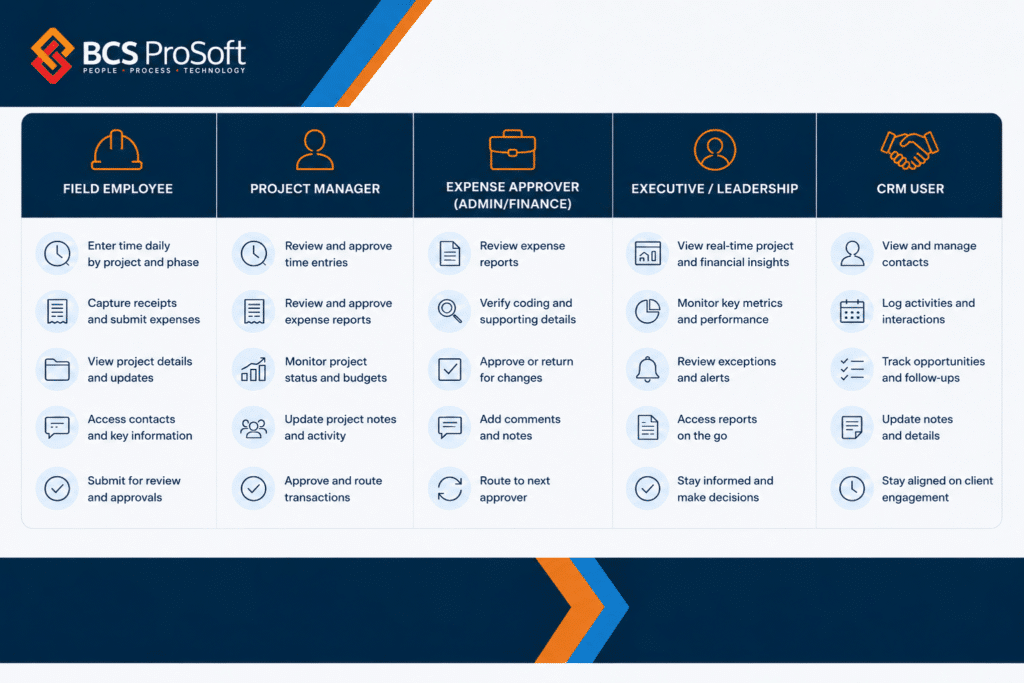
Start with the job the employee needs to perform, then configure and train around that workflow.
That approach gives people a smaller set of relevant actions to learn and makes the value of mobile use easier to understand.
8. Test Whether Mobile Is Actually Faster for Routine Field Work
This is the final configuration test, and it should happen before a broad rollout.
Choose several transactions that represent a normal field week and ask pilot users to complete them from their phones.
Can someone enter today’s eight hours against the right project without searching for instructions? Can they photograph a parking receipt and finish the expense while the purchase is still fresh? Can a PM open a submitted timesheet, understand it, and approve it between meetings?
Watch for hesitation.
If users repeatedly ask which project to select, the naming or access model may need attention. If they stop at the same required field, revisit why that information is being requested. If expense reports remain unfinished after receipts are captured, examine what comes after the photo.
Field adoption becomes much more likely when the mobile workflow is the quickest practical way to complete the task the firm already requires.
A Short Rollout Sequence for Getting a Field Team Onto Vantagepoint Mobile
A successful mobile rollout usually starts with a controlled test of the firm’s actual Vantagepoint setup. This is also where working with a Deltek partner like BCS ProSoft can help. The goal is to review how the mobile workflow behaves in real field conditions, identify configuration issues early, and make adjustments before expanding access across the firm.
A typical rollout can follow five steps:
Step 1: Pick a Representative Field Group
Choose a small group that reflects the employees who will eventually use Vantagepoint mobile. That might include several field employees, a project manager, and someone who regularly submits expenses.
The pilot group should use the system often enough to expose the practical issues that may affect broader adoption.
Step 2: Review Their Real Projects and Transactions
Use the projects the pilot group is already working on.
Review project and phase names, time-entry requirements, expense categories, required fields, access rights, authentication, and approval paths.
This is one area where an experienced Vantagepoint partner can add value. BCS ProSoft can help review the configuration from the field user’s perspective and identify settings that may create unnecessary friction on mobile.
Step 3: Have Them Use Mobile During a Normal Workweek
Ask the pilot group to use Vantagepoint mobile for the same work they would normally handle during the week.
That may include entering time, capturing receipts, submitting expenses, completing approvals, and using CRM functions when those are part of the intended workflow.
Real use tends to surface issues that are easy to miss during a controlled demonstration.
Step 4: Track Where Users Get Stuck
Pay attention to the questions employees ask.
“Which project should I choose?”
“Which expense category applies?”
“Why is this field required?”
“Why can’t I log in?”
“Who needs to approve this?”
Those questions are useful feedback. They can point to configuration issues, unclear internal policies, or areas where employees need better guidance.
A partner can help separate a training problem from a Vantagepoint setup problem, which matters before the firm rolls the same workflow out to dozens of additional users.
Step 5: Refine the Setup and Expand the Rollout
Use what the pilot group learned to make any needed changes to project access, coding, expense requirements, authentication, permissions, or approval workflows.
From there, define clear expectations for how employees should use mobile Vantagepoint. That may include entering time daily, capturing receipts when expenses occur, submitting expense reports weekly, and completing approvals by a specific cutoff.
Once the workflow works well for the pilot group, the firm can introduce it to additional teams with a tested configuration and a clearer training process.
Getting Deltek Vantagepoint Mobile to Work in the Field

Deltek Vantagepoint gives A&E firms a practical set of mobile options for work that regularly happens away from a desk. Time can be recorded closer to when the work occurs, receipts can be captured before they disappear, PMs can act on approvals while traveling, and client-facing employees can access CRM information from their phones.
The configuration behind those capabilities determines how well they fit into a normal field day.
For firms using Vantagepoint, mobile adoption is a useful reason to review authentication, project structures, time-entry requirements, expenses, permissions, and approvals from the employee’s point of view. A field team that can open the app, understand its choices, and finish routine tasks quickly has a much stronger reason to keep using it after the rollout is over.
BCS ProSoft works with A&E firms on Deltek Vantagepoint configuration, implementation, and business processes. If your field teams are still relying on delayed time entry, saved receipts, or desktop-only workflows, reviewing the Vantagepoint setup behind those processes is a practical place to start.
Key Takeaways
- Deltek Vantagepoint’s mobile capabilities cover time, expenses, receipt capture, approvals, contacts, firms, projects, activities, and opportunities across Mobile Time & Expense and Mobile CRM.
- Field conditions matter. Firms should test connectivity, receipt workflows, and approvals where employees actually perform the work.
- Mobile receipt capture can reduce lost-document problems, while the surrounding expense requirements still determine how quickly an employee can complete the report.
- Authentication, project structure, required fields, expense categories, record naming, access rights, and approval design all influence field adoption.
- A small pilot can reveal where employees hesitate before those same problems are introduced to the entire firm.
- The best sign of adoption is routine use during the workday, with fewer late timesheets, unfinished expenses, missing receipts, and approval delays.
Does Deltek Vantagepoint have a mobile app?
Yes. Deltek provides Mobile Time & Expense for timesheets, expenses, receipt capture, and approvals, along with Deltek CRM for Vantagepoint for mobile access to firms, contacts, projects, activities, and opportunities.
Can employees enter Deltek Vantagepoint timesheets from their phones?
Yes. Mobile Time & Expense supports Vantagepoint timesheet activity from a phone or tablet, with mobile work synchronized with the Vantagepoint database.
Can employees submit expenses and receipts through Vantagepoint mobile?
Yes. Employees can create and manage expense reports through Mobile Time & Expense, and the Capture Receipt feature allows them to photograph or select receipt images. ICR can analyze captured images and populate matched expense fields when that feature is enabled.
Can project managers approve timesheets from their phones?
Yes. Users with the appropriate role and access can review pending employee timesheets through Mobile Time & Expense.
Can you use Deltek Vantagepoint CRM from a phone?
Yes. Deltek CRM for Vantagepoint allows mobile users to work with firms, contacts, activities, projects, and opportunities. It also includes business-card capture for creating contacts from an image.