
If you are looking for Replicon pricing, you probably want a straightforward answer to a straightforward question: What is Replicon going to cost us?
However, there is a reason a useful answer starts with your requirements.
Replicon pricing is shaped by the number and types of users, pay rules, approval workflows, project and job-costing requirements, integrations, and workforce requirements such as multi-state or union rules.
Those variables can create very different scopes for companies that look similar on paper. In this blog, we will take a look at what drives Replicon pricing, why headcount alone does not tell the full story, which configuration decisions can add complexity, and what your team should have ready before requesting a quote.
What Actually Drives a Replicon Quote?

Employee count is an obvious place to start, although it tells only part of the story.
Replicon can support time capture, project costing, workforce requirements, payroll processes, approvals, reporting, and connections with other business systems. BCS ProSoft’s overview of Replicon features covers many of those capabilities in more detail.
The scope starts to become clearer when you look at how your company plans to use those capabilities. Here are the major quote drivers we look at when discussing Replicon with a prospective client:
User Count and User Types
The number of people using Replicon matters, but start by asking who those people are.
Your Replicon population might include:
- Salaried employees
- Hourly employees
- Contractors
- Supervisors
- Project managers
- Payroll staff
- Finance staff
- System administrators
These users may interact with the system in different ways.
A field employee might need a very direct method for recording hours against an assignment. A project manager may need to review time across several projects. Payroll may need approved hours categorized according to earning codes. Finance may need labor costs attached to the correct project, department, or other reporting category.
So when someone tells us, “We have 800 employees,” there are several follow-up questions before that number tells us much about the actual setup.
Who enters time? Who reviews it? Who approves it? Who needs the data afterward?
Pay-Rule Complexity
This is one of the most important Replicon pricing variables to understand early.
Consider how many rules your payroll team applies to employee time today:
- Regular time
- Overtime
- Double time
- Shift differentials
- Weekend premiums
- Holiday pay
- Break requirements
- PTO
- Different employee classifications
- Union rules
- Location-specific policies
For some organizations, those rules are already documented clearly.
For others, the real rule book lives partly in payroll software, partly in spreadsheets, partly in company policy, and partly in the heads of the payroll people who know that “this group gets handled differently.”
A rule that has never been clearly documented still has to be understood before it can be configured correctly.
SHRM’s guidance on overtime management discusses the administrative and compliance considerations that come with overtime policies, recordkeeping, different employee classifications, and varying workforce requirements. For organizations with several employee populations, accurate timekeeping becomes closely tied to the way those policies are administered. SHRM’s Smart Strategies for Overtime Management provides additional context around those issues.
Replicon can support structured time and payroll workflows, including connections between approved time and downstream payroll systems. BCS ProSoft covers that process in more detail in our guide to Replicon payroll time tracking.
The important pricing question is therefore more specific than “How many employees do you have?”
It is: How many rules does Replicon need to apply to those employees’ time?
Approval Flows
Approval requirements can look deceptively simple during a software discussion. A company may start with a basic employee-to-manager-to-payroll workflow, only to find that the real process includes project-manager review, different payroll approvers by department, delegated approvals, post-cutoff corrections, and second-level approval for certain projects.
That added variation matters because Replicon needs to know which approval path applies to each employee, project, or exception. The implementation team also has to account for what happens when someone is unavailable, a timesheet is rejected, or a correction is made after approval.
A useful scoping exercise is to document the approval routes your company actually uses, including the exceptions. That gives the implementation team a more accurate picture of the workflow that needs to be configured.
Projects and Job Costing
Project requirements can have a major effect on the Replicon scope.
Some companies simply need to know how many hours someone worked. Project-based organizations often need considerably more information attached to those hours.
An employee may need to record time against:
- Client
- Project
- Project phase
- Task
- Labor category
- Cost center
- Billable or non-billable status
- Work type
- Cost rate
- Billing category
Replicon supports project time, costing, billing, and related project structures.
The scoping question becomes: What information does finance or operations need each time an employee records an hour?
That answer affects time-entry design, project setup, reporting, integrations, and the amount of information employees must choose from while completing their timesheets.
There is a balance here.
Too little detail can leave finance without the job-cost information it needs. Too much detail can create cumbersome timesheets that employees struggle to complete correctly.
That balance should be worked through during the design stage.
Payroll, ERP, and Other Integrations
Time rarely ends its life inside the time-tracking system.
Approved time may need to go to payroll. Project hours may need to feed an ERP or accounting system. Employee records may originate in an HR platform. Project information may come from another operational system.
Replicon supports connections with payroll, ERP, accounting, HR, and project systems.
Every integration brings a set of decisions with it.
For example:
- Which application creates the employee record?
- Which application owns project information?
- Where are pay rules maintained?
- Which system contains the official cost code?
- What information moves into Replicon?
- What information moves out?
- How frequently should it move?
- What happens when a record cannot be matched?
- Who is responsible for fixing an exception?
These are implementation questions, but they are also pricing questions because they determine what integration work needs to be scoped.
Multi-State and Union Requirements
Workforce complexity can increase quickly when employees operate under different sets of rules.
A company may have employees working in several states, employee groups covered by collective bargaining agreements, multiple shifts, different classifications, or local requirements that affect how time is handled.
Those populations may need different:
- Pay rules
- Premium rules
- Time-entry requirements
- Approval workflows
- Employee classifications
- Payroll mappings
- Reporting structures
The important part during Replicon scoping is identifying those differences early enough to account for them in the design.
What Are You Actually Paying for in a Replicon Project?
When reviewing Replicon pricing, separate the software from the work required to configure and connect the system.
The exact commercial structure of your quote should be confirmed with your Replicon provider, but buyers commonly need to clarify several categories during the scoping conversation.
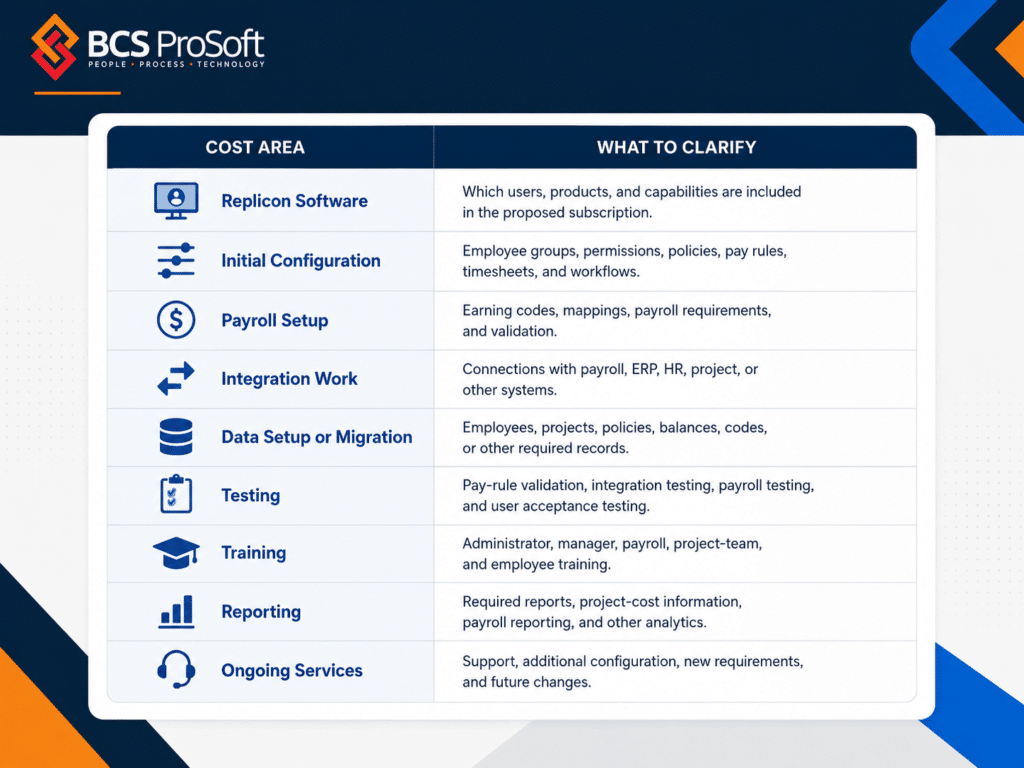
This matters because software pricing and implementation scope answer two different questions.
The software discussion establishes what Replicon capabilities and access your organization needs. The services discussion establishes what has to be configured, connected, tested, and taught before your team can rely on the system.
BCS ProSoft approaches that conversation by starting with the operating workflow.
We want to understand who enters time, how those hours should be treated, who approves them, what project information needs to be captured, where approved data goes, and what finance and operations need to report on afterward.
Those answers give us the information needed to build a more useful Replicon scope.
Why Can Two Companies With the Same Headcount Get Different Replicon Quotes?
Imagine two companies with 500 employees.
Company A has mostly salaried employees. Everyone follows the same weekly timesheet process. Employees submit time to their manager, managers approve it, and approved hours move to one payroll system. Project tracking is relatively basic.
Company B also has 500 employees.
Its workforce includes salaried and hourly employees across several states. Some employees belong to unions. The company runs several shifts, uses multiple overtime and premium rules, tracks labor against projects and tasks, has project-manager and department-level approvals, and sends time data into both payroll and an ERP.
The employee counts match.
The configurations do not.
Company B has more rules to define, more workflows to configure, more data relationships to map, and more scenarios to test before payroll and finance can rely on the results.
This is why employee count should be viewed as one pricing input rather than the pricing formula.
It also explains why asking another company, “What did you pay for Replicon?” may not give you a particularly useful benchmark.
Their workforce may have very little in common with yours.
The BCS ProSoft 4R Replicon Readiness Framework

Before getting deep into a Replicon quote, we recommend looking at four areas of the business.
We call these Rules, Routes, Records, and Reporting.
Together, they provide a practical way to identify where your Replicon scope is likely to be straightforward and where more discussion is needed.
1. Rules
Start with the rules governing employee time.
Ask:
- How is regular time defined?
- Which employees receive overtime?
- Are there different overtime rules among employee groups?
- Are shift premiums or differentials used?
- How are holidays handled?
- How does PTO affect time records?
- Are union rules involved?
- Do different locations or employee populations follow different policies?
You are trying to document the logic payroll already applies today.
If payroll regularly has to explain, correct, recalculate, or manually interpret a time record, that workflow deserves attention during Replicon scoping.
2. Routes
Next, map where a timesheet goes after the employee submits it.
- Who reviews it?
- Who can reject it?
- Does a project manager need to approve project hours?
- Does payroll perform another review?
- What happens if someone’s manager is unavailable?
- What happens when a timesheet is changed after approval?
- What happens when payroll cutoff arrives and approval is still missing?
Real approval processes often contain branches that never appear in the official process diagram.
Finding those branches before configuration helps establish what the workflow actually needs to handle.
3. Records
Now look at the systems and data involved.
Replicon may need information about:
- Employees
- Projects
- Clients
- Tasks
- Cost codes
- Labor categories
- Payroll codes
- Departments
- Locations
- Other organizational structures
Identify where each record originates and which application is responsible for maintaining it.
For example, if the ERP owns the project record, Replicon should not be treated casually as another independent source for that same project information.
Clear record ownership gives the integration team a much cleaner starting point.
For readers earlier in the buying process, our guide to what Replicon is and how it works gives a broader look at how the platform fits into project-based organizations.
4. Reporting
Finally, decide what each team needs to learn from the time data. Payroll may need hours by earning code, project managers may need actual hours against budget, finance may need labor cost by project, operations may want overtime by location or department, and leadership may need utilization or other workforce metrics.
Those reporting requirements should be defined early because they influence how projects, employee groups, time codes, and other records are configured in Replicon.
The 4R exercise gives you a useful test before requesting pricing: Can your team explain its Rules, Routes, Records, and Reporting requirements well enough for someone else to configure them? You do not need every detail finalized, but you should know where the complexity sits.
What Should You Have Ready Before Requesting Replicon Pricing?
You do not need to write a complete implementation specification before talking to BCS ProSoft.
You will get more from the conversation if you have basic information available about your workforce and current time process.
Before requesting a Replicon quote, gather what you can about:
- Total employee and contractor count
- Major employee groups
- Salaried and hourly populations
- Locations where employees work
- Union employee groups
- Payroll schedules
- Overtime rules
- Shift or premium rules
- PTO and leave treatment
- Current timesheet process
- Current approval paths
- Project and job-cost requirements
- Payroll software
- ERP or accounting software
- HR platform
- Other applications that use time data
- Reports required by payroll, finance, operations, and project managers
- Frequent corrections or exceptions
- Manual spreadsheets involved in the process
- Areas where payroll spends the most time fixing time data
Pay particular attention to the last few items.
The parts of your current process that require the most human intervention often point directly to requirements that deserve more attention in a Replicon implementation.
You may also find that some issues have little to do with the time-entry screen itself.
The underlying problem could be an undefined payroll rule, a project hierarchy that does not support job costing, inconsistent employee information, or an approval process that has grown more complicated over time.
Those are useful things to know before the quote is built.
Conclusion: Assess Your Replicon Readiness Before You Scope the Project

If your time-tracking process is already causing payroll corrections, project-cost questions, missing timesheets, manual reconciliations, or reporting problems, collecting more software pricing without documenting those requirements will only get you so far.
A better Replicon pricing conversation starts with your workforce, rules, workflows, projects, connected systems, and reporting requirements.
BCS ProSoft’s Replicon Time Tracking Readiness Assessment + ROI Calculator is designed for companies at this stage.
The assessment helps you look at your current time-tracking process, identify where the important requirements sit, and examine the operational cost of the process you are using today.
From there, you can have a much more specific conversation about what your Replicon environment needs to support.
Frequently Asked Questions
How is Replicon pricing determined?
Replicon pricing can be influenced by factors including the size and makeup of your user population, the Replicon capabilities required, pay-rule complexity, approval workflows, project requirements, integrations, and implementation services.
A useful quote therefore requires some understanding of how your organization plans to use Replicon.
Does employee count determine Replicon pricing?
Employee count is one factor, but companies with the same number of employees can have very different requirements.
An organization with one employee type, straightforward approvals, and basic time capture has a different scope from an organization managing several pay policies, unions, project costing, multiple approval paths, and connected business systems.
What makes a Replicon implementation more complex?
Complexity commonly increases with additional pay rules, employee populations, approval workflows, project and job-costing requirements, integrations, multi-state requirements, union rules, and reporting needs.
The quality of the existing process documentation also matters. A company with clearly documented rules gives the implementation team a much firmer starting point than one relying heavily on informal payroll knowledge and manual exceptions.
What Replicon costs should we ask about beyond licensing?
Ask what services are included in the proposed scope for configuration, integrations, data setup or migration, testing, training, reporting, and ongoing support.
You should also clarify any responsibilities that remain with your internal team so everyone understands what is covered before the project begins.
What information should we prepare before requesting Replicon pricing?
Start with your employee count and employee groups, payroll policies, approval structure, project requirements, payroll and ERP systems, required integrations, and reporting needs.
Document the parts of your current time process that regularly require corrections, spreadsheets, emails, or manual intervention as well. Those areas often expose requirements that matter during scoping.
Can Replicon connect with payroll and ERP systems?
Replicon supports integration with payroll, accounting, ERP, HR, and other business applications so time information can be shared with downstream systems.
The specific integration design depends on the applications involved, which records each application owns, and what data needs to move between them.