
The hard part about the Sage Intacct Marketplace is deciding which apps actually belong in your stack.
Most companies start looking because a process has become harder to manage. The issue may involve approvals, expense reporting, payroll allocation, sales handoffs, or operational data that is not reaching accounting cleanly.
An add-on can solve a real gap. It can also create more records to manage, more support responsibility, and more work at month-end.
The key is giving each system a clear role and making sure the connection into Sage Intacct gives finance the detail it needs.
This guide will help you figure out when an integration makes sense, which categories deserve a closer look, how to sequence new apps, and what the operational cost can look like after launch.
What Is the Sage Intacct Marketplace?

The Sage Intacct Marketplace is a directory of applications that work with Sage Intacct.
It includes software for accounts payable, accounts receivable, expense management, payroll, CRM, planning, tax, payments, reporting, project management, ecommerce, and a wide range of industry workflows. Sage uses the marketplace to help customers find products that extend Intacct into other parts of the business.
That makes it useful for research, especially when you already know the kind of process you want help with.
The marketplace listing itself only tells you part of the story. You still need to understand what the app owns, what information it sends into Intacct, and how much work remains with finance after the connection is live.
This matters because two products can both say they integrate with Sage Intacct and still behave very differently.
One may send a summarized journal entry. Another may create native bills, invoices, payments, or customers with line-level dimensions and attachments.
If you are still getting familiar with the platform itself, BCS ProSoft’s Sage Intacct overview is a useful place to see how the core financial system is structured before you start adding applications around it.
Once you understand what the marketplace is for, the more useful question is whether your current process really needs an outside app.
How Do You Know When You Need a Sage Intacct Marketplace Integration?
A good integration usually solves a clear handoff between Sage Intacct and another part of the business.
Maybe employees are submitting expenses in one system while finance re-enters them in another. Maybe sales is managing customer and contract data in a CRM, then accounting has to recreate the same information for billing. Maybe a field or industry platform is producing project data that never reaches finance in a dependable format.
Those are good signals that an integration deserves a closer look.
It is also worth asking why the process feels difficult in the first place.
Sometimes the issue comes from the current Intacct configuration. Approval rules may be incomplete. Dimensions may be used inconsistently. A module may be available but underused. Reporting may have been set up for an earlier version of the business.
This is one of the most important distinctions in the article.
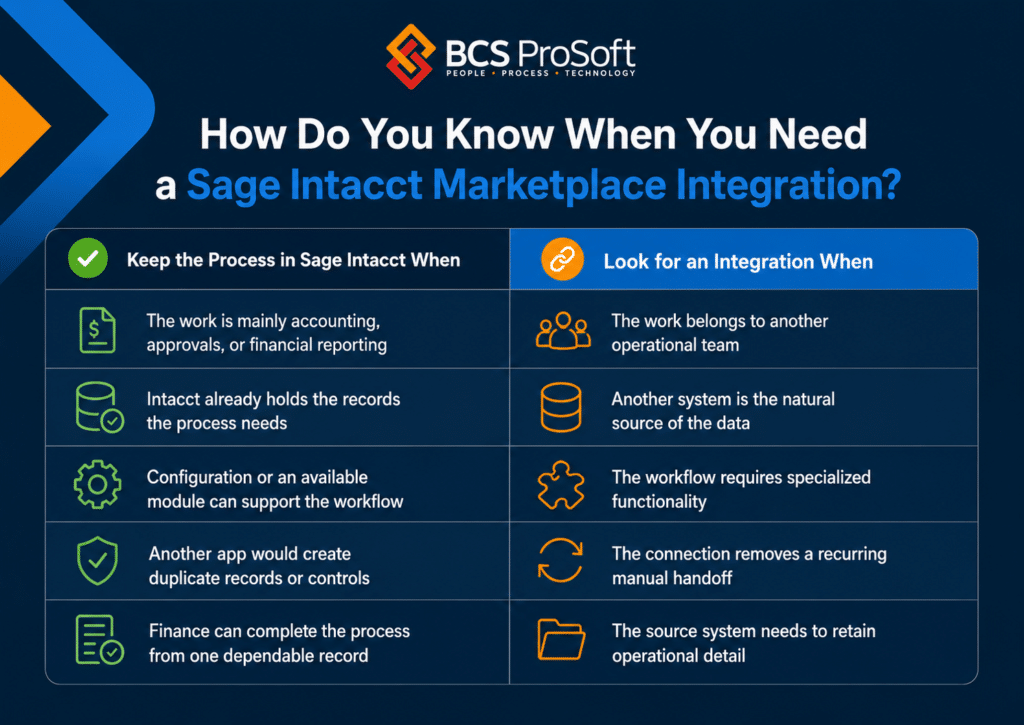
A useful test is to look at where the process begins.
If finance creates and controls the record, there is a good chance the answer belongs inside Intacct. If sales, operations, HR, field teams, donors, tenants, patients, or another group owns the work, a connected application may have a clearer role.
Once that need is established, you can narrow the marketplace down to the categories that matter most.
What Are the Most Common Sage Intacct Marketplace Integrations?
Most companies do not need to compare hundreds of apps. Their search usually falls into a handful of common categories:
AP Automation
Accounts payable is one of the first areas companies look at when invoice volume starts creating more work for finance.
You may have invoices arriving through several inboxes, approvals that depend on follow-up emails, or staff spending too much time entering coding from PDF invoices.
An AP platform may take over invoice capture, coding, approval routing, purchase-order matching, vendor communication, and payment workflows.
The part finance should study carefully is what happens after the invoice is approved.
Does the app create a native bill in Sage Intacct? Does it pass the vendor, account, date, due date, line items, dimensions, and supporting document?
That detail can have a real impact at month-end. A summary posting may give you the right balance while leaving the invoice-level research in another system.
For a closer look at the native and connected options, see BCS ProSoft’s guide to Sage Intacct AP automation.
Companies considering a dedicated AP workflow can also review Beanworks as one option in this category.
Expense Management
Expense apps are usually about what happens before the accounting entry is created.
They can make it easier for employees to submit receipts, manage corporate cards, follow travel rules, request reimbursement, and code expenses to the right department or project.
The accounting question is how much detail reaches Intacct.
Finance may need the employee, merchant, account, department, location, project, transaction date, and receipt. A lighter connection may send only a summarized amount.
Think about how the expense will be researched later. Someone should be able to move from the Intacct entry back to the supporting transaction without digging through several systems.
Payroll and HCM
Payroll and HCM systems often have a clear role because they manage employee processes that sit outside the general ledger.
They may handle payroll calculations, taxes, benefits, recruiting, onboarding, timekeeping, and leave.
Sage Intacct receives the financial impact.
The important question is how detailed that posting needs to be.
A smaller company may be comfortable with a summarized payroll journal. A project-based firm may need labor allocated across projects and departments. A nonprofit may need payroll divided across programs, grants, and locations.
That requirement should be documented before you compare products.
It is also worth asking how the integration handles corrections. Payroll rarely stays perfectly static, so voids, employee changes, and liability adjustments tell you a lot about how the connection behaves in day-to-day accounting.
CRM
CRM integrations connect the sales process with finance.
The CRM may own leads, opportunities, quotes, renewals, and sales activity. Intacct may hold the customer’s financial record, invoices, payments, projects, and revenue data.
The handoff sounds simple until both systems can create or update the same customer information.
That is where the integration design starts to matter.
Your team should agree on which system owns the customer name, billing address, payment terms, contract information, product data, project records, and invoice status.
A useful product demo should follow a customer all the way from opportunity to billing and payment. That walkthrough can reveal duplicate work long before the integration is turned on.
Planning and Reporting
Planning and reporting apps can help with budgeting, forecasting, scenario modeling, and management analysis.
This is one category where it pays to review the current Intacct setup carefully.
Sage Intacct already supports dimensional reporting, dashboards, and financial reporting. BCS ProSoft’s current Sage Intacct page also highlights reporting, multi-entity management, AP, AR, and related core finance capabilities.
A separate planning tool may make sense when the company needs detailed forecasting across several entities, broader operational data, department-level budget participation, or more advanced scenario work.
The key question is whether the company has a planning need or a data-quality problem.
A new reporting layer will still depend on the source data being correct.
These categories cover many of the common marketplace searches. Some businesses need something much more specific to the way they operate.
When Do You Need a More Specialized Sage Intacct Integration?

Industry-specific systems usually have a clear operational purpose.
A construction company may need a field and project platform. A property company may need lease management. A healthcare organization may need service or billing software. A nonprofit may need a fundraising system. A subscription business may need a dedicated billing platform.
These applications are often the place where the day-to-day operational work happens.
Sage Intacct then needs the financial result.
The challenge is deciding what detail should move with it.
A construction integration may need to send the project, task, vendor, cost code, commitment, date, amount, and source document.
A fundraising platform may need to send the donor, program, campaign, restriction, date, and gift amount.
A summarized journal may be accurate from a general ledger perspective. Finance may still need transaction-level detail for billing, grant reporting, audits, or project analysis.
This is where the integration should be designed around the accounting question that comes later.
Ask what someone will need to know when they review the transaction during close, an audit, a billing dispute, or a management meeting.
That answer will tell you how much information Intacct needs to receive.
Once you know which apps are worth adding, the next question is timing.
In What Order Should You Add Sage Intacct Integrations?
The order matters because every connected app depends on the structures already inside Intacct.
A connection cannot map departments reliably if the department hierarchy is still being rebuilt. A project integration will struggle if project and task rules are still changing. A billing app will have trouble sending clean data if customer ownership has not been settled.
A practical sequence looks like this:
| Stage | Typical priority |
|---|---|
| Core financial setup | Chart of accounts, entities, dimensions, approvals, roles, reports, and data ownership |
| Early integrations | AP, expenses, payroll, banking, and payments |
| Operational integrations | CRM, industry platforms, project systems, and billing applications |
| Later additions | Planning, analytics, commissions, close management, and secondary tools |
The exact order depends on the company.
A construction business may need its project system much earlier. A software company may need subscription billing in the first phase. A professional services firm may need CRM and project systems closely tied to the initial rollout.
The broader point is that every new integration needs a stable accounting foundation.
Adding several apps at once can also make testing much harder. When something posts incorrectly, the team needs to know which mapping, workflow, or source system caused the problem.
A phased approach gives finance time to understand the behavior of each connection before another one is introduced.
That is also why implementation planning matters so much. BCS ProSoft’s Sage Intacct implementation services page explains how implementation planning includes process, reporting, and integration requirements rather than treating the software setup as a separate exercise.
The next part of the decision is less visible during a demo and often more important after go-live: what the app costs your team to operate.
How Much Will Another Sage Intacct App Cost You Operationally?
Software pricing gives you one part of the cost.
The rest shows up in the work required to keep the connection dependable. That work usually falls into four areas:
Reconciliation
Every connected system creates another set of records that may need to agree with Intacct.
Finance may have to compare approved invoices with posted bills, payroll registers with journal entries, CRM contracts with invoices, or project transactions with the financial ledger.
This creates what I would call the reconciliation surface of the stack.
The more records, statuses, batches, and handoffs you have across systems, the more places finance may need to check before closing the books.
Research on cross-system reconciliation makes the same broader point. A recent paper on governed reconciliation architectures describes how ERP, billing, supply chain, and reporting systems can create unmatched transactions and manual audit work when data moves poorly across systems.
The practical question is simple: What will someone have to compare at month-end once this app is live?
Support Boundaries
Integration problems often sit between teams.
The application vendor may say Intacct rejected the record. The Intacct team may find that a required field never came from the source app. Internal IT may own authentication while finance owns the transaction.
You should know who handles mapping, failed records, user access, data repair, and escalation before you sign the contract.
This matters because marketplace apps may come from third parties. The marketplace can help you find the product, while the support responsibility still needs to be worked out with the provider and your implementation team.
Maintenance
Connections change over time.
Fields are added. Permissions change. Authentication methods get updated. New versions of the source system may affect the records being sent.
Someone needs to own those changes.
Ask who monitors the connection and what happens when an update affects posting.
You do not need a complicated maintenance plan for every app. You do need a clear owner.
Month-End Work
This is where an app can look great during the month and feel very different at close.
An AP tool may reduce invoice entry while creating a queue of failed transactions that finance has to investigate. A CRM connection may save sales time while leaving customer records out of sync. A payroll integration may remove journal entry work while creating allocation differences that show up during review.
The real operational value depends on what remains after the automated part is done.
That is why the question should never stop at “How much time will this app save?” A better question is:
What work will still be left for finance when the transaction reaches Intacct?
That answer often tells you whether the app belongs in the stack.
Why Should You Work With a Sage Intacct Partner Before Adding More Apps?

One of the easiest mistakes to make is adding software before fixing the underlying Intacct setup.
The process feels manual, so the company buys another app. The new app gets connected. Finance still has the original configuration issue, plus another system to support and reconcile.
This is where a Sage Intacct partner can be useful.
A good partner should help you figure out what kind of problem you actually have.
Is the issue coming from the current configuration? Is there a native Intacct capability that has not been set up? Does the workflow genuinely belong in another application? How much detail should that system send into finance?
The answer may point in several directions.
BCS ProSoft can review the current Sage Intacct environment, map the process causing trouble, and help determine whether the company needs configuration work, an existing module, a marketplace application, or a custom connection.
That review can include data ownership, integration depth, implementation timing, reconciliation requirements, and support responsibility.
This is especially helpful when the company already has several apps in place. At that point, adding another product can affect much more than the team buying it.
Finance, IT, operations, and leadership may all depend on the records moving through the connection.
A partner can look at the stack as one accounting environment rather than several independent software purchases.
Conclusion on Sage Intacct Marketplace
The Sage Intacct Marketplace gives companies a wide range of ways to connect accounting with the rest of the business.
The strongest app choices usually have a clear purpose, a dependable handoff into Intacct, and a manageable operational cost.
Start with the process causing trouble. Figure out who should own it. Decide what information finance needs after the transaction reaches accounting. Then look at the marketplace with those requirements in hand.
If the current Intacct setup is part of the problem, fix that before adding another layer.
BCS ProSoft can review your current setup, compare marketplace options, and help you decide which integrations fit your accounting and operational requirements. The goal is to add the apps that have a clear job and keep finance from carrying unnecessary reconciliation work into every close.
Key Takeaways
- The Sage Intacct Marketplace is a useful place to research apps, while the selection decision still depends on your own processes and accounting requirements.
- Look for an integration when another system naturally owns the source process and finance needs a dependable handoff into Intacct.
- Common marketplace categories include AP automation, expense management, payroll and HCM, CRM, planning, and reporting.
- Add integrations in an order that gives each connection stable dimensions, records, and accounting rules to work with.
- Include reconciliation, support, maintenance, and month-end work when evaluating the operational cost of another app.
Frequently Asked Questions
Are Sage Intacct Marketplace apps reviewed by Sage?
Marketplace inclusion indicates that the product has an established relationship with Sage Intacct, but buyers still need to review the vendor, support model, security practices, and integration details. Your team should treat the listing as a starting point for due diligence.
Can a Sage Intacct Marketplace app be added after implementation?
Yes. Many companies add apps after Sage Intacct is already live, especially when transaction volume grows or new operational needs appear. The current chart of accounts, dimensions, approval rules, and master data should be reviewed before the connection is configured.
Who supports a Sage Intacct Marketplace integration when something breaks?
Support may sit with the app vendor, the Sage Intacct partner, internal IT, or more than one party. Confirm the first point of contact, escalation process, and responsibility for failed records before signing a contract.
What security questions should you ask a Sage Intacct app vendor?
Ask how the app authenticates with Intacct, what data it can access, how user permissions are managed, where data is stored, and how security incidents are handled. Finance and IT should also review audit logs, access controls, and data-retention policies.
Can you replace one Sage Intacct Marketplace app with another later?
Yes, but the change may require new field mappings, data migration, workflow updates, testing, and reconciliation procedures. Review what historical data must remain accessible and how open transactions will move before switching products.