Sage 100 is still an active product, but individual versions do retire.
A Sage 100 end of life notice usually applies to a specific release, not the entire product. Once that version falls outside Sage’s support window, companies need to decide how long they can reasonably keep relying on it.
For some businesses, the next step is a straightforward Sage 100 upgrade. For others, the retirement date creates a good time to reassess whether the current system still fits the company’s financial and operational needs.
Before making that decision, it helps to understand how Sage 100 version retirement works.
How Sage 100 Version Retirement Works
Sage supports the current version of Sage 100 and the two versions that came before it.
With Sage 100 2026 now available, the current support window includes:
- Sage 100 2026
- Sage 100 2025
- Sage 100 2024
Sage 100 2023 is retired.
When Sage releases version 2027, version 2024 is expected to leave the support window. The same pattern continues as new annual releases come out.
Here is the current model:
| Release position | Current example |
|---|---|
| Current version | Sage 100 2026 |
| One version behind | Sage 100 2025 |
| Two versions behind | Sage 100 2024 |
| Retired version | Sage 100 2023 |
Sage’s current fixes, product updates, and compatibility work focus on supported releases. Once a version retires, the company has fewer options when a problem appears.
What Happens When a Sage 100 Version Is Retired?

A retired Sage 100 version moves outside Sage’s active support cycle.
The software may continue operating, which can make the situation feel less urgent. The problems usually surface later, when the company needs a fix, updates another system, or faces a new compliance requirement.
Here is how that tends to play out:
Software Problems May Require an Upgrade First
A problem may appear after a server update, a Microsoft change, a new integration, or a report modification.
The available fix may only apply to a supported Sage 100 release.
At that point, the company may need to deal with the original issue and an upgrade at the same time.
We see this most often when a business has delayed upgrades for several years and then runs into a time-sensitive problem during payroll, month-end, inventory, or a busy production period.
The upgrade becomes harder because the company is reacting under pressure.
Security and Compliance Questions Become Harder to Answer
Sage 100 usually connects with a larger technology environment.
That may include:
- Windows Server
- SQL Server
- Microsoft 365
- Payment applications
- Sales tax software
- Warehouse systems
- Shipping platforms
- CRM software
- Production applications
Those systems continue to change even when Sage 100 does not.
A retired version receives less current compatibility coverage as those surrounding products move forward. That can become a concern during cyber-insurance reviews, customer audits, internal IT assessments, or vendor security questionnaires.
If someone asks whether the company’s financial system is under active vendor support, a retired release creates a difficult answer.
We view a retired Sage 100 version as an unmanaged security and compliance liability. The company is still depending on the software, but the support around it has narrowed.
Integrations Often Become the Weak Point
Manufacturers and distributors rarely use Sage 100 by itself.
The system may connect with:
- Warehouse management software
- EDI platforms
- Shipping systems
- Ecommerce tools
- Barcode applications
- Sales tax software
- Payment processors
- CRM platforms
- Production software
- Custom scripts and reports
Any one of those connections can create the first sign of trouble.
A warehouse vendor may stop supporting an older connector. A shipping provider may update its API. A custom script may behave differently after a server change.
In our experience, the first real problem often appears outside Sage 100, even though the resolution still requires a Sage 100 upgrade.
This matters even more for companies using Sage 100 manufacturing software for production, inventory, bills of materials, work orders, and costing. A compatibility issue can affect daily operations along with accounting.
Payroll Risk in Sage 100

Payroll is one of the strongest reasons to address an aging Sage 100 version early.
Payroll rules, tax calculations, forms, and reporting requirements continue to change. Sage releases Payroll updates to account for those changes.
An older Sage 100 version will not remain compatible with every future Payroll release.
Sage 100 Payroll follows a separate compatibility schedule. A retired core version may continue working with Payroll for a limited period, but that extra time does not restore full support for the rest of Sage 100.
Eventually, the Payroll compatibility window moves forward too.
Once that happens, the company may no longer be able to install the current Payroll release. That can affect tax calculations, W-2s, 1099s, deductions, and year-end reporting.
We tell payroll users to review compatibility before the deadline becomes urgent.
At minimum, confirm:
- The installed Sage 100 version
- The installed Payroll version
- Compatibility between the two
- Upcoming federal and state changes
- W-2 and 1099 requirements
- The safest time to test an upgrade
Companies on Sage 100 2023 should pay close attention here. The core version is already retired, and future Payroll releases are expected to move beyond its compatibility range.
The practical next step is to confirm exactly which Sage 100 version is installed.
How to Check Your Sage 100 Version Now
You can find the installed version directly inside Sage 100.
- Open Sage 100.
- Select Help.
- Select About.
- Record the version year and product update.
- Check the Payroll version separately if your company uses Sage 100 Payroll.
The product update matters.
Two companies may both use Sage 100 2024 while running different update levels. That difference can affect available fixes, compatibility, and upgrade planning.
We also recommend documenting the environment around Sage 100 before discussing next steps:
| Item | What to record |
|---|---|
| Sage 100 version | Year and product update |
| Edition | Standard, Advanced, or Premium |
| Payroll | Full Payroll version |
| Database | ProvideX or SQL |
| Hosting | On-premises or hosted |
| Custom work | Scripts, screens, fields, and reports |
| Connected systems | EDI, WMS, shipping, ecommerce, tax, CRM, and payments |
| Critical dates | Payroll, audits, inventory counts, and busy seasons |
This information gives us a much clearer view of the project.
A company with a standard setup may have a relatively contained upgrade. A manufacturer with custom screens, production integrations, and specialized reports usually needs a more detailed testing plan.
The version number alone does not tell the whole story. The surrounding system often determines how much work is involved.
If you are on Sage 100 2024, this is the right time to gather that information.
If you are on Sage 100 2023 or earlier, the company is already outside the current core support window.
Once those details are clear, the larger decision becomes easier to evaluate.
Your Two Upgrade Paths: Stay on Sage 100 or Move to Sage Intacct
We do not recommend leaving Sage 100 simply because a version has retired.
For many manufacturers and distributors, Sage 100 still supports the operational side of the business well. In those cases, the better decision may be to upgrade and keep the system that already fits the company’s daily work.
Other companies have reached a point where another version upgrade would address support without addressing the larger issues finance deals with every month.
The right path depends on what the company needs next.
Stay on Sage 100
A Sage 100 upgrade may make sense when the company still depends on the system for:
- Production management
- Inventory
- Purchasing
- Sales orders
- Bills of materials
- Work orders
- Job costing
- Lot and serial tracking
- Warehouse processes
- Industry-specific integrations
This path keeps familiar workflows in place and usually creates less disruption for users.
Employees already know the system. Existing records remain in the same general environment. Reports and processes can often be carried forward after testing and any required updates.
The project can still involve meaningful work.
Custom scripts, Crystal Reports, server requirements, modified screens, and third-party applications all need to be reviewed. Companies that skipped several versions may also face more conversion work.
Our Sage 100 implementation services cover the technical and operational work involved in upgrades, testing, configuration, and support.
We usually recommend staying on Sage 100 when its manufacturing and distribution capabilities still fit the business and the main issue is getting back onto a supported release.
Move to Sage Intacct
We usually recommend a broader Sage Intacct discussion when the company’s main issues involve multi-entity reporting, consolidations, approvals, remote access, or financial visibility.
The retirement deadline may simply be the point that brings those issues into focus.
A company may already be dealing with:
- Slow consolidations
- Spreadsheet-heavy reporting
- Limited access across locations
- Weak approval controls
- A growing number of entities
- Difficulty producing timely financial reports
- Too much manual work around the close
Those needs can support a move to Sage Intacct.
Sage Intacct is often a fit for companies that need:
- Multi-entity accounting
- Dimensional reporting
- Cloud access
- Role-based approvals
- Dashboards
- Stronger audit trails
- Better visibility across locations or companies
- More flexibility when adding entities
Manufacturers and distributors still need to look closely at operations.
Sage Intacct is a financial management system. It does not directly replace every production, inventory, warehouse, or distribution function inside Sage 100.
A company may need to connect Sage Intacct with a separate manufacturing, warehouse, or industry platform.
That creates a larger implementation project, but it may still be the better long-term choice when financial complexity has become the larger constraint.
Here is a practical comparison:
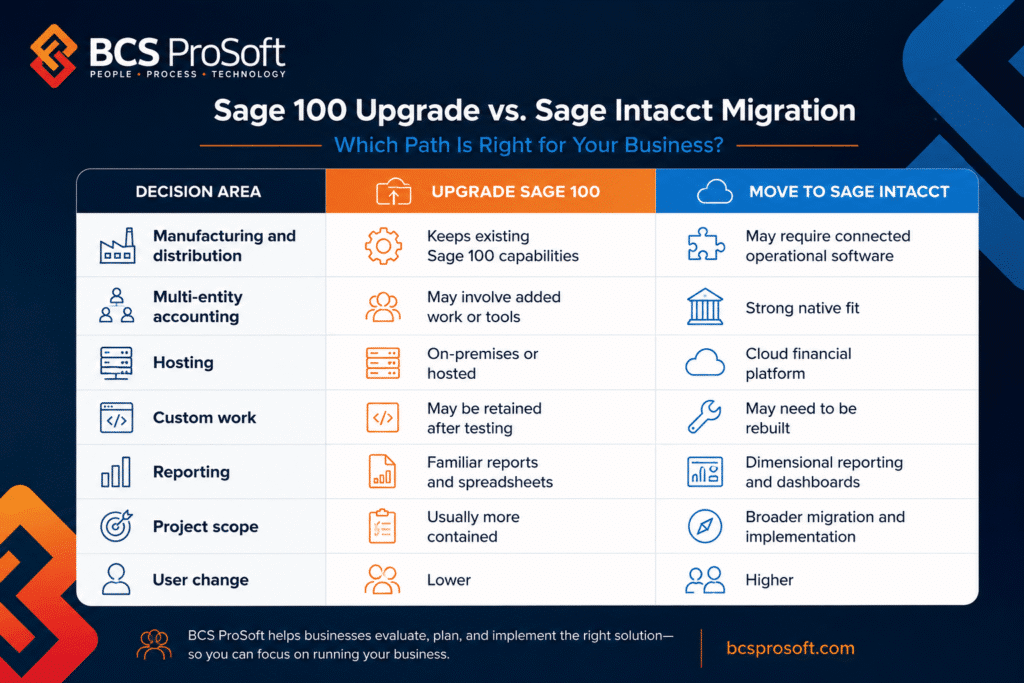
We generally recommend staying with Sage 100 when its operational strengths still match the business.
We recommend a closer look at Sage Intacct when reporting, entity structure, approvals, and financial access have become the larger concern.
The retirement deadline gives leadership a useful point to compare those two paths before committing money to another upgrade.
How BCS ProSoft Can Help with Sage 100 End of Life
A Sage 100 retirement deadline gives your company a reason to review the system before the next issue forces the decision.
That review should cover the version, modules, payroll setup, customizations, integrations, reports, hosting, and future plans.
At BCS ProSoft, we look at the full Sage 100 environment before recommending a path. For some companies, the right answer is a Sage 100 upgrade with proper testing and planning.
For others, the version deadline confirms that the business has outgrown the current financial system and should consider Sage Intacct.
Our job is to help you understand the tradeoffs, the project scope, and the risks tied to each option.
The recommendation should fit the way your company operates today and what it will need over the next several years.
What Should You Do Before Your Sage 100 Version Retires?

Start by checking the version your company currently uses.
If you are running Sage 100 2024, now is the time to review your upgrade requirements before the next release changes its support status. If you are on Sage 100 2023 or an earlier version, the review should already be underway.
The right next step depends on how well Sage 100 still fits the business. Manufacturers and distributors that rely on its operational capabilities may be best served by upgrading to a current release. Companies facing larger issues with reporting, multiple entities, approvals, or financial visibility may have a stronger case for Sage Intacct.
At BCS ProSoft, we review the version, modules, customizations, payroll setup, integrations, infrastructure, and future requirements before recommending either path. That gives your team a practical plan based on the full system rather than the retirement date alone.
Key Takeaways
- Sage 100 is still active, but individual versions retire.
- Sage currently supports versions 2026, 2025, and 2024.
- Payroll compatibility can create a separate deadline.
- A Sage 100 upgrade may fit companies that still depend on its operational capabilities.
- Sage Intacct may fit companies with growing financial complexity.
Frequently Asked Questions
Is Sage 100 being discontinued?
No. Sage 100 remains an active product. Sage officially supports the current version and the two previous releases. Older versions retire as new annual releases enter the support window.
Which Sage 100 versions are currently supported?
As of July 2026, the supported versions are Sage 100 2026, 2025, and 2024. Sage 100 2023 and earlier releases have moved outside the current Sage support window.
When did Sage 100 2023 reach end of support?
Sage 100 2023 reached end of support when Sage 100 2026 was released in April 2026. Companies still using that release should review their upgrade plan, connected applications, payroll setup, and any upcoming year-end processing requirements.
When will Sage 100 2024 retire?
Just a general guideline- Sage 100 2024 is expected to retire when Sage 100 2027 is released. As a general guideline, companies should begin planning before the official retirement date, especially when custom reports, integrations, payroll, or several modules are involved.
Will Sage 100 stop working after retirement?
The software may continue operating after retirement. However, the company may have fewer options for fixes, compatibility updates, and Sage support when a problem appears.
This can become more serious during year-end processing, quarter-end processing, or work involving a closed fiscal year, when accounting teams have less room for disruption.
Can a retired Sage 100 version still receive Payroll updates?
A retired Sage 100 release may remain compatible with Payroll for a limited period because Payroll follows a separate compatibility schedule.
That compatibility eventually ends. Companies should confirm their Sage 100 version and Payroll release before beginning year-end processing or installing a new tax update.
Does version retirement affect the Sage 100 closing process?
Version retirement does not automatically change the formal closing procedure inside Sage 100. However, an unsupported release can create problems if the company needs a fix, updated tax form, report correction, or technical help during closing.
Teams should follow the closing instructions for their installed version and confirm compatibility before starting year-end processing.
Should we upgrade Sage 100 or move to Sage Intacct?
A Sage 100 upgrade may be the right choice when the company still depends on its manufacturing, inventory, purchasing, sales order, or distribution capabilities.
Sage Intacct may deserve consideration when the larger issues involve multi-entity accounting, reporting, approvals, cloud access, or financial visibility. BCS ProSoft can review the full system and recommend a path based on the company’s operational and financial requirements.