
Replicon and Harvest are often compared through the wrong lens.
Harvest is usually treated as the easier fit for small firms. Replicon is usually treated as the stronger fit for larger organizations with more advanced billing, approvals, compliance, and reporting needs.
That assumption can send firms in the wrong direction.
The better question is how much the business depends on accurate, approved, well-structured time data.
Harvest can work well when time tracking is mostly administrative. Replicon becomes the stronger choice when time data affects billing, project margin, accounting handoff, compliance records, labor cost, utilization, and leadership reporting.
That is where the Replicon vs Harvest comparison gets more useful.
This blog compares Replicon and Harvest through that lens: when Harvest makes sense, where it starts to strain, why Replicon can fit smaller firms with more serious operational needs, and how BCS ProSoft helps firms move into Replicon with a setup that matches how the business actually runs.
Why Harvest Looks Appealing to Smaller Firms

Harvest has a strong reputation for good reason.
It is approachable. It is easy for teams to understand. It gives small firms a familiar way to track hours, connect time to clients and projects, review budgets, and create basic invoices.
For solo consultants, very small agencies, and firms with straightforward billing, that can be enough.
If the business has a small team, a limited number of clients, basic hourly work, and light approval needs, Harvest may feel like the right fit. People can enter time without much training. Managers can review hours. Finance can use the data for invoicing. The system does not require a major process redesign.
That is why Harvest often appears in searches for Replicon competitors. It solves an obvious problem: teams need a clean, easy place to record time.
So the appeal is real.
Harvest is a good fit when time tracking stays simple, billing rules are limited, and the firm does not need much structure around approvals, compliance, project cost, or reporting.
The limitation shows up when the firm starts asking time data to do more.
Where Harvest Starts to Show Strain
Many firms do not outgrow Harvest because they suddenly become large. They outgrow it because time data starts carrying more financial weight.
That shift can happen early.
A firm may add new clients with different billing rules. Senior and junior staff may need different rates. Project managers may need to approve time before finance bills it. A public-sector project may require labor categories or stronger documentation. Leadership may want better visibility into utilization, project margin, and labor cost.
At that point, time tracking is no longer just a timer.
It becomes part of the revenue process.
Harvest can start to strain when the firm needs more control around:
- Multiple billing rates by employee, role, project, task, client, or contract
- Project manager approvals before time reaches finance
- Labor cost visibility by project, phase, task, or work type
- Cleaner data before time reaches QuickBooks
- Correction history and review controls
- Compliance records for government, public-sector, or regulated work
- Reporting beyond total hours, project budgets, and basic invoicing
The pain usually shows up in the gaps around the system.
Rates live in spreadsheets. Project codes get used inconsistently. Finance has to clean up time before billing. Project managers review hours through side conversations. Invoice questions require someone to trace time entries, notes, approvals, and project context manually.
None of those issues mean Harvest is a bad product. They mean the firm’s timekeeping process has become more complex than the original setup was meant to carry.
That is usually the point where Replicon deserves a closer look.
Why Replicon Can Make Sense Before a Firm Is Large
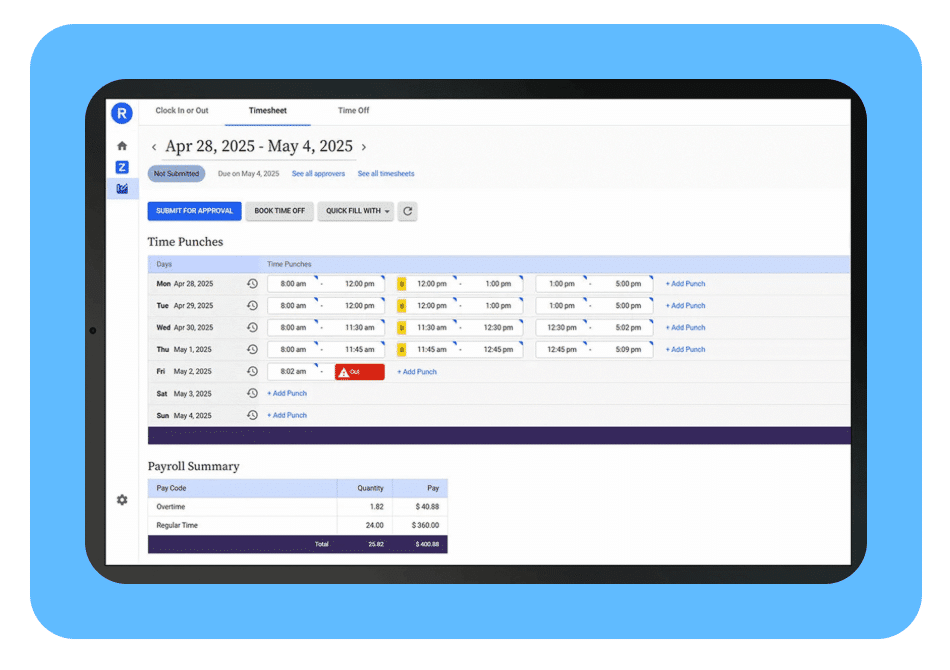
Replicon is not only a better fit for larger businesses. It is the stronger choice for any firm that needs time data to do more than record hours.
That includes small, mid-sized, and large firms.
The deciding factor is not headcount. It is how much the business depends on time data for billing, approvals, project cost, payroll, compliance, reporting, and financial control.
Harvest can work well when the goal is simple time entry. A team logs hours, reviews basic budgets, and creates straightforward invoices.
Replicon is built for the next level of time management, where those hours need structure before they affect the rest of the business.
A small firm may still use QuickBooks. A mid-sized firm may be adding more managers, clients, and project types. A larger firm may need stronger controls across teams, departments, contracts, and compliance requirements.
In each case, the issue is the same: time data has to be accurate, approved, billable, reportable, and connected to the way the business actually operates.
That is where Replicon becomes the superior choice.
Replicon gives firms a more controlled way to manage time across projects, tasks, roles, policies, approvals, rates, reporting, ERP, payroll, and accounting workflows. The value is not only in collecting hours. The value is in making those hours useful before they affect invoices, labor cost, project margin, compliance records, payroll review, and leadership reporting.
Structured Time Data
Replicon gives firms more control over how time is captured.
That can include projects, phases, tasks, labor categories, roles, departments, clients, work types, policies, and approval requirements. For professional services firms, that structure matters because time entries often become the source for billing, payroll-adjacent workflows, project reporting, labor analysis, and financial review.
If time is logged without the right structure, the business has to fix the data later.
Replicon helps firms get that structure in place earlier, so the information is more useful by the time it reaches billing, reporting, payroll, accounting, or project review.
Billing Rules
Billing gets complicated as soon as work moves beyond one client, one rate, and one approval path.
One client may have a standard hourly rate. Another may require role-based billing. Another may have project-specific terms. Some work may be billable, some may be internal, and some may need to be tied to a phase, labor category, or cost code.
When those rules sit outside the timekeeping system, finance ends up fixing the process manually.
Replicon gives firms stronger control over rates, billable work, approvals, and project structure before invoicing begins. That means finance has cleaner data, fewer manual checks, and more confidence in the invoice.
For any firm that bills for time, that matters.
Approval Workflows
Basic approvals are fine when time only needs a quick manager review.
That changes when project managers, department leads, finance, operations, compliance reviewers, or client-facing leaders need visibility before time is billed, exported, or closed.
Replicon supports more structured approval paths. Time review can reflect how the business actually works: by manager, project, department, client, contract, policy, finance requirement, or compliance need.
That is especially valuable for project-based firms where time should not move directly from employee entry to billing without the right review.
Replicon gives businesses more control over who reviews time, when they review it, and what needs to happen before that time becomes part of the financial record.
Project and Labor Visibility
Replicon gives firms a stronger view of project and labor performance.
Leadership may need to know which phase is using the most time, which roles are driving cost, which clients create too much non-billable work, which teams are overextended, and which projects look profitable on the invoice but weak after labor cost.
Those questions affect pricing, staffing, capacity planning, project management, utilization, and margin.
This matters at every size.
For a small firm, those issues may be hiding in the owner’s head or a finance spreadsheet. For a mid-sized firm, they may show up as inconsistent reporting across teams. For a larger firm, they may create bigger problems across departments, regions, contracts, or business units.
Replicon gives the business a clearer operating record for time, labor, cost, and project performance.
QuickBooks, ERP, and Payroll Integration
Replicon also gives firms a stronger path for connecting time data to the systems that depend on it.
For smaller firms, that may mean cleaner time and project data flowing into QuickBooks before invoices or financial reports are prepared. For mid-sized and larger firms, it may mean stronger connections across ERP, payroll, project management, and reporting tools.
This matters because time data rarely stays inside the timekeeping system. It may support billing, payroll review, project cost reporting, labor analysis, utilization tracking, and financial planning. If the time data is incomplete, inconsistently coded, or loosely approved, every connected workflow becomes harder to trust.
Replicon helps firms build a cleaner timekeeping layer before data moves downstream. Time can be structured by project, task, role, department, labor category, policy, approval path, and billing rule before it reaches QuickBooks, ERP, payroll, Microsoft Project, or other business systems.
That gives finance, operations, and project leaders better information to work with across the business.
For firms planning to grow, this is especially important. The accounting or payroll system may change over time, but the need for accurate, approved, reportable time data remains. Replicon gives firms a stronger foundation for current tools and future system connections.
Compliance Support
Compliance need is not determined by company size.
A small government contractor can need tighter timekeeping controls than a much larger private-sector firm with simple client work.
For government contractors, defense-adjacent firms, public-sector consultants, AEC firms, IT services firms, and other professional services organizations, time records may need to stand up to review. That can include approval history, correction records, labor categories, overtime rules, documentation, policy controls, and consistent coding.
Replicon is the stronger fit when timekeeping needs to support that level of control.
The point is simple: if the business is only logging hours, a lightweight system may be enough. If time data affects billing, payroll, reporting, compliance, margin, or project decisions, Replicon is the better choice.
Feature-by-Feature Comparison: Replicon vs Harvest
| Feature | Harvest | Replicon | Better Fit |
|---|---|---|---|
| Ease of adoption | Very approachable for small teams that need basic time tracking | More setup required because the system supports more structure | Harvest for very simple needs |
| Basic time entry | Strong timer-based and manual time entry | Strong time entry with more policy, project, and approval structure behind it | Tie for basic use |
| Simple invoicing | Good fit for straightforward client invoicing | Better fit when invoicing depends on rates, roles, approvals, project rules, or contract terms | Harvest for simple invoicing, Replicon for complex billing |
| Billing rates | Supports basic billable rates | Supports more advanced rate logic by employee, role, project, task, client, contract, or work type | Replicon |
| Project tracking | Good for clients, projects, tasks, budgets, and basic reports | Stronger fit for projects with phases, labor categories, cost structures, approvals, and deeper controls | Replicon |
| Cost visibility | Limited fit for deeper labor cost and margin reporting | Stronger support for labor cost tracking, utilization, and project margin visibility | Replicon |
| Approvals | Basic manager approval workflow | Multi-step approvals by manager, project manager, department, finance, client, or policy | Replicon |
| Time corrections | Basic edits and adjustments | Stronger correction workflows, review controls, and audit trail support | Replicon |
| Compliance | Best for low-compliance environments | Better fit for overtime rules, audit trails, labor policies, public-sector work, and stricter records | Replicon |
| QuickBooks fit | Useful for basic invoice and payment workflows | Useful when firms need cleaner time, project, and billing data before accounting handoff | Depends on complexity |
| Integrations | Connects with common small-business and productivity tools | Better fit for firms that need time data connected to accounting, ERP, PSA, HR, project, payroll-adjacent, or reporting systems | Replicon |
| Expenses | Basic expense tracking tied to projects and invoices | Expense workflows can sit within a broader project, billing, approval, and reporting structure | Replicon |
| Reporting | Basic time, budget, invoice, and team reports | More useful for utilization, project cost, labor, approvals, compliance, and margin reporting | Replicon |
| Mobile time entry | Good mobile support for basic time tracking | Mobile time entry with stronger project, policy, and approval logic behind it | Tie for basic use, Replicon for controlled workflows |
| Best-fit use case | Simple time entry, basic budgets, and straightforward invoicing | Structured time tracking tied to billing, accounting, approvals, compliance, project cost, and growth | Depends on business need |
How BCS ProSoft Helps Firms Move from Harvest to Replicon
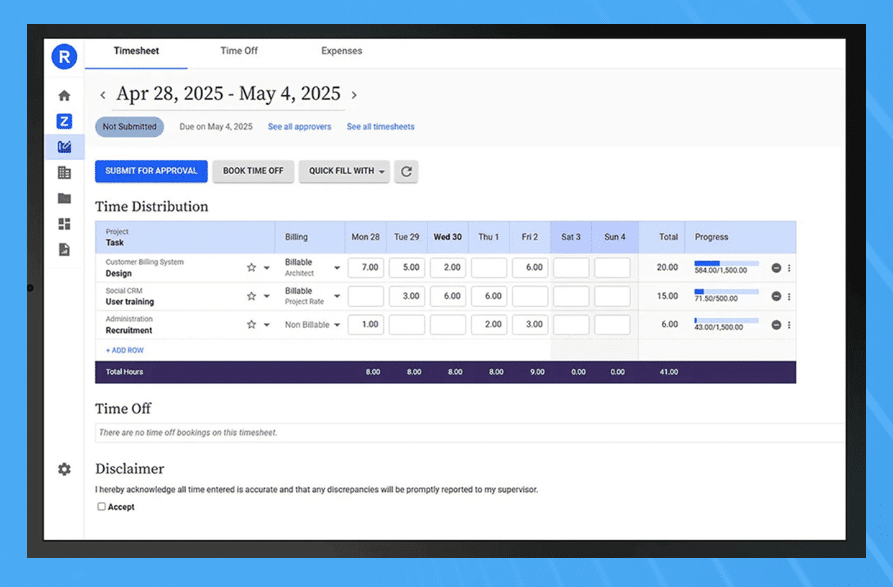
Moving from Harvest to Replicon should not mean copying the old setup into a stronger system.
Most firms already have useful history in Harvest: clients, projects, people, tasks, time entries, expenses, and budget context. The issue is usually that the firm has grown past the structure Harvest was originally asked to support.
BCS ProSoft helps firms use the move to Replicon as a chance to clean up the timekeeping process and build a better operating structure around how the business works today.
That includes five important areas.
Setup Design
Replicon’s features work best when the setup reflects the way the firm bills, reviews, manages, and reports time.
BCS ProSoft helps firms define the structure before configuration decisions get locked in. That can include projects, phases, tasks, labor categories, roles, departments, clients, work types, rates, policies, and approval paths.
The goal is to build a system that matches the business instead of forcing the team into a generic timekeeping model.
Cleanup
A messy Harvest setup should not become a messy Replicon setup.
Old task lists, inconsistent project codes, outdated rates, manual invoice notes, duplicate clients, and spreadsheet-based workarounds should be reviewed before migration.
BCS ProSoft helps firms decide what should move, what should be cleaned up, what should be archived, and what should be rebuilt with a better structure.
That cleanup matters because the quality of the new system depends on the quality of the decisions made before data moves.
Migration Planning
Migration is not only a data transfer exercise.
The firm needs to think through how historical clients, projects, users, time entries, expenses, budgets, and reporting context should be handled. Some data may need to move into Replicon. Some may need to stay available as history. Some may need to be cleaned before it is useful.
BCS ProSoft helps firms plan that transition so the new Replicon setup supports current operations instead of carrying forward every old workaround.
Rate, Approval, and Reporting Structure
Replicon gives firms more control, but that control only helps if it is designed well.
BCS ProSoft helps firms define practical rules around:
- Billing rates
- Cost rates
- Billable and non-billable work
- Project manager approvals
- Finance review
- Department or role-based approvals
- Compliance documentation
- Utilization reporting
- Project margin reporting
- QuickBooks or accounting handoff
These decisions are where many firms get the most value from Replicon.
The best time and attedndance software can support more structure. BCS ProSoft helps the firm decide which structure actually belongs in the system.
Industry-Specific Configuration
Different firms need different timekeeping models.
For AEC firms, Replicon may need to reflect projects, phases, disciplines, cost codes, and project manager review.
For government contractors or public-sector consultants, the setup may need stronger approval controls, correction rules, labor categories, audit trail support, and documentation.
For IT services and consulting firms, the priority may be utilization, project profitability, role-based billing, client-specific rates, and cleaner reporting.
For QuickBooks-based firms, the focus may be better time, project, and billing data before information reaches accounting.
BCS ProSoft helps firms configure Replicon around those real operating needs.
That is the value of having an implementation partner involved before setup decisions are made. Replicon can give firms stronger controls, but the system needs to be shaped around how the firm sells, bills, staffs, approves, and reports work.
The Final Recommendation: Replicon vs Harvest

For solo consultants, very small teams, and low-complexity firms, Harvest may be enough. It is familiar, easy to adopt, and useful when time data does not need to carry much financial, operational, or compliance weight.
Replicon is the better fit when time data affects how the business runs.
That includes firms with multiple billing rates, project manager approvals, labor cost tracking, QuickBooks cleanup issues, compliance requirements, utilization reporting, public-sector work, or margin visibility needs.
For smaller firms, Replicon can make sense earlier than expected. The trigger is not size. The trigger is complexity.
If time data now affects billing, margin, compliance, accounting handoff, or project reporting, the firm may need more than lightweight time tracking.
BCS ProSoft helps firms make that decision before configuration begins. If Harvest is still enough, that should be clear. If the firm has already outgrown it, BCS ProSoft can help design a Replicon setup that reflects how the business actually works.
For firms that want time tracking to support cleaner billing, stronger approvals, better project visibility, and more reliable reporting, Replicon is the stronger long-term fit.
Frequently Asked Questions
Is Replicon better than Harvest for professional services firms?
In a replicon vs harvest evaluation, Replicon is usually the better fit for firms that need stronger controls around billing, approvals, compliance, and project operations. Harvest can work for very small teams, but Replicon is better suited for organizations with more complex workflows, especially when time data affects revenue, margin, and delivery oversight.
When does Harvest stop scaling?
Harvest usually stops scaling when firms need to track time spent across specific tasks, billing rates, labor categories, or approval paths. Once employee time needs to support compliance, audit records, overtime, cost controls, and project margin reporting, Replicon becomes the stronger time tracking software choice.
Is Replicon a good fit for AEC firms?
Yes. Replicon is a strong fit for AEC firms because it supports deeper project management features, including project phases, cost codes, labor categories, approvals, and reporting tied to project progress. That matters when project managers, finance teams, and principals all need cleaner visibility into people, costs, and delivery status.
Which tool is better for government contractors?
Replicon is usually the better fit for government contractors because security, audit trails, approval controls, and compliance-ready records matter more in that segment. For firms dealing with DCAA-style requirements, Replicon gives the company a stronger foundation for managing employee work hours and documentation.
What should firms expect when migrating from Harvest to Replicon?
A migration should include an in depth comparison of the current Harvest setup and the future Replicon structure. BCS ProSoft helps review clients, projects, tasks, rates, approval paths, expense tracking, and reporting needs so the firm can decide which resources should move, what should be cleaned up, and what should be rebuilt.
What makes Replicon stronger for growing firms?
Replicon has stronger capabilities for resource management, approvals, labor rules, costing, and reporting. Its key features are better aligned with firms that need to manage multiple teams, rates, roles, and compliance requirements while enabling businesses to connect time data to billing, delivery, and margin.
What should firms compare before choosing?
A detailed comparison should look past the feature checklist and focus on billing complexity, approval routing, compliance needs, reporting depth, pricing, integrations, implementation effort, and long-term fit. The right answer depends on how the firm makes money, manages delivery, and uses time data.
Is Replicon worth it for firms that already use Harvest?
Yes, when Harvest no longer supports the firm’s operating model. If teams are using spreadsheets to check time, fix invoices, manage rates, or measure productivity, Replicon may give the firm a better long-term structure.
Can teams use these tools on the go?
Both tools support mobile use through apps, which helps consultants and field teams enter time away from a desk. The bigger difference is what happens after that time is submitted: Replicon gives firms more control over review, approval, billing, and reporting.
Where should a firm start its evaluation?
Start with an overview of how the firm tracks time today, then review the vendor website, product page, implementation requirements, customer fit, and how each system verifies time entries, changes, and approvals. BCS ProSoft can help turn that review into a practical decision based on workflows, compliance needs, and growth plans.