Invoice processing often gets treated as an accounts payable issue. In reality, it touches far more than AP. It influences how confident finance leaders feel in monthly numbers, how early cost trends surface, and how much time teams spend reconciling instead of reviewing.
Most organizations do not intentionally design an invoice process. They inherit one. It forms gradually through shared inboxes, approval habits, and workarounds that make sense in the moment. As the business grows, those habits start to carry more weight than expected.
This is where invoice automation enters the discussion. Not as a quick fix, but as a way to bring structure back into a process that has quietly expanded beyond what it was built to handle.
In this blog, we’ll walk through what invoice processing automation actually covers, where manual processes tend to break down, and how finance teams can approach automation in a way that improves visibility without creating new problems.
What is Invoice Processing Automation?

Invoice processing automation is a way to bring consistency to how invoices are received, reviewed, approved, and recorded. Instead of relying on inboxes, memory, or side conversations, the system guides invoices through a clear path.
At a basic level, an automated invoice processing system brings structure to steps teams already handle manually, including:
- Invoices entering the system the same way every time
- Key invoice details being captured in a consistent format
- Clear rules for who reviews and approves each invoice, so approvals do not depend on who happens to be copied on an email
- Approved invoices posting directly into the general ledger
Invoice processing automation does not take judgment away from finance teams. Someone still decides whether a cost is correct and how it should be coded. The difference is that people no longer have to wonder where an invoice is or who is holding it.
When teams approach automation with this understanding, it becomes easier to scale invoice volume without adding confusion or extra manual work.
Risks of Not Using Invoice Processing Software
When invoices are handled manually, the risks tend to build quietly. Teams often adjust around them without realizing how much extra work they are taking on. The issue most teams run into first is visibility. Once that slips, the other risks tend to follow.
Common risks include:
- Limited visibility into invoice status: This is usually the first crack. Invoices arrive through email, portals, and forwarded PDFs. Context gets lost as files move between people, and it becomes harder to tell what has been reviewed and what is still pending. During close, this often turns into a last-minute search for invoices that everyone assumed were already handled.
- Unclear approval ownership: Approval responsibility is often assumed instead of defined. When questions come up, invoices sit while teams figure out who should review them. Over time, this hesitation slows approvals even when the invoice itself is straightforward.
- Delays tied to project changes: In project-based environments, shifts in resource assignment or project ownership leave invoices without a clear path. Approvals slow down because reviewers lack context, not because the invoice is incorrect.
- Late or incomplete cost visibility: Costs appear in the system after decisions have already been made. Forecasts rely on partial data, and reporting reflects past activity instead of current conditions. Budget conversations become reactive instead of useful.
- Growing reliance on manual workarounds: Spreadsheets, reminder emails, and extra checks near close become normal. Over time, the accounting system stops being the primary source of truth, even though it is still where final numbers live.
Manual handling also slows approvals and increases errors. Studies show that traditional manual invoice workflows can take around two weeks per invoice and have high error rates, significantly impacting cash flow and operational efficiency.
When these risks take hold, teams usually do not notice all at once. By the time automation feels unavoidable, manual workarounds are already embedded in daily routines, which makes the problem harder to unwind later.
4 Building Blocks That Make Invoice Automation Work

An effective automated invoice workflow rests on a few foundational elements. These are the pieces that tend to hold up as volume increases and responsibilities shift. If one of them is weak, teams usually feel it first in close reviews and project check-ins:
1. Centralized Intake
If there is one place teams underestimate, it is intake.
Invoices need a single, obvious home. When invoices arrive through one known path, finance can see what has been received, what is waiting for review, and what is still missing without asking around.
When intake is scattered across inboxes and folders, issues show up during close. Someone asks why an invoice is missing. Someone else swears it was already sent. Time gets spent searching instead of reviewing. Centralized intake removes that uncertainty early, before it turns into cleanup work later.
2. Consistent Data Capture
Automation should handle repetitive entry so reviewers can focus on whether a cost makes sense. When invoice details are captured consistently, reports line up more cleanly and questions are easier to answer.
This is not about capturing everything. It is about capturing what finance actually looks at. When fields shift from invoice to invoice, reviews slow down and small errors are easier to miss, especially during busy periods.
3. Approval Rules That Reflect Authority
Approval rules work when they match how decisions are already made. Dollar thresholds, department responsibility, and project ownership usually cover most cases.
Problems show up when approval logic does not reflect reality. I have seen invoices sit for days simply because no one was sure whether they were the right person to approve them. Clear authority removes that hesitation and keeps invoices moving without follow-up emails.
4. Posting With Context Intact
Once approved, invoices need to post into the accounting system with clear links to projects, departments, and entities. That context is what makes numbers defensible later.
When context is missing, the pain shows up during reviews. Costs are technically correct, but harder to explain. Finance ends up reconstructing history instead of responding confidently in the moment.
These elements do not need to be perfect to be effective. They do need to be intentional. When teams gloss over them early, invoice automation still works, but it works against the finance team instead of supporting them.
Taken together, these elements reduce how much finance teams have to compensate for the process. When they are missing, automation still runs, but the burden quietly shifts back onto people.
Why Invoice Automation Belongs Inside the Accounting System
Invoice processing automation works best when it lives inside the accounting system, usually within accounts payable. That is where invoices are reviewed, approved, and recorded, and separating those steps creates more problems than it solves.
We often see teams start with tools that sit outside accounting. Intake tools, shared folders, or document workflows get added first because they feel easy to roll out. They can help collect invoices, but they also introduce handoffs. Someone still has to move the data into the accounting system, and that delay matters more than most teams expect.
When automation lives outside accounting, timing gaps start to appear. Invoices may be received on time, but approvals lag behind posting. Costs show up in reports after decisions have already been made. Finance teams spend more time reconciling than reviewing, and reporting starts to rely on manual checks to fill in the blanks.
The same issue shows up with time entry. Conversations about what to do when employees won’t submit timesheets or how to avoid timesheet errors usually come back to delayed information. By the time the data is complete, it is no longer as useful.
When invoice automation lives inside the accounting system, invoices move through intake, approval, and posting in one place. Reporting, forecasting, and project oversight all reference the same data at the same time. That reduces handoffs and keeps the system aligned with how finance actually works.
Where teams get into trouble is assuming placement does not matter. Once invoice automation is built outside the accounting system, it is harder to bring it back in later without reworking the process. That is a decision worth slowing down for.
How Sage Intacct Supports Invoice Processing Automation
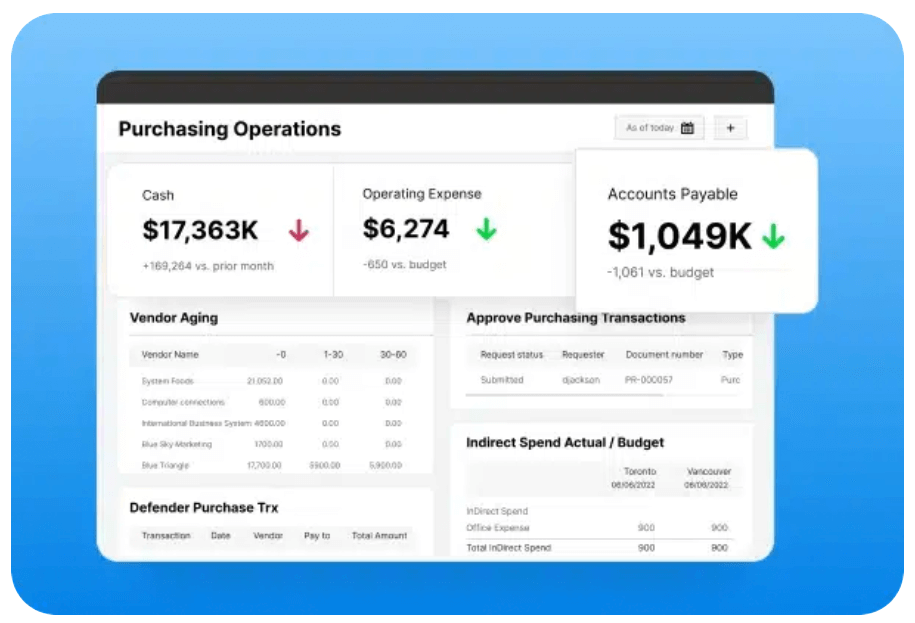
Sage Intacct includes invoice processing automation as part of its accounts payable functionality. Invoices move through intake, review, approval, and posting within the same system used for general ledger and reporting.
That structure matters because invoice activity remains connected to the broader financial picture. Approved invoices tie directly to:
- Project cost records
- Entity structures
- Approval history
- Financial reports
The system handles the mechanics. The outcome depends on configuration. Approval rules, coding structures, and project setup determine whether automation feels supportive or restrictive.
Finance teams that treat configuration as process design tend to see stronger adoption. Those that treat it as a technical exercise often revisit decisions later.
This is where experience and judgment make a difference.
How BCS ProSoft Approaches Invoice Processing Automation
BCS ProSoft works with finance teams running invoice processing inside Sage Intacct, with a clear priority on making invoice workflows match how accounting actually operates day to day.
Implementation starts by looking closely at how invoices move today. How they come in, who reviews them, how they tie back to projects, and what leadership expects to see in reports. Those details shape how the system is configured, and they matter more than most teams realize at the start.
I’ve seen teams run into trouble when configuration decisions are made quickly without that context. Because invoice activity flows straight into the general ledger and reporting, small setup choices tend to show up later in close reviews and project discussions.
BCS ProSoft helps finance teams make those decisions deliberately, with an eye toward how the process will hold up six months down the line. Once invoice workflows are in place, changing them is possible, but it is rarely simple, which is why getting the foundation right early matters.
Conclusion: Automation Works When Structure Comes First

Invoice processing automation works best when it is treated as an accounting decision, not a technical one. When intake is clear, approvals match real authority, and invoices post with context, finance teams spend less time correcting issues and more time reviewing information while it still matters.
The challenge is that these choices tend to stick. Once workflows are live, changing them later is rarely simple. That makes it worth slowing down early and getting the structure right before volume increases.
If you are planning to automate invoice processing in Sage Intacct, or revisit an existing setup that never quite held up, BCS ProSoft can help. Their team works with finance leaders to design invoice workflows that support day-to-day accounting and scale without adding friction.
Getting the foundation right now makes everything that follows easier.
Key Takeaways
- Invoice automation standardizes how invoices move through accounting
- Consistency matters more than feature depth
- Automation belongs inside the accounting system
- Clear ownership determines long-term success
- BCS ProSoft helps finance teams set up invoice workflows that hold up as complexity grows.
Frequently Asked Questions
Does invoice automation remove the need for human review?
No. An automated invoice does not replace judgment or accountability in accounts payable. It changes how processing invoices happens so reviewers spend less time chasing information and more time validating it. Instead of relying on manual processes or manual invoice processing, teams review complete invoice data inside their accounting software, with clear invoice approval history and visibility into incoming invoices.
This approach reduces repetitive data entry and manual data entry without taking decision-making away from finance. Even when teams are moving away from paper invoices toward electronic invoices, someone still reviews costs and confirms accuracy before posting to the general ledger.
How does invoice processing automation improve cash flow?
Invoice processing automation improves cash flow by shortening the gap between receiving an invoice and recording it accurately. When invoice capture happens consistently, teams avoid delays caused by manually processing invoices or missing documentation. That timing matters when managing approvals, forecasting spend, or taking advantage of early payment discounts.
An automated invoice processing software setup keeps invoice details visible as invoices move through the invoice processing workflow, making it easier to plan payments and reduce surprises. Over time, the benefits of automated invoice handling show up in steadier forecasting and fewer last-minute adjustments.
Where does invoice automation typically live?
Invoice automation usually lives inside the accounts payable function of an erp system or core accounting software, not in disconnected tools. When teams integrate automated invoice processing directly into the system where posting and reporting occur, automated invoice processing works as part of day-to-day accounting instead of creating extra handoffs.
Some teams attempt to integrate automated invoice processing through external tools first, but that often leads back to manual processes when data needs to be reconciled. A well-designed invoice automation solution keeps invoice data tied to projects, departments, and entities inside the same system finance already relies on.
How does invoice automation handle different invoice formats?
Most invoice automation software relies on optical character recognition and optical character recognition ocr to read paper invoices and electronic invoices during invoice capture. This allows the system to extract invoice data without repeated data entry, even when vendors send invoices in different formats.
Once captured, the automated invoice moves through a defined invoice processing workflow, where processing invoices becomes consistent regardless of format. This is one of the practical ways automated invoice processing integrate into existing accounting operations without forcing vendors to change how they submit invoices.
What should finance teams watch out for when adopting invoice automation?
The biggest risk is assuming invoice processing automation software will fix weak processes on its own. If approval ownership, posting rules, or invoice processing workflow design are unclear, an automated invoice will move faster, but not better. That is why teams should focus on how automated invoice processing works in their environment before scaling volume.
Finance leaders should also watch how accounts payable automation impacts reporting and cash flow over time. When implemented thoughtfully, the benefits of automated invoice handling compound. When rushed, teams often fall back into manual invoice processing to fill gaps the system exposes.