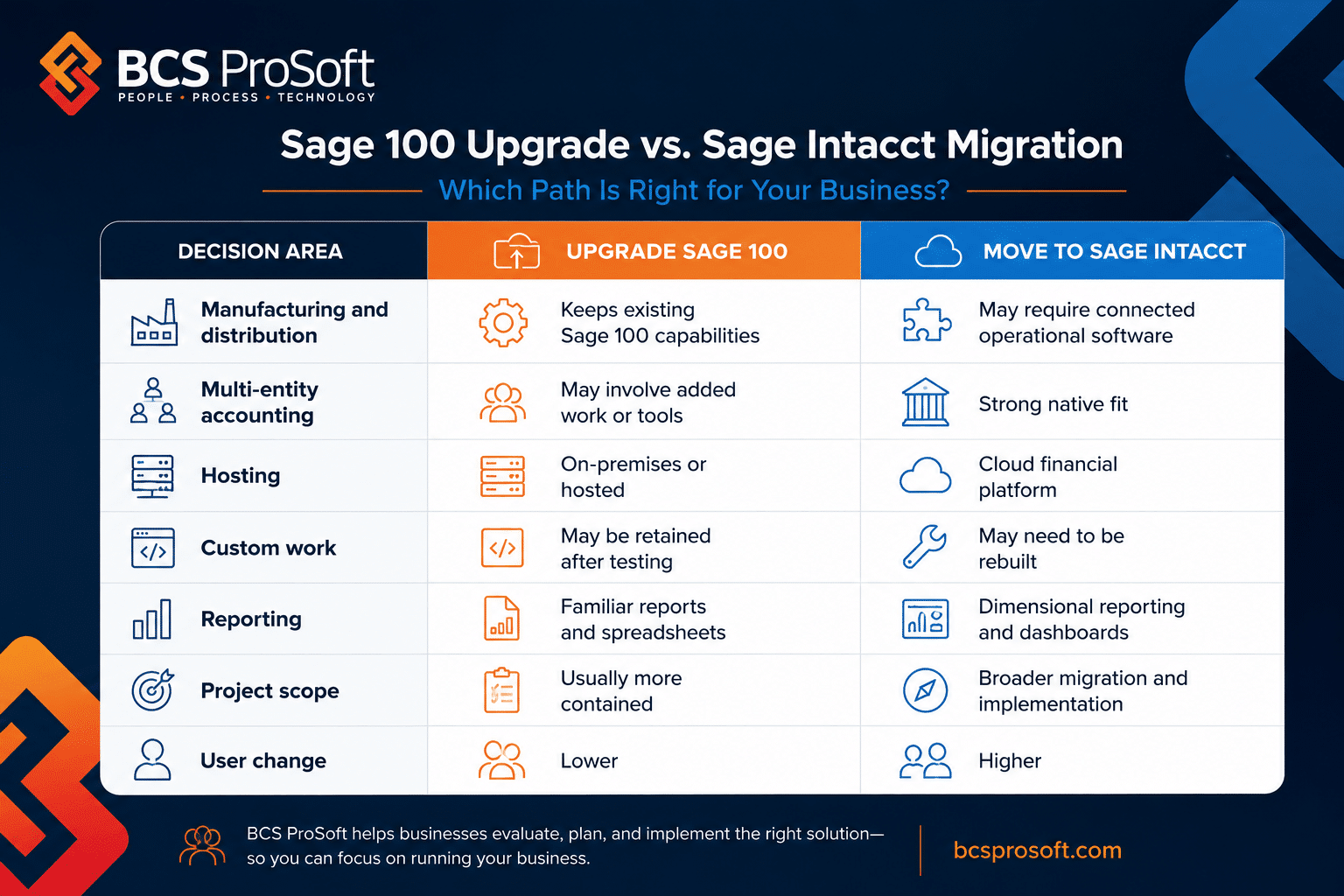
If you’ve landed here, chances are you’re at a decision point. Maybe you’re trying to choose between Sage 100 and Sage Intacct for the first time. Or maybe you’ve been using Sage 100 for years and are wondering if it’s time to make the leap to Sage Intacct. Either way, you’re looking for clarity—and that’s what we’re here to provide.
The truth is, there’s no one-size-fits-all answer. Sage 100, with its on-premise solution design, has been a long-time favorite for businesses with basic accounting needs or specific workflows like inventory management. But as operations grow and the need for real-time data and multi-entity support becomes more pressing, many businesses start considering Sage Intacct’s cloud technology and dimensional reporting capabilities.
This guide is here to walk you through the key differences between these two systems, explain what they do best, and help you figure out which one aligns with your business goals—whether you’re starting fresh or thinking about making a switch. Let’s go!
A Brief History: Sage 100 vs. Sage Intacct
Sage 100 has been a reliable on-premise solution for businesses for decades. Initially designed for basic accounting needs, it later evolved to include light manufacturing and inventory management capabilities. On the other hand, Sage Intacct, launched as a cloud-based platform, was developed to meet the demand for software as a service (SaaS) solutions with advanced features for financial management and real-time insights.
While both platforms are backed by Sage’s reputation, they cater to different business systems. Sage 100 is primarily focused on companies looking for customizable on-premise software, whereas Sage Intacct is designed for organizations embracing cloud technology and dimensional reporting.
If you’re also weighing out QuickBooks, check out this in-depth comparison between Sage Intacct vs. QuickBooks to see how it stacks up against other financial management solutions.
8 Key Differences Between Sage 100 and Sage Intacct

Source: Sage.com
When comparing Sage 100 vs. Sage Intacct, the decision often comes down to your business’s needs today and your goals for the future. Both platforms have their strengths, but their capabilities and focus areas are quite different. Let’s take a closer look at some of the most critical differences.
1. Reporting
When it comes to reporting capabilities, the differences between Sage 100 and Sage Intacct are significant, especially for businesses that depend on accurate, flexible, and up-to-the-minute insights to drive decisions. Here’s how they stack up:
Sage 100 Reporting Capabilities
Sage 100 offers basic financial and operational reporting, but its limitations can be a challenge for businesses with more complex reporting needs:
- Limited customization: Sage 100’s reporting capabilities lack the flexibility many businesses require. Formatting and layout options are restrictive, making it difficult to tailor reports to your specific needs without custom programming.
- No real-time data: Reports in Sage 100 are generated on a scheduled basis, meaning you’re working with historical data rather than real-time insights. For businesses needing up-to-the-minute visibility into their financial performance, this can create a bottleneck in decision-making.
- Limited integration with other tools: To build more advanced reports, users often need to export data into external programs, such as Excel or third-party applications. This process can be time-consuming and adds unnecessary complexity to the workflow.
Sage 100 is a solid option for businesses with basic accounting needs, but its reporting functionality may not keep up with organizations that require detailed, real-time analysis or flexibility in reporting formats.
Sage Intacct Reporting Capabilities
Sage Intacct takes reporting to the next level, offering dynamic and flexible options that allow businesses to extract actionable insights effortlessly:
- Dimension-driven reporting: Unlike Sage 100, Sage Intacct allows users to analyze real-time business performance by business drivers—such as department, project, location, or customer type—without the need for a complex chart of accounts. This makes it easier to get a clear picture of performance across multiple dimensions.
- Built-in financial and operational reports: Sage Intacct provides pre-built reports that can include financial data alongside operational metrics tailored to your business. Whether you’re tracking SaaS metrics, square footage, or available hospital beds, Intacct’s built-in reporting tools make it simple to gather the data that matters most.
- Real-time data and flexible delivery: Sage Intacct’s real-time reporting gives you up-to-the-minute insights that can be shared through customizable dashboards, cloud repositories, or email. You can also archive reports directly within the system for future reference, making it a one-stop shop for your reporting needs.
For businesses that depend on timely, detailed reporting to make data-driven decisions, Sage Intacct’s reporting capabilities are hard to beat. The ability to customize reports, access real-time data, and integrate seamlessly with other tools gives it a significant edge over Sage 100.
2. Multi-Entity and Consolidation
There is a gap between Sage 100 and Sage Intacct when it comes to managing multiple entities and consolidating financial data. Let’s explore how each system handles these functions and why this is a crucial consideration for businesses operating across multiple locations or subsidiaries.
Sage 100 Multi-Entity Capabilities
Sage 100 is not natively designed for multi-entity management, which means businesses requiring this functionality will need to rely on additional tools or workarounds:
- No native multi-entity support: Sage 100 does not have built-in capabilities for managing multiple entities. To handle intercompany transactions or consolidations, businesses must use an add-on, such as Sage 100 Intercompany, or depend on external reporting tools like Sage Intelligence.
- Cumbersome consolidation process: Consolidating data across entities requires manual intervention, often involving exporting data to external systems or tools. This process can be time-consuming and error-prone, particularly for organizations with frequent intercompany transactions.
- Limited real-time visibility: Without native automation, consolidated reporting in Sage 100 typically occurs after the fact, providing delayed insights into financial performance.
For businesses with straightforward financial structures, this may not pose a significant issue. However, as organizations grow and intercompany complexity increases, these limitations can become a bottleneck.
Sage Intacct Multi-Entity Capabilities
Sage Intacct is purpose-built for multi-entity management, offering a seamless and automated experience that simplifies consolidation and intercompany transactions:
- Native multi-entity automation: Sage Intacct allows multiple entities to share the same chart of accounts, customers, and vendors, streamlining processes across locations or subsidiaries. Consolidations and eliminations are automated, providing real-time visibility into consolidated financial results.
- Journaled consolidations: Sage Intacct ensures granular visibility into eliminations and currency impacts, making it easy to make post-consolidation adjustments and maintain accurate financial records.
- Automated intercompany eliminations: Intercompany eliminations are handled at the point of consolidation, reducing the need for manual adjustments and improving accuracy.
- Real-time reporting: With Sage Intacct, you can view interim summary figures at any time, giving you the ability to close the books faster and access financial statements as needed.
These capabilities make Sage Intacct a standout choice for businesses with complex financial structures, such as those managing multiple entities or operating in multiple currencies.

Source: Sage.com
3. Implementation
This is one of the biggest key differences between the two platforms. Sage 100 is an on-premise solution, meaning it’s installed on your company’s servers and requires dedicated IT infrastructure. For businesses that prefer to keep their data in-house or don’t have a reliable internet connection, this setup may work well. However, it can also mean higher costs for hardware, maintenance, and IT support.
Although Sage 100 is traditionally an on-premise solution, it can also be hosted in the cloud through Sage Partner Cloud, allowing businesses to enjoy the benefits of remote access and scalability. Learn more at our blog about how Sage 100 compares to Sage Partner Cloud.
Sage Intacct, by contrast, is entirely cloud-based. It only requires an internet connection and can be accessed from anywhere, making it ideal for teams that work remotely or across multiple locations. This flexibility is a major advantage for businesses that prioritize agility and want to eliminate the headaches of maintaining an on-premise solution.
4. Updates and Upgrades
When it comes to updates and upgrades, the difference between Sage 100 and Sage Intacct boils down to manual effort versus automation. This distinction is critical for businesses that want to minimize downtime and stay current with the latest features and security enhancements.
Sage 100 Update Deployment and Frequency
As an on-premise solution, Sage 100 relies on manual updates, which can be a time-consuming and resource-intensive process:
- Manual installation required: Updates for Sage 100 must be installed and configured on every server where the software is hosted. This includes both local servers and any hosted environments.
- Planning and downtime: Because updates can involve data backups, testing, and system reconfiguration, they often require significant planning. This can result in downtime, disrupting business operations and increasing costs.
- Financial investment: Beyond the cost of the software update itself, businesses must account for the expense of IT resources to manage the process. For companies without dedicated IT teams, this can be a significant burden.
For businesses that prioritize control over their software environment, this manual approach may work. However, the additional planning and effort required can become a drawback as operations scale.
Sage Intacct Update Deployment and Frequency
Sage Intacct, as a cloud-based SaaS solution, eliminates the hassle of manual updates by delivering automatic quarterly upgrades directly to the system:
- Automatic deployment: Updates and new features are seamlessly deployed to Sage Intacct’s cloud environment without requiring user intervention. This means no manual installation, no system reconfiguration, and no dedicated IT resources needed.
- No downtime: Upgrades are rolled out without interrupting your access to the software. This ensures businesses can continue operations uninterrupted while benefiting from the latest features.
- Regular enhancements: Sage Intacct releases updates on a quarterly basis, keeping the software current with new features, performance improvements, and security enhancements. Users can take advantage of these upgrades immediately, maintaining a competitive edge.
This automated approach is ideal for businesses that want to stay agile and focus their resources on growth rather than managing software updates.

5. Pricing
Understanding the pricing structure of Sage 100 and Sage Intacct is a crucial part of determining which software fits your budget and business needs. While both platforms offer subscription-based licenses with monthly or yearly payment options, their costs and inclusions differ significantly.
Sage 100 Pricing
Sage 100’s subscription pricing is an appealing choice for businesses with limited budgets. The base price includes the Essentials Bundle, which provides key modules such as:
- General Ledger
- Accounts Payable
- Accounts Receivable
- Bank Reconciliation
- Sage Intelligence – Report Designer and 1 Report Manager User
- Custom Office and Crystal Reports
In addition to the core modules, Sage 100 offers annual maintenance and support plans at three levels—Silver, Gold, and Platinum. These plans include varying numbers of support cases, starting with five free cases under the Silver plan.
However, maintenance for Sage 100 can add to the overall cost. Upgrades occur annually and often require the assistance of a Sage 100 partner for installation and configuration. While the support plan helps offset some costs, the need for manual upgrades and partner involvement can create additional expenses over time.
Sage Intacct Pricing
Sage Intacct’s subscription pricing includes the core modules for Intacct Financial Management, such as:
- General Ledger
- Cash Management
- Accounts Payable
- Accounts Receivable
- Purchase Order
- Order Entry
- Dashboards and Standard Reports
- Customization Services
One of the key advantages of Sage Intacct’s pricing is what’s included. The subscription covers four automatic upgrades per year, as well as hosting, maintenance, backups, and security. These features eliminate the need for additional costs related to IT infrastructure, data backups, or manual upgrade installations.
While the initial price point may seem higher than Sage 100, businesses often find that Sage Intacct’s all-inclusive pricing results in lower long-term operational costs, especially for those with complex needs like multi-entity management and real-time reporting.
6. Industries and Business Sizes
Both Sage 100 and Sage Intacct cater to a range of industries, but their focus areas differ slightly. Sage 100 is often favored by companies with light manufacturing, inventory management, and distribution needs. It’s a solid choice for businesses that require a stable, reliable solution for handling basic accounting and operations.
Sage Intacct, on the other hand, is tailored to organizations with more complex requirements, such as nonprofit organizations, public companies, or businesses needing advanced cash management and revenue recognition capabilities. Its emphasis on real-time visibility and dimensional reporting makes it an excellent fit for companies looking to scale.
If you’re comparing Sage Intacct to other cloud-based systems like NetSuite, this Sage Intacct vs. NetSuite blog offers a detailed breakdown.

7. Ability to Customize the System
Customization allows businesses to tailor their software to meet unique operational needs, making it a critical factor when choosing between Sage 100 and Sage Intacct. Both systems offer robust customization options but take different approaches.
Sage 100 Customization
Sage 100 is renowned for its flexibility, offering extensive customization options:
- Codeless customization: Modify screens, workflows, and data fields without needing to write code.
- Unlimited User-Defined Fields (UDFs): Add custom fields to capture the data that matters most to your business.
- Programming capabilities: For businesses with advanced needs, Sage 100 allows full customization through programming, offering nearly unlimited potential to adapt modules to your processes.
This flexibility makes Sage 100 a strong choice for businesses with complex workflows or industry-specific requirements.
Sage Intacct Customization
Sage Intacct also provides a highly customizable experience but focuses on flexibility within its cloud-native framework:
- Workflow tailoring: Adjust transaction definitions, approval workflows, and processes to match your operations.
- Custom data fields: Add fields to track unique data points across your system.
- Report and invoice formatting: Customize reporting and invoicing formats to meet your specific business and branding needs.
These options make Sage Intacct an excellent fit for businesses looking for powerful customization within a modern, user-friendly platform.
Both systems allow for substantial customization, but the choice depends on how much flexibility you need. Sage 100 offers nearly unlimited customization, including full programming options, while Sage Intacct provides intuitive customization tools designed to enhance workflows and processes within its cloud-based structure.
8. Scalability
Both Sage 100 and Sage Intacct are scalable, but their approaches cater to different growth trajectories:
- Choose Sage 100 if your growth is steady and you prefer a system that allows for incremental expansion, particularly if you value control over an on-premise or hosted environment.
- Choose Sage Intacct if you need fast, effortless scalability, whether it’s adding new entities, users, or modules, or expanding into multi-entity or multi-location operations.
When evaluating scalability, it’s important to consider not just where your business is today, but where you expect to be in the next 5–10 years. Working with a Sage Partner like BCS ProSoft can help you identify which system will best support your growth and ensure you’re ready for what’s next.
Pros and Cons of Sage 100 vs. Sage Intacct
That was a lot of information, so here’s a quick comparison of the strengths and drawbacks of Sage 100 and Sage Intacct to help you decide which system better aligns with your business needs.
Sage 100 Pros
- Advanced ERP capabilities: Ideal for manufacturing, distribution, and process management.
- Robust manufacturing and inventory tools: Includes automation features for production and inventory.
- Extensive third-party integrations: Expands functionality with tools for barcode scanning, warehouse automation, e-commerce, and more.
- Payroll included: Integrated payroll functionality is part of the solution.
- Flexible import tool: Simplifies importing and exporting data.
- Customization: Sage 100 excels in allowing businesses to customize operational processes with third-party tools, whereas Sage Intacct focuses on financial management and automation with minimal manual setup.
Sage 100 Cons
- On-premise solution: Requires hosting and a Remote Desktop connection for off-site access.
- Costly and time-intensive upgrades: Updates often need significant planning and investment.
- Limited reporting flexibility: Reporting can be labor-intensive, often requiring re-formatting in Excel.
- Batch-based transaction posting: Results in delays between transaction entry and reporting.
- Segmented general ledger: Leads to a large and complex chart of accounts, creating challenges for financial reporting.
Sage Intacct Pros
- Cloud-native solution: True multi-tenant architecture enables access from anywhere.
- Modern dimensional chart of accounts: Streamlines consolidations and automates intercompany eliminations.
- Interactive dashboards and instant visibility: Provides real-time reporting and financial insights.
- Configurable workflows: Automates approvals, reducing manual processes.
- Quarterly automatic updates: Updates are applied seamlessly without downtime or consulting costs.
- Industry-specific automation: Tailored to verticals like nonprofits, healthcare, and professional services.
- Ease of Use: Sage Intacct’s modern interface and cloud-native architecture make it user-friendly and accessible, while Sage 100 may require more training, especially for non-technical teams.
Sage Intacct Cons
- Limited operational functionality: Not ideal for extensive manufacturing or distribution needs without add-ons.
- Payroll not included: Requires third-party integrations for payroll functionality.
- Higher initial cost: Pricing starts at a higher level compared to Sage 100, which can be a consideration for smaller organizations.
Sage 100 shines in operational functionality and manufacturing, while Sage Intacct stands out for its modern, cloud-based approach and financial automation. Your choice will depend on your industry, growth plans, and specific operational needs.
Final Thoughts on Sage 100 vs Sage Intacct

Both Sage 100 and Sage Intacct offer distinct advantages and challenges. To make the right choice, it’s essential to consider your business’s current needs, industry requirements, and long-term growth plans. Collaborating with a Sage Partner like BCS ProSoft is a smart move to gain deeper insights into which solution best aligns with your goals.
At BCS ProSoft, we specialize in helping businesses navigate this decision. With decades of experience in enterprise resource planning and financial software, our team can guide you through the evaluation process, providing personalized recommendations based on your industry, operational needs, and growth strategy. Whether it’s understanding the nuances of Sage 100’s customization or exploring the scalability of Sage Intacct, we’re here to ensure you make the best investment for your business.
Reach out to us to discuss your unique challenges, and let’s find the solution that fits your business today—and into the future.
Key Takeaways
- Sage 100 is best for businesses focused on manufacturing, distribution, and operational functionality, with on-premise deployment and extensive customization options.
- Sage Intacct excels in cloud-based financial management, real-time reporting, and multi-entity support, making it ideal for growing, service-oriented organizations.
- Sage 100 offers a lower upfront cost but requires manual upgrades and infrastructure management, while Sage Intacct includes automatic quarterly updates and built-in scalability.
- Both solutions are scalable, but Sage Intacct’s cloud-native design provides faster, easier growth capabilities.
- Consulting with BCS ProSoft ensures you choose the solution that aligns with your industry, business size, and long-term goals.
Frequently Asked Questions
Is Sage 100 going away?
No, Sage 100 is not going away. It remains a popular accounting software solution for businesses that prefer an on-premise system. However, Sage is encouraging users to consider integrated accounting solutions like Sage Partner Cloud, which combines the functionality of Sage 100 with the accessibility of a cloud-hosted platform.
Is Sage 100 outdated?
Sage 100 is far from outdated, but it’s not part of the cloud financial management revolution that systems like Sage Intacct lead. While Sage 100 offers robust ERP capabilities for manufacturing, distribution, and inventory management, its on-premise nature and manual updates may not meet the needs of businesses seeking real-time insights or cloud accessibility.
Which Sage solution is better for multi-entity management?
For businesses with multi-entity needs, Sage Intacct is the better choice. It offers built-in automation for consolidations, intercompany eliminations, and real-time reporting, making it ideal for organizations managing multiple locations or subsidiaries. While Sage 100 can handle multi-entity setups with the help of add-ons, it lacks the native integrated accounting solutions and efficiency of Sage Intacct’s cloud financial management revolution. If multi-entity management is a priority, Sage Intacct’s capabilities provide a streamlined and scalable option.